





Definition & Meaning
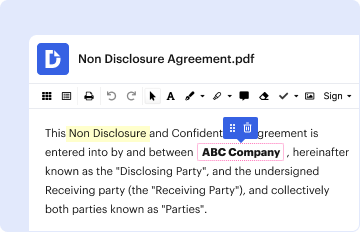
The term "form online" generally refers to the digital equivalent of traditional paper forms, which can be filled out, submitted, and often processed electronically over the internet. These forms can be utilized for a myriad of purposes, ranging from applications and registrations to surveys and data collection. The primary benefit of using forms online is the enhanced efficiency and convenience, allowing users to complete necessary documentation without the constraints of physical paperwork. Online forms eliminate geographical barriers and enable faster information exchange while providing an environmentally friendly option that reduces paper consumption. In the context of software services like DocHub, an online form can include fillable fields, digital signatures, and automated workflows.
How to Use the Form Online
When using an online form on platforms like DocHub, the process typically involves several straightforward steps.
- Access the form via a shared link or direct website portal.
- Review the form fields to understand what information is required.
- Fill out the mandatory fields that are typically marked with an asterisk (*) or highlighted differently.
- Optional fields may be available for additional details or specific case-related information.
- Attach any necessary supporting documents through direct upload options provided on the form interface.
Users can often benefit from automatic saving features that prevent data loss during the process. Upon completion, the form can be submitted with a simple click, allowing users to receive immediate confirmation of receipt. Some platforms may also offer a preview feature, enabling users to verify all entries before submission.
Steps to Complete the Form Online
Completing an online form involves several key steps to ensure accuracy and completeness. Here is a typical process that users might follow:
-
Form Access: Start by accessing the form through the hosting platform or a shared link. Platforms like DocHub may provide direct access from integrated services like Google Drive.
-
Review Requirements: Thoroughly check the instructions and required fields at the start of the form. Understanding the sections beforehand helps streamline the filling process.
-
Input Information: Accurately enter data into each field. Use dropdown menus and checkboxes where applicable to minimize errors and speed up data entry.
-
Attach Documents: Upload supporting documents if necessary. This can include identification paperwork, proof of address, or other relevant documentation.
-
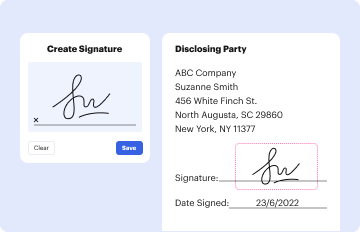
Digital Signature: If a signature is required, utilize DocHub’s electronic signature feature to add your signature directly within the form fields.
-
Submission: Review the completed form, ensuring all required fields are filled. Submit the form and save or download a copy for your records. Most platforms also provide a confirmation message to notify successful submission.
Key Elements of the Form Online
A comprehensive online form platform like DocHub provides several key elements to enhance functionality:
- Interactive Fields: These include text boxes for data entry, checkboxes for selections, and dropdown menus to present options.
- Signature Fields: Allow users to add legally binding electronic signatures.
- Conditional Logic: This feature enables dynamic form fields that appear or change based on user input, ensuring that forms remain relevant and user-friendly.
- Progress Tracking: Visual indicators help users understand how far they are into the form and what's remaining, reducing form abandonment rates.
- Security Features: Encryption protocols ensure that data entered in forms remains confidential and secure from unauthorized access.
- Mobile Compatibility: Responsive design ensures forms are accessible and fully functional across different devices, including smartphones and tablets.
State-Specific Rules for the Form Online
Certain forms, such as legal documents or tax forms, may have state-specific requirements due to varying laws and regulations. For instance, if the form involves aspects like business registration or licensing, the rules may differ significantly from state to state.
- Legal Forms: Forms submitted for legal purposes might require specific state mandates, such as particular notarial language or additional disclosures.
- Tax Forms: Variations can arise in state tax forms based on local tax codes and regulations.
Users should verify any specific requirements related to their state to ensure compliance. Platforms like DocHub facilitate this by integrating state-specific templates and providing access to legal resources.
Examples of Using the Form Online
Online forms are utilized across numerous scenarios:
- Job Applications: Companies often use online forms to streamline the hiring process, capturing resumes and candidate information efficiently.
- Customer Feedback: Restaurants and service providers typically use forms to gather customer feedback and insights directly online.
- Educational Enrollment: Schools and universities use online registration forms for course enrollment and administrative tasks.
- Medical Intake Forms: Healthcare providers use secure online forms to collect patient health histories and consent forms efficiently.
These examples highlight how online forms provide versatility and adaptability across different sectors.
Legal Use of the Form Online
The legality of using online forms is supported by acts such as the Electronic Signatures in Global and National Commerce Act (ESIGN), which affirms the validity of contracts and signatures in electronic form.
- Compliance: Platforms must comply with legal standards for electronic transactions and maintain secure protocols for handling sensitive information.
- Audit Trails: Online form tools commonly include audit trails that record each action taken on a document, providing transparency and dispute resolution in legal contexts.
- Data Protection: Leveraging encryption and secure access protocols ensures compliance with privacy laws, thus safeguarding user data.
Understanding these principles is crucial for organizations that depend on electronic documentation for legal and business transactions.
Digital vs. Paper Version
Choosing between digital and paper form versions involves considering factors such as convenience, speed, accessibility, and security:
-
Digital Forms:
- Offer enhanced convenience and accessibility.
- Allow for faster processing and seamless integration with other systems.
- Include advanced functionalities like auto-fill and real-time validation.
-
Paper Forms:
- May offer familiarity to those less comfortable with technology.
- Require physical storage and can be prone to human error in data handling.
- Typically involve longer processing times due to manual handling.
Organizations often prefer digital forms for their efficiency and capacity to streamline workflows, reduce waste, and enhance productivity.




