Type text, add images, blackout confidential details, add comments, highlights and more.
02. Sign it in a few clicks
Draw your signature, type it, upload its image, or use your mobile device as a signature pad.
03. Share your form with others
Send tax declaration sample via email, link, or fax. You can also download it, export it or print it out.
How to use or fill out tax declaration form with our platform
Ease of Setup
DocHub User Ratings on G2
Ease of Use
DocHub User Ratings on G2
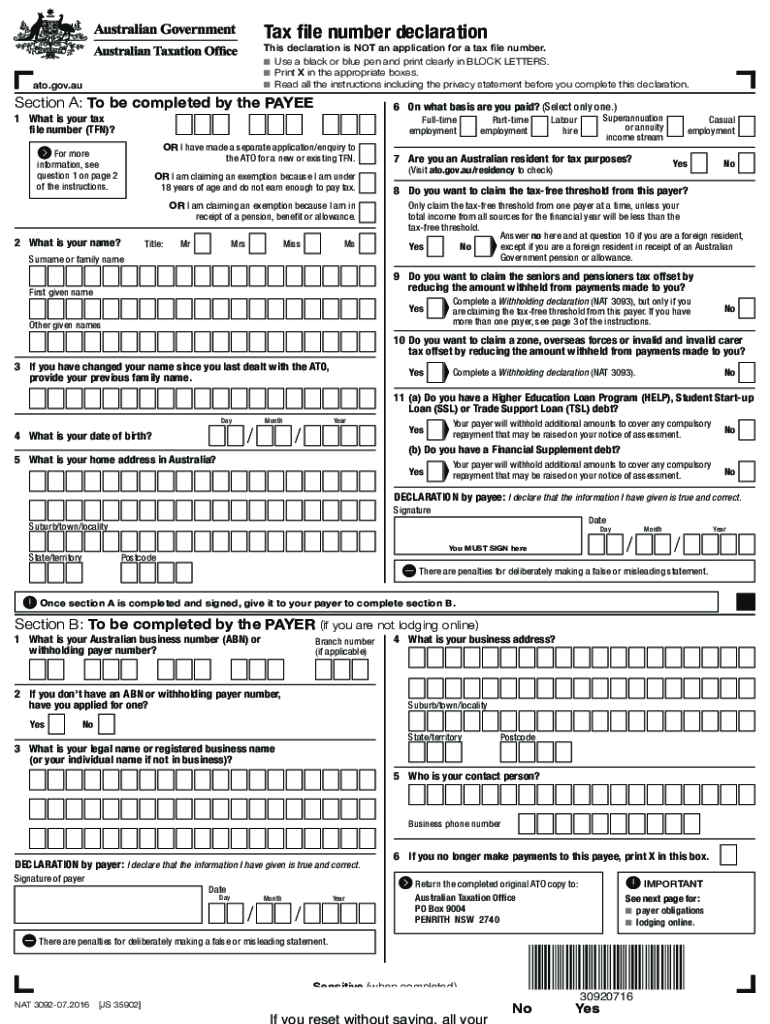
Click ‘Get Form’ to open the tax declaration form in the editor.
In Section A, provide your Tax File Number (TFN) in Question 1. Ensure you only share this information with your employer after starting work.
Complete your personal details including name and address in Questions 2 and 5. Use clear block letters for accuracy.
Answer Questions 6 through 11 based on your employment status and residency. Be sure to read each question carefully to determine your eligibility for tax offsets.
Once all questions are answered, sign and date the declaration at the bottom of Section A. This confirms that the information provided is true.
Submit the completed form to your payer for them to fill out Section B, ensuring all necessary information is included.
Start using our platform today for free to streamline your tax declaration process!
Application for Extension of Time To File U.S. Income Tax
You should file Form 2350 if all three of the following apply. 1. You are a U.S. citizen or resident alien. 2. You expect to qualify for the foreign earnedRead more
Cookie consent notice
This site uses cookies to enhance site navigation and personalize your experience.
By using this site you agree to our use of cookies as described in our Privacy Notice.
You can modify your selections by visiting our Cookie and Advertising Notice.