





Definition and Meaning of "Form Online"
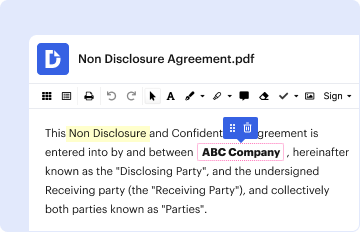
The term "form online" refers to digital forms that can be completed, submitted, and processed via the internet on various devices, including computers and smartphones. These forms are designed to replace traditional paper forms, providing a more efficient and streamlined approach to data collection and submission. They can encompass a wide range of purposes, including tax submissions, legal agreements, application forms, surveys, and more. The digital aspect allows for greater flexibility in accessing and managing forms, enabling users to complete them at their convenience without the constraints of geographical location or time.
Types of Online Forms
- Application Forms: Used for job applications, school admissions, and membership requests.
- Tax Forms: Digital versions of forms required by the IRS or state tax authorities for filing taxes.
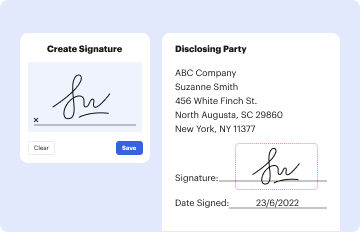
- Legal Documents: Such as contracts and agreements that can be signed electronically.
- Surveys and Feedback Forms: For customer feedback, research, and data analysis.
- Registration Forms: For events, conferences, and community activities.
How to Use the Form Online
Using an online form typically involves several straightforward steps, which vary depending on the specific form type and platform:
-
Access the Form: Navigate to the website or platform where the form is hosted. This could be an official government site, a company's website, or a document management system like DocHub.
-
Complete Required Fields: Fill in the necessary information. Online forms often include fields for personal data, choices from dropdown menus, text boxes for detailed responses, and checkboxes for selection options.
-
Review Entries: Before submitting the form, users should review their entries to ensure all information is accurate and complete.
Step-by-Step Instruction Example
- Step 1: Open your browser and go to the URL provided for the online form.
- Step 2: Enter details such as your name, address, contact information, and any other required data.
- Step 3: Upload any necessary supporting documents, if applicable.
- Step 4: Verify all information entered, ensuring all mandatory fields are filled.
- Step 5: Submit the form by clicking the submit button and wait for a confirmation message.
Steps to Complete the Form Online
-
Open the Form: Ensure that you access the form through a secure connection. This often means checking for an "https://" in the web address to protect your data.
-
Enter Data: Carefully fill out each section of the form. Pay special attention to required fields, often denoted with an asterisk (*). Use correct formats for dates, phone numbers, and email addresses.
-
Attach Documents: Some forms may require additional documentation. Use the upload feature to attach these files—commonly accepted formats include PDF, JPEG, and PNG.
-
Agree to Terms: Before submission, you might be prompted to agree to terms and conditions. Ensure you read and understand these terms to avoid unintended obligations.
-
Submit and Receive Confirmation: After submission, look for a confirmation message or email indicating successful submission. This step is crucial to ensure your form has been received and is in process.
Why You Should Use Forms Online
Utilizing online forms offers numerous advantages over traditional methods:
- Efficiency: The process of filling out forms online is typically faster than completing paper forms. Automation can fill in repetitive fields, and errors can be corrected instantly without requiring new copies.
- Convenience: Forms can be accessed and submitted from anywhere, as long as there is internet connectivity, making it easier for users to participate regardless of their location.
- Environmentally Friendly: Reducing paper usage contributes to environmental conservation by minimizing the waste generated by paper forms.
- Enhanced Security: With encryption and secure access protocols, digital forms can offer enhanced data protection compared to physical documents that might be lost or accessed inappropriately.
Practical Benefits
- Real-Time Validation: Online forms can instantly validate data entries, which reduces errors and increases accuracy.
- Immediate Submission: Once completed, forms can be submitted with a simple click, reducing delays associated with mailing documents.
Key Elements of an Online Form
An effective online form comprises several essential components that facilitate ease of use and successful data capture:
- User-Friendly Interface: Arranging fields in a logical order with clear labels ensures user input is straightforward and free from confusion.
- Responsive Design: This allows forms to function optimally across various devices and screen sizes, from desktop computers to mobile phones.
- Progress Indicators: For forms that require multiple steps, progress bars help users understand how much of the form they have completed.
- Submission Confirmation: Acknowledgements post-submission provide reassurance to users that their data has been received and recorded.
Legal Use of Forms Online
The legal validity of online forms, especially those incorporating electronic signatures, is upheld by various laws, including the ESIGN Act in the United States. This act provides a legal framework ensuring that electronic signatures are as binding as traditional handwritten signatures, provided certain conditions are met:
- Authenticity: The identity of the signing parties must be verifiable.
- Intent and Consent: Signatories must demonstrate an intent to sign the document electronically and consent to the use of electronic records.
Considerations for Legal Compliance
- Privacy Protections: The data collected via online forms must adhere to privacy laws such as the General Data Protection Regulation (GDPR) in applicable regions.
- Document Integrity: Ensure that once signed, documents cannot be altered without creating a digital paper trail.
Important Terms Related to Online Forms
Understanding critical terminologies associated with online forms enhances user comprehension and effective usage:
- SSL Encryption: A standard protocol for securing internet communication, ensuring the data submitted is encrypted and transmitted safely.
- OAuth 2.0: An authorization framework utilized for secure delegated access, often seen in platforms that connect through third-party services.
- Captcha: A type of challenge-response test designed to determine whether the user is human, protecting online forms from spam and abuse.
Examples of Using Online Forms
Online forms are prevalent across various scenarios, providing flexible solutions:
- Tax Filing: Digital tax forms simplify the submission process with direct uploads to tax agencies, enabling faster processing.
- Job Applications: Companies employ online forms to efficiently manage and sort candidate information through structured data capture.
- Event Registrations: Organizers utilize electronic forms to gather attendee details, preferences, and payments, streamlining event management.
Each of these usage cases highlights the adaptability and efficiency of online forms in everyday applications.