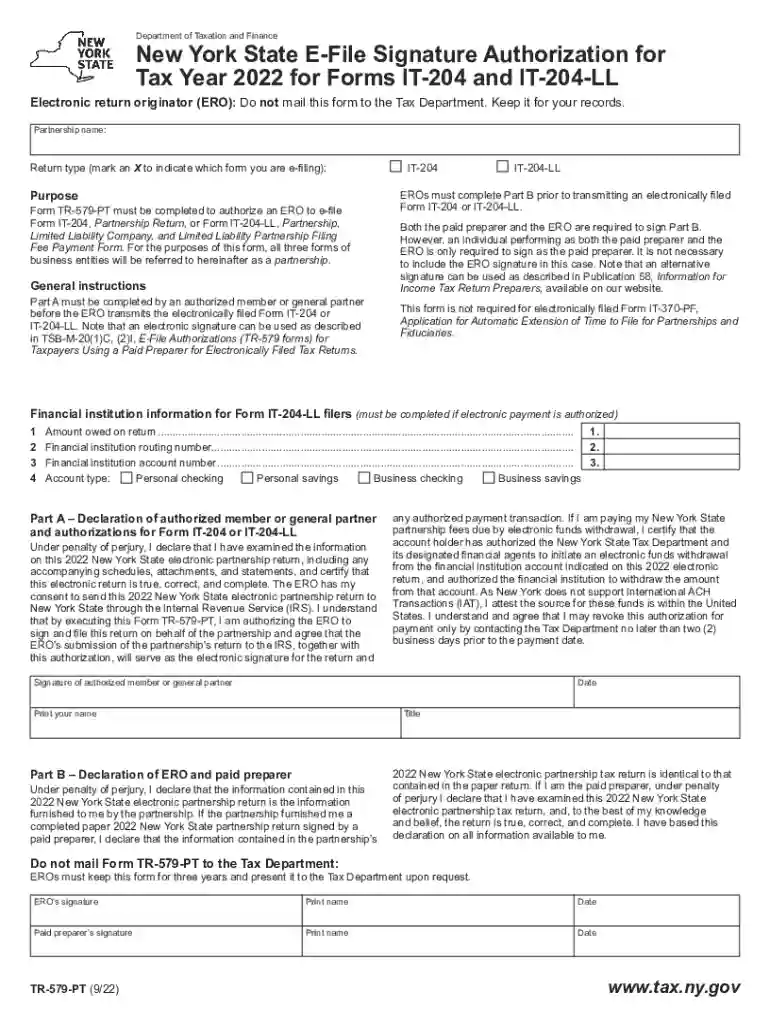
New York State E-File Signature Authorization for Tax Year 2022 for Forms IT-204 and IT-204-LL-2026

Get Form
tr 579 pt Preview on Page 1

Here's how it works

01. Edit your tr 579 pt online
Type text, add images, blackout confidential details, add comments, highlights and more.

02. Sign it in a few clicks
Draw your signature, type it, upload its image, or use your mobile device as a signature pad.

03. Share your form with others
Send ny e file signature authorization via email, link, or fax. You can also download it, export it or print it out.

How to use or fill out New York State E-File Signature Authorization for Tax Year 2022 for Forms IT-204 and IT-204-LL with our platform

Form edit decoration
9.5
Ease of Setup
DocHub User Ratings on G2
9.0
Ease of Use
DocHub User Ratings on G2
  1. Click ‘Get Form’ to open it in the editor.
  2. Begin with Part A, where an authorized member or general partner must declare the accuracy of the information. Fill in the partnership name and mark the appropriate return type (IT-204 or IT-204-LL).
  3. In Part A, provide your signature, date, and title. Ensure that you print your name clearly.
  4. Proceed to Part B, where both the ERO and paid preparer need to sign. If one person fulfills both roles, only their signature as a paid preparer is necessary.
  5. If applicable, complete the financial institution information section for electronic payment authorization by entering routing number, account number, and selecting account type.

Start using our platform today to easily fill out your New York State E-File Signature Authorization form for free!

be ready to get more

Complete this form in 5 minutes or less

Get form

Got questions?

We have answers to the most popular questions from our customers. If you can't find an answer to your question, please contact us.
Contact us
There is no extension of time to file Form IT-204-LL or pay the annual fee. If you fail to timely file Form IT-204-LL, or fail to pay the full amount of the filing fee by the due date, you may be subject to penalties and interest.
Electronic signatures are legal in all 50 states in the United States.
Pursuant to Governor Cuomos Executive Order 202.15 issued in response to the Coronavirus COVID-19 situation, the Department of Taxation and Finance (Tax) is temporarily authorized to accept digital signatures in place of handwritten signatures on documents related to the determination or collection of tax liability.
IRS Permanently Allows Electronic Signatures on Certain Tax Forms. The US Internal Revenue Service (IRS) has updated the Internal Revenue Manual (IRM) to specify which forms taxpayers can electronically sign and which types of electronic signatures are permitted, now on a permanent basis.
You can sign your tax return electronically by using a Self-select PIN, which serves as your digital signature when using tax preparation software, or a Practitioner PIN when using an Electronic Return Originator (ERO).

Security and compliance

At DocHub, your data security is our priority. We follow HIPAA, SOC2, GDPR, and other standards, so you can work on your documents with confidence.

Learn more
ccpa2
pci-dss
gdpr-compliance
hipaa
soc-compliance

People also ask

Form 8879 is the declaration document and signature authorization for an e-filed return filed by an electronic return originator (ERO). Complete this form when: The Practitioner PIN method is used.
Electronic signatures are equal to paper signatures in New York State. The Electronics Signatures and Records Act (ESRA) guarantees this state-wide. All businesses are bound by this law. Electronic records have the same legal force as paper, microfilm, and other records.
You must file Form IT-204-LL, Partnership, Limited Liability Company, and Limited Liability Partnership Filing Fee Payment Form, if you are a: limited liability company (LLC) that is a disregarded entity for federal income tax purposes that has income, gain, loss, or deduction from New York State sources; or.

Related links