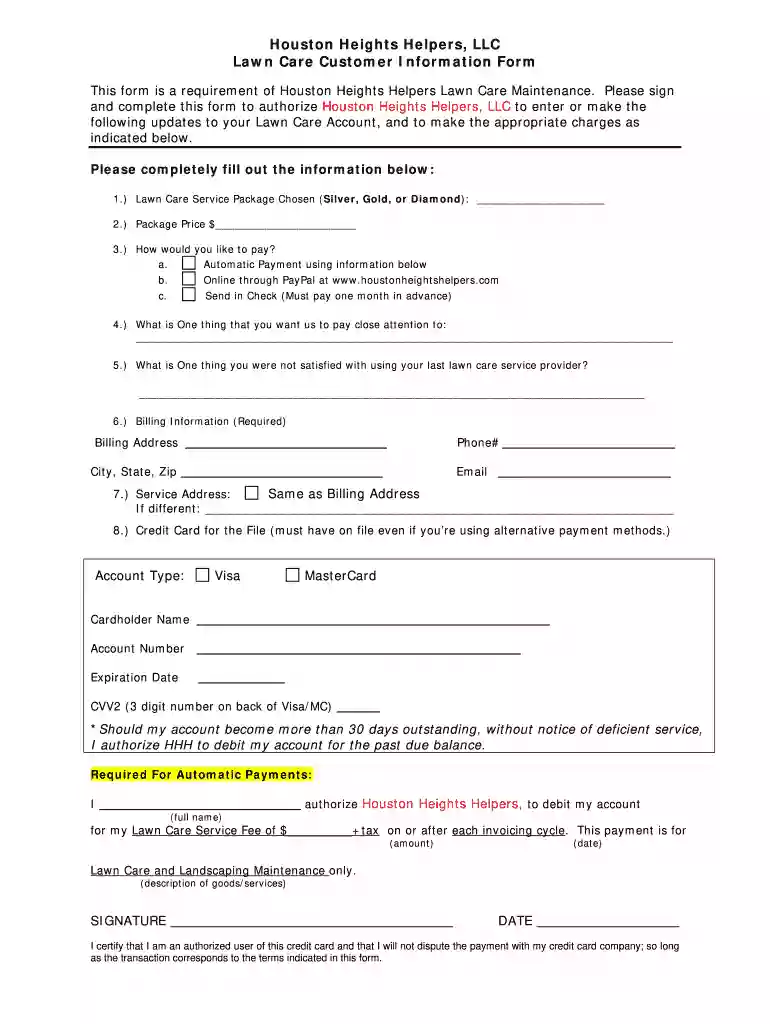
Lawn care client information sheet 2026

Get Form
lawn care customer information sheet Preview on Page 1

Here's how it works

01. Edit your lawn care customer information sheet online
Type text, add images, blackout confidential details, add comments, highlights and more.

02. Sign it in a few clicks
Draw your signature, type it, upload its image, or use your mobile device as a signature pad.

03. Share your form with others
Send client information sheet bank via email, link, or fax. You can also download it, export it or print it out.

How to use or fill out lawn care client information sheet with our platform

Form edit decoration
9.5
Ease of Setup
DocHub User Ratings on G2
9.0
Ease of Use
DocHub User Ratings on G2
  1. Click ‘Get Form’ to open the Lawn Care Customer Information Form in the editor.
  2. Begin by selecting your preferred Lawn Care Service Package (Silver, Gold, or Diamond) and enter the package price in the designated fields.
  3. Choose your payment method by indicating whether you prefer automatic payment, online payment through PayPal, or sending a check. Fill in any necessary details based on your choice.
  4. Provide specific instructions for your lawn care service by detailing one aspect you want us to focus on and one area of dissatisfaction from your previous provider.
  5. Complete the Billing Information section with your address, phone number, city, state, zip code, and email address.
  6. If your service address differs from the billing address, indicate this clearly. Otherwise, select 'Same as Billing Address.'
  7. Fill out credit card information for file storage. Ensure you include account type, cardholder name, account number, expiration date, and CVV2.
  8. Authorize automatic payments by signing and dating the form at the bottom to confirm your agreement with the terms outlined.

Start using our platform today to streamline your lawn care client information process for free!

be ready to get more

Complete this form in 5 minutes or less

Get form

Got questions?

We have answers to the most popular questions from our customers. If you can't find an answer to your question, please contact us.
Contact us

Many software applications are available out there for document modifying and signing. DocHub is one of the most popular online solutions that comply with all data protection and compliance standards and ensures your electronically signed documentation is legally enforceable. All you need to give it a try is to sign up for an account, add your customer information sheet, provide the requested details, and click Sign. Generate your electronic signature by typing, drawing it, uploading its picture to your form, or scanning a unique QR code.

If you store your files in Google Drive, there is no need to download your lawn care client information sheet on your computer and upload it back to our editor. A much easier way is to set up a browser extension created by DocHub to streamline this flow. The extension allows editing PDFs in your browser. Alternatively, you can integrate your DocHub and Gmail accounts for more efficient editing.

Lawn care covers maintenance tasks for your property. Edging, mowing, blowing, fertilization, whacking, seeding, and pest management. This is typically done on a routine basis daily, weekly, or monthly, depending on the specific tasks.
Heres an example of a mission statement for a smaller lawn maintenance company: As a company that is committed to a professional approach to our business, we provide hands-on care toward quality landscapes through individualized attention.
50 inspiring mission statement examples Achievers: We connect people to purpose through frequent, meaningful recognition and motivating rewards. Patagonia: Were in business to save our home planet. Warby Parker: To inspire and impact the world with vision, purpose, and style.

Security and compliance

At DocHub, your data security is our priority. We follow HIPAA, SOC2, GDPR, and other standards, so you can work on your documents with confidence.

Learn more
ccpa2
pci-dss
gdpr-compliance
hipaa
soc-compliance
be ready to get more

Complete this form in 5 minutes or less

Get form

People also ask

To write a lawn care invoice, include the businesss name and contact information at the top, followed by the clients name and address. List the services provided, the date they were performed, itemized costs for each service, and the total amount due, along with payment terms and methods.
The 5 Best Lawn Care Business Softwares of 2025 Connecteam Best all-in-one lawn care business software. Jobber Good for managing clients and handling invoicing. Yardbook Good for basic scheduling and record-keeping on a budget. LMN Good for estimating jobs and tracking costs.

Related links