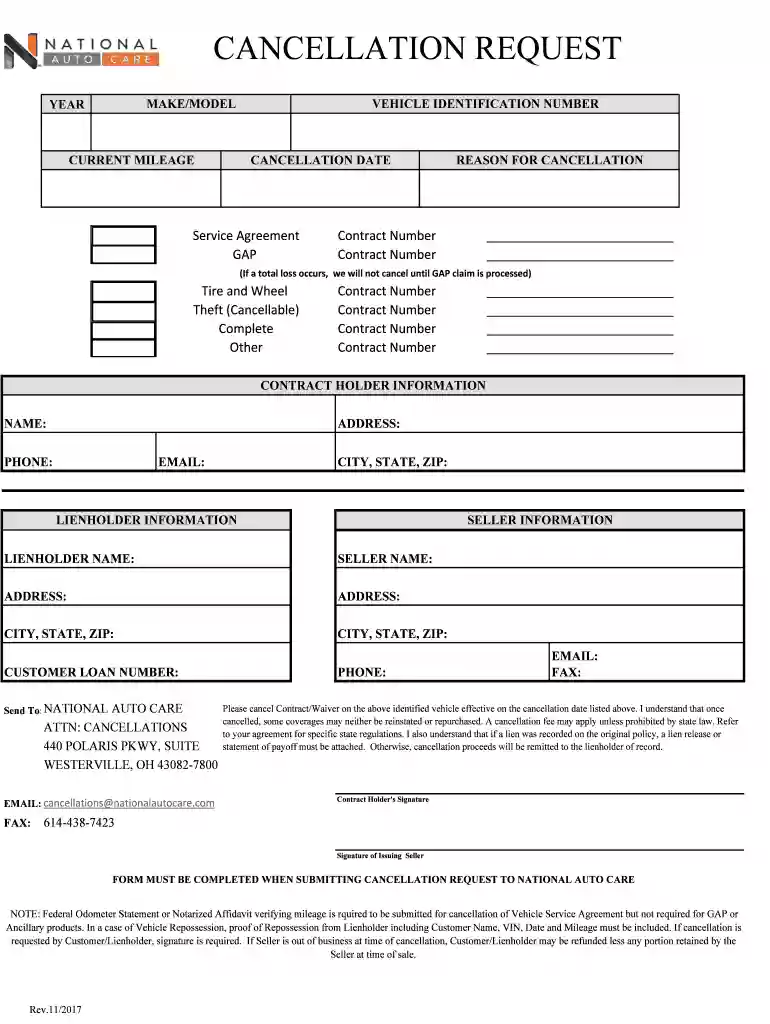
Cancellation request - Intrepid Automotive 2026

Get Form
national auto care cancellation form Preview on Page 1

Here's how it works

01. Edit your national auto care cancellation form online
Type text, add images, blackout confidential details, add comments, highlights and more.

02. Sign it in a few clicks
Draw your signature, type it, upload its image, or use your mobile device as a signature pad.

03. Share your form with others
Send cancellation national auto care via email, link, or fax. You can also download it, export it or print it out.

How to use or fill out cancellation request - Intrepid Automotive with our platform

Form edit decoration
9.5
Ease of Setup
DocHub User Ratings on G2
9.0
Ease of Use
DocHub User Ratings on G2
  1. Click ‘Get Form’ to open the cancellation request in the editor.
  2. Begin by filling in the 'MAKE/MODEL', 'YEAR', and 'CURRENT MILEAGE' of your vehicle. This information is crucial for identifying the contract associated with your cancellation.
  3. Enter the 'VEHICLE IDENTIFICATION NUMBER' (VIN) and specify the 'CANCELLATION DATE'. Ensure these details are accurate to avoid processing delays.
  4. Select the appropriate service agreement type, such as GAP or Tire and Wheel, and provide any relevant contract numbers in the designated fields.
  5. Complete the 'CONTRACT HOLDER INFORMATION' section with your name, address, email, and phone number. This ensures that all communications regarding your cancellation are directed to you.
  6. Fill out the 'LIENHOLDER INFORMATION' and 'SELLER INFORMATION' sections accurately. This includes names, addresses, and contact details.
  7. Review all entries for accuracy before signing. Remember that a signature from both the contract holder and issuing seller may be required.

Start using our platform today to easily complete your cancellation request for free!

be ready to get more

Complete this form in 5 minutes or less

Get form

Got questions?

We have answers to the most popular questions from our customers. If you can't find an answer to your question, please contact us.
Contact us
Tips for Writing Cancellation Emails Be direct. Use a clear subject line like Cancellation Request and state your purpose in the first sentence. Include key info. Add your account number or relevant details to help them find your account quickly. Stay polite and brief. Ask for proof.
CUSTOMER SERVICE (CANCELLATIONS OR OTHER QUESTIONS), CALL TOLL-FREE: 1-800-747-4400. MONDAY THROUGH FRIDAY 8:00 a.m. 5:00 p.m. CST. FOR GAP OR THEFT CLAIMS CALL TOLL-FREE: 1-800-747-4400.
Heres a step-by-step guide on how to write a cancellation letter for an event: Choose a letter format. Make the cancellation clear. Share why the event was cancelled. Apologise for the cancellation. Include information about event refunds. Share words of appreciation.
Im writing to let you know that Ive experienced a personal emergency and must cancel our appointment scheduled for [Date] at [Time]. I sincerely apologize for any disruption this may cause to your schedule. Please docHub out to me to reschedule at your earliest convenience.
Example Cancellation Message: 2 We regret to inform you that the [event] scheduled for [date] has been cancelled due to [Reason]. We apologize for any inconvenience this may cause. We will provide updates on rescheduling or refund options as soon as possible.

Security and compliance

At DocHub, your data security is our priority. We follow HIPAA, SOC2, GDPR, and other standards, so you can work on your documents with confidence.

Learn more
ccpa2
pci-dss
gdpr-compliance
hipaa
soc-compliance