Type text, add images, blackout confidential details, add comments, highlights and more.
02. Sign it in a few clicks
Draw your signature, type it, upload its image, or use your mobile device as a signature pad.
03. Share your form with others
Send it via email, link, or fax. You can also download it, export it or print it out.
How to use or fill out Maryland MLOE 1 with our platform
Ease of Setup
DocHub User Ratings on G2
Ease of Use
DocHub User Ratings on G2
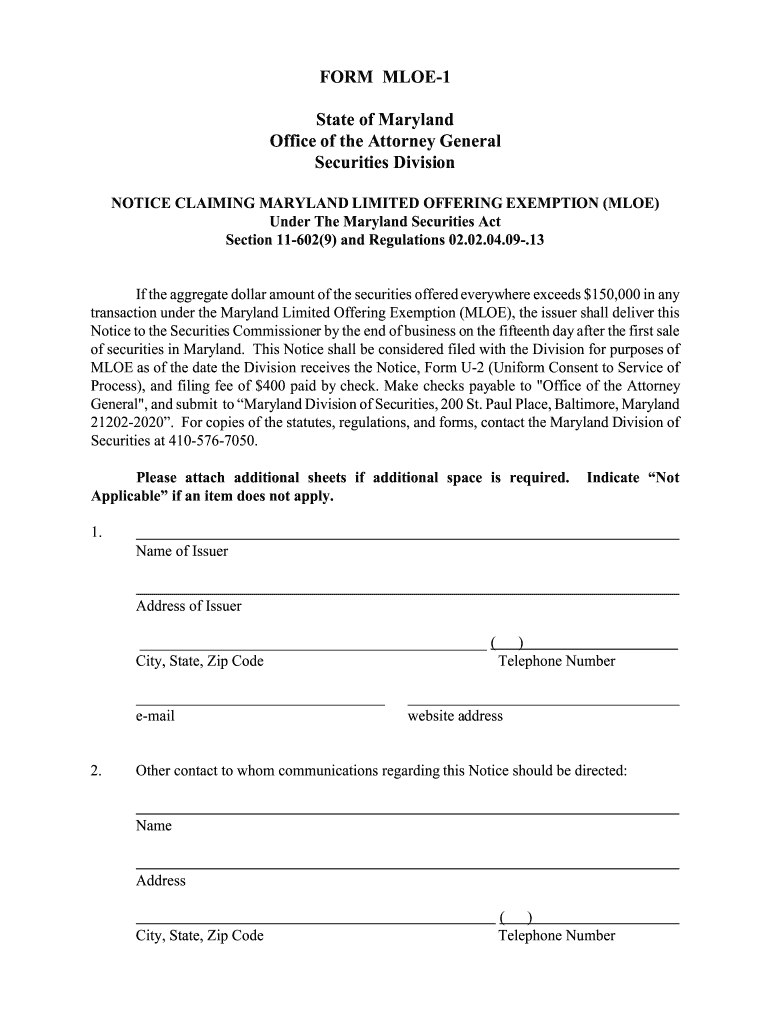
Click ‘Get Form’ to open the Maryland MLOE 1 in the editor.
Begin by entering the 'Name of Issuer' and 'Address of Issuer' in the designated fields. Ensure that all contact information, including telephone number and email, is accurate.
In section 3, provide a brief summary of the issuer's business. This should be concise yet informative to give a clear picture of your operations.
Select the type of business organization from the options provided in section 4. If your organization falls under 'Other', attach any necessary documentation as specified.
Complete sections regarding exemption from federal registration and details about securities being offered. Be thorough in your responses to avoid delays.
Finally, review all entries for accuracy before signing and dating the form at the end. Use our platform’s features to save or print your completed document.
Start filling out your Maryland MLOE 1 form online for free today!
MLOE-1: Notice of Limited Offering of Securities MLOE-2: Limited Offering Exemption Form U-2 (Uniform Consent to Service of Process) Form SRQ-1: QuarterlyRead more
Md. Code Regs. 02.02.04.10 - MLOE: Generally Applicable
(1) Transactions by an issuer involving the offer or sale of securities of the issuer that are part of an offering that satisfies the terms of MLOE are exempt.Read more
Cookie consent notice
This site uses cookies to enhance site navigation and personalize your experience.
By using this site you agree to our use of cookies as described in our Privacy Notice.
You can modify your selections by visiting our Cookie and Advertising Notice.