Type text, add images, blackout confidential details, add comments, highlights and more.
02. Sign it in a few clicks
Draw your signature, type it, upload its image, or use your mobile device as a signature pad.
03. Share your form with others
Send it via email, link, or fax. You can also download it, export it or print it out.
How to use or fill out Planning and Inspection Forms with our platform
Ease of Setup
DocHub User Ratings on G2
Ease of Use
DocHub User Ratings on G2
Click ‘Get Form’ to open the Planning and Inspection Form in the editor.
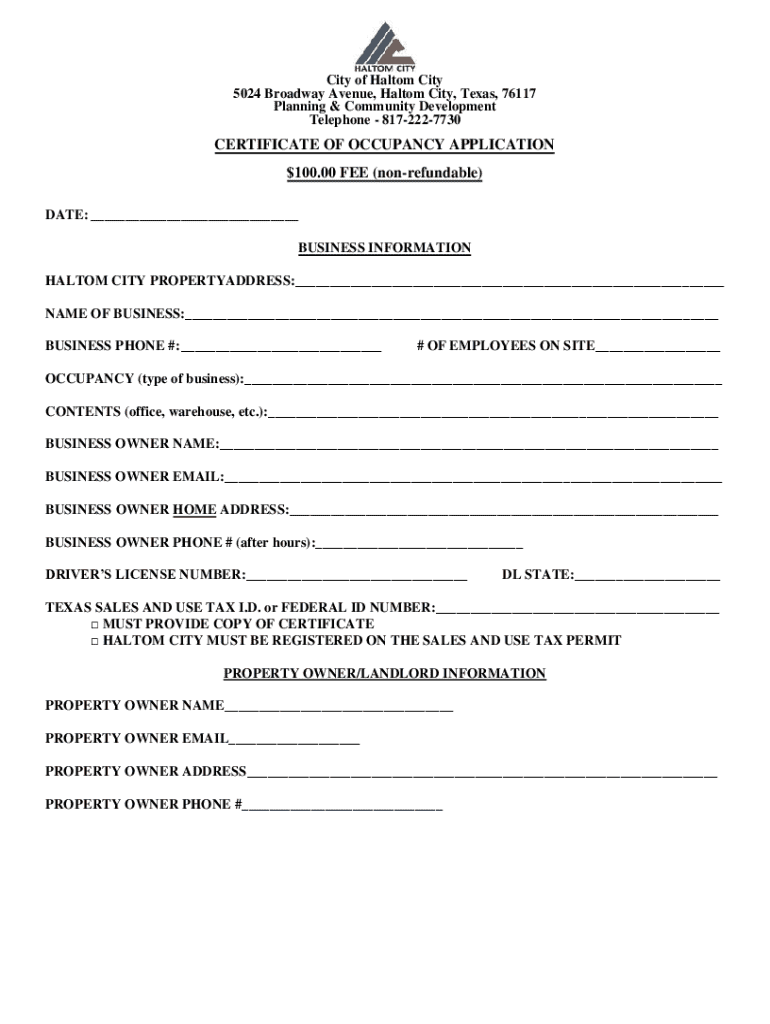
Begin by entering the date at the top of the form. This is essential for tracking your application.
Fill in the business information section, including the Haltom City property address, name of business, and contact details. Ensure accuracy as this information is crucial for processing.
Complete the occupancy type and contents fields. Specify what type of business you are operating and what will be stored on-site.
Provide detailed information about the business owner, including their email and home address. This ensures proper communication regarding your application.
Answer all questions regarding your business operations, such as whether you will store hazardous materials or perform specific processes. Be thorough to avoid delays.
Sign and date the application at the bottom before submitting it through our platform for processing.
Start filling out your Planning and Inspection Forms online for free today!
Fill out Planning and Inspection Forms online It's free
We've got more versions of the Planning and Inspection Forms form. Select the right Planning and Inspection Forms version from the list and start editing it straight away!
Building permits are required before you start any construction work and are the responsibility of the property owner but may be applied for by a contractor or other representative. Permit costs are quadrupled if you start a project without a permit.
What is a certificate of occupancy in Omaha Nebraska?
This certificate confirms that your space complies with all relevant codes and is safe for occupancy. To obtain a Certificate of Occupancy: Ensure all previous inspections and approvals are complete. Submit an application for a Certificate of Occupancy to the City of Omaha Planning Department.
Can you build a fence on the property line in Nebraska?
If you locate the fence on the property line, you automatically give permission to an adjoining neighbor to physically connect to your fence. Also, if your neighbor disputes the location of the property line, you must have the property line located by a surveyor licensed in Nebraska.
What are the basic guidelines for planning and preparing for an inspection?
Identify the evidence that you need to have available. Start putting together information you need to send to the inspectors before the inspection. Prepare any timetables and send them to your lead inspector. Plan how to ensure inspectors can find the sites and employers they are visiting.
Do you need a permit to build a fence in Omaha, NE?
Q: Do I need a permit to put up/replace a fence? A: Yes, you can contact the Permits and Inspections counter at 444-5350 for information on how to apply.
Related Searches
Planning and inspection forms pdfPlanning and inspection forms californiaPlanning and inspection forms onlineOne-Stop Shop permitsCity of El Paso permits phone numberEl Paso Planning and DevelopmentCity of El Paso One-Stop ShopEl Paso restaurant inspection scores
Security and compliance
At DocHub, your data security is our priority. We follow HIPAA, SOC2, GDPR, and other standards, so you can work on your documents with confidence.
View a list of documents and forms to apply for a subdivision, land development, licensing, zoning, or permits. Translate Search CoEP Planning Inspections (
Cookie consent notice
This site uses cookies to enhance site navigation and personalize your experience.
By using this site you agree to our use of cookies as described in our Privacy Notice.
You can modify your selections by visiting our Cookie and Advertising Notice.