




Here's how it works



How to use or fill out Individual Consumer's Use Tax with our platform

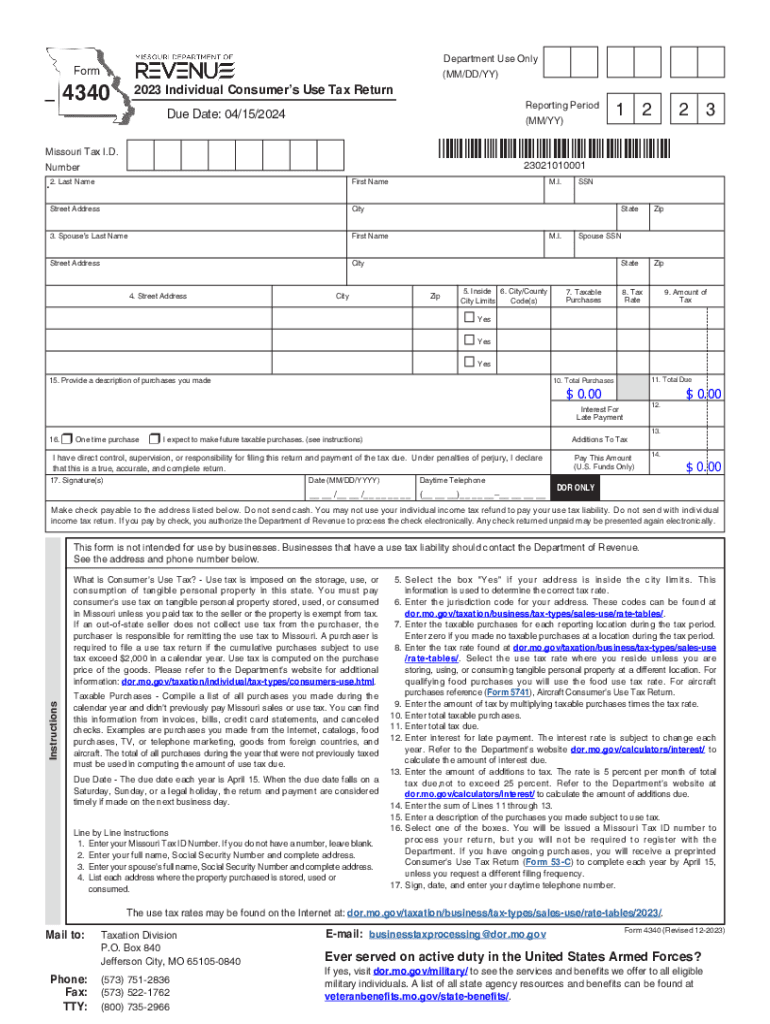
- Click ‘Get Form’ to open the Individual Consumer's Use Tax Return in the editor.
- Enter your Missouri Tax ID Number in the designated field. If you do not have one, leave it blank.
- Fill in your full name, Social Security Number, and complete address in the respective fields.
- If applicable, provide your spouse’s full name, Social Security Number, and address.
- List each address where the purchased property is stored or consumed.
- Indicate if your address is inside city limits by selecting 'Yes' or 'No'.
- Input the jurisdiction code for your address as found on the Department's website.
- Record all taxable purchases made during the reporting period. Enter zero if none were made.
- Determine and enter the applicable tax rate based on your location from the provided resources.
- Calculate and enter the amount of tax due by multiplying taxable purchases by the tax rate.
- Complete total taxable purchases and total tax due fields accordingly.
- If applicable, calculate interest for late payment using current rates from the Department's website.
- Enter any additions to tax as specified in the instructions provided on the form.
- Provide a description of all purchases subject to use tax in section 15.
- Select whether this is a one-time purchase or if you expect future taxable purchases.
- Sign and date your return, then include your daytime telephone number before submission.
Start filling out your Individual Consumer's Use Tax Return today for free using our platform!
It's free
See more Individual Consumer's Use Tax versions
Got questions?
Can I sign my Individual Consumer's Use Tax electronically?
As outlined by eSignature laws, forms signed digitally have the same validity as those approved with pen and paper. You can electronically sign almost any business and personal paperwork. Four types of paperwork still require wet signatures only - wills and testamentary trusts, court orders and other court papers, state statutes governing divorce, adoption, or other family law, and notice of cancellation of utility services. If you adhere to the rules and utilize a trustworthy and compliant software solution, like DocHub, you can eSign your Individual Consumer's Use Tax without printing it.
How do you create an e-signature for the Individual Consumer's Use Tax on iOS?
In addition to an extensive toolset for editing PDFs on mobile phones, DocHub enables you to sign your Individual Consumer's Use Tax along the way. Open our editor in your browser, make modifications using DocHub’s toolset, and complete your editing by eSigning the finished form.
What is the consumers use tax in Virginia?
What is an example of a consumer use tax?
What is consumers use tax in KY?
Security and compliance
At DocHub, your data security is our priority. We follow HIPAA, SOC2, GDPR, and other standards, so you can work on your documents with confidence.
Learn more


