SECURE LEAVE FORM 2026

Get Form
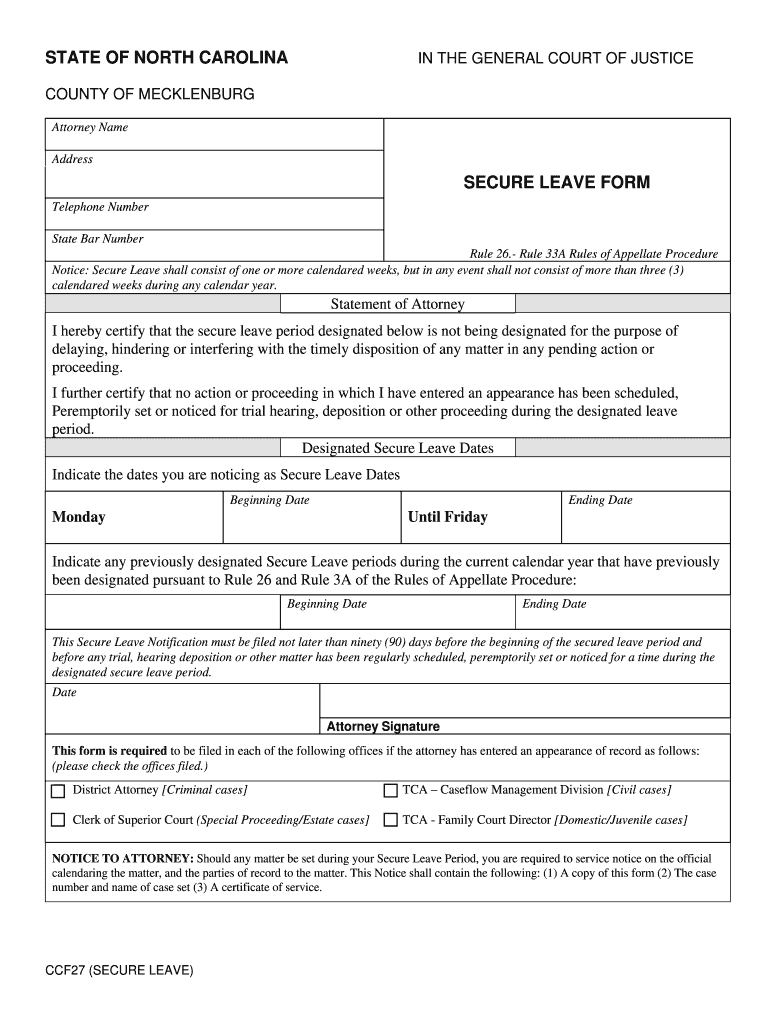
SECURE LEAVE FORM Preview on Page 1

Here's how it works

01. Edit your form online
Type text, add images, blackout confidential details, add comments, highlights and more.
02. Sign it in a few clicks
Draw your signature, type it, upload its image, or use your mobile device as a signature pad.
03. Share your form with others
Send it via email, link, or fax. You can also download it, export it or print it out.

How to use or fill out SECURE LEAVE FORM with our platform

Form edit decoration
9.5
Ease of Setup
DocHub User Ratings on G2
9.0
Ease of Use
DocHub User Ratings on G2
  1. Click ‘Get Form’ to open the SECURE LEAVE FORM in the editor.
  2. Begin by filling in your attorney name and address at the top of the form. Ensure that all contact information is accurate for any necessary follow-ups.
  3. In the 'Designated Secure Leave Dates' section, indicate your starting and ending dates for the secure leave period. Remember, this should not exceed three calendared weeks within a calendar year.
  4. If applicable, list any previously designated secure leave periods during the current calendar year. Fill in both beginning and ending dates for these periods.
  5. Review the certification statement carefully. By signing, you confirm that your leave does not interfere with any pending actions or proceedings.
  6. Finally, sign and date the form at the bottom before submitting it to the required offices as indicated.

Start using our platform today to easily complete your SECURE LEAVE FORM online for free!

be ready to get more

Complete this form in 5 minutes or less

Get form

Got questions?

We have answers to the most popular questions from our customers. If you can't find an answer to your question, please contact us.
Contact us
What Makes a Parent Unfit? North Carolina does not have specific criteria that automatically deem a parent unfit. Such conclusions can be drawn only on a case by case basis depending on the specific facts of a case. One of the most common reasons that a parent is deemed unfit concerns acts of domestic violence.
Do I have to hire an attorney for a lawsuit? People can represent themselves (known as proceeding pro se), but this can be difficult, especially in complex cases. If you choose to represent yourself, you will be held to the same rules of evidence and procedure as a licensed attorney.
Format of a Leave Application for Office I hope you are doing well. I am requesting for leave from [Start Date] to [End Date] due to [mention reason briefly, e.g., personal reasons, family function, medical issue, etc.]. I have assigned my tasks to [Colleagues Name], who will handle any urgent matters in my absence.
Before departure, you must have an approved leave authorization (AF Form 988, Leave Request/Authorization) or special order and enough funds for expenses, including costs for travel.
How much does it cost to get an emergency custody order in NC? There is no cost to file a motion in an existing court action. If you are filing a new child custody case at the same time you seek emergency custody, you must pay a filing fee of $150.

Security and compliance

At DocHub, your data security is our priority. We follow HIPAA, SOC2, GDPR, and other standards, so you can work on your documents with confidence.

Learn more
ccpa2
pci-dss
gdpr-compliance
hipaa
soc-compliance
be ready to get more

Complete this form in 5 minutes or less

Get form

People also ask

How to File a Secure Leave Request. Go to the NCIC Online Services Center to file a secure leave request. Please direct any questions about your secure leave request to secure.leave@ic.nc.gov.
A secure leave period shall consist of one or more complete calendar weeks. During any calendar year, an attorneys secure leave periods pursuant to this Rule shall not exceed, in the aggregate, three calendar weeks.

Related links