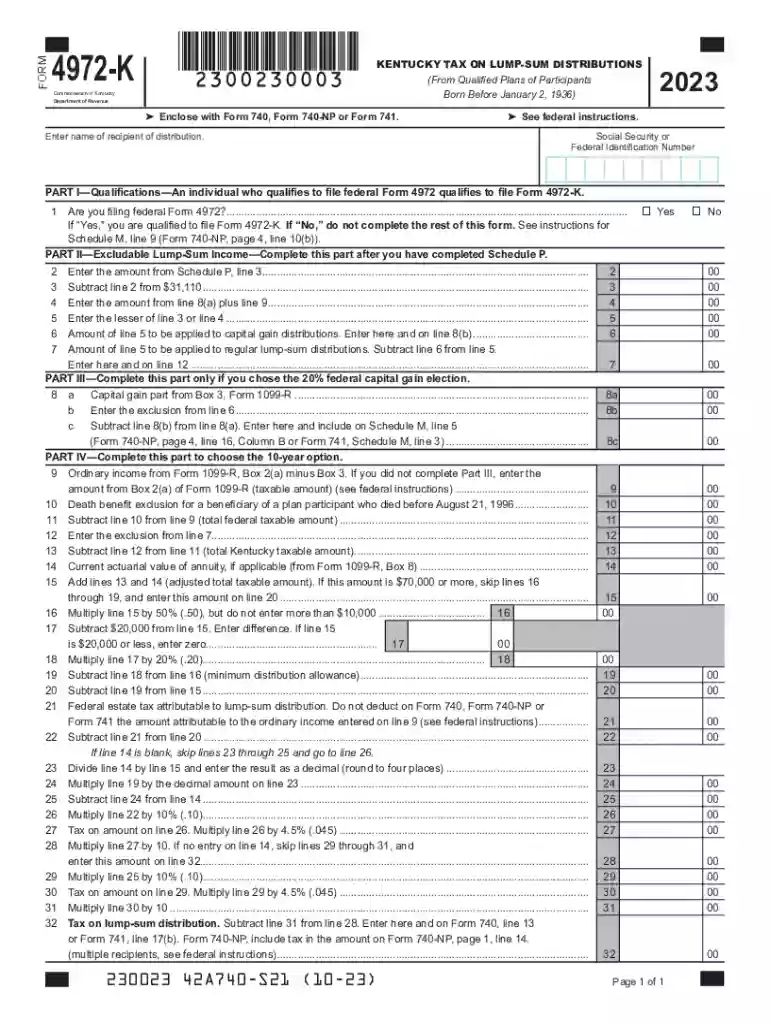
Complete Form 4972 - Tax on lump-sum distributions-2026

Get Form
Complete Form 4972 - Tax on lump-sum distributions Preview on Page 1

Here's how it works

01. Edit your form online
Type text, add images, blackout confidential details, add comments, highlights and more.

02. Sign it in a few clicks
Draw your signature, type it, upload its image, or use your mobile device as a signature pad.

03. Share your form with others
Send it via email, link, or fax. You can also download it, export it or print it out.

How to use or fill out Complete Form 4972 - Tax on lump-sum distributions with our platform

Form edit decoration
9.5
Ease of Setup
DocHub User Ratings on G2
9.0
Ease of Use
DocHub User Ratings on G2
  1. Click ‘Get Form’ to open it in the editor.
  2. Begin by entering the name of the recipient of the distribution at the top of the form. Ensure accuracy as this information is crucial for tax processing.
  3. In Part I, confirm if you are filing federal Form 4972 by selecting 'Yes' or 'No'. If 'Yes', proceed to complete the rest of the form.
  4. Move to Part II and fill in the amounts from Schedule P as instructed. This section requires calculations based on your previous entries, so double-check your figures.
  5. If applicable, complete Part III for capital gain elections. Enter values from Form 1099-R as directed, ensuring that all calculations align with federal guidelines.
  6. Finally, review all sections for accuracy before saving your completed form. Utilize our platform’s features to sign and distribute your document seamlessly.

Start using our platform today to fill out your tax forms online for free!

See more Complete Form 4972 - Tax on lump-sum distributions versions

We've got more versions of the Complete Form 4972 - Tax on lump-sum distributions form. Select the right Complete Form 4972 - Tax on lump-sum distributions version from the list and start editing it straight away!
Versions Form popularity Fillable & printable
2023 4.2 Satisfied (51 Votes)
2022 4.2 Satisfied (31 Votes)
2021 4.9 Satisfied (60 Votes)
2020 4.4 Satisfied (42 Votes)
be ready to get more

Complete this form in 5 minutes or less

Get form

Got questions?

We have answers to the most popular questions from our customers. If you can't find an answer to your question, please contact us.
Contact us
Heres how to calculate the taxes: Federal Income Taxes: Determine your tax bracket based on your total income, including the lump sum. Apply this percentage to the lump sum to estimate the federal tax. State Income Taxes: Similar to federal taxes, apply your states income tax rate to the lump sum.
Mandatory income tax withholding of 20% applies to most taxable distributions paid directly to you in a lump sum from employer retirement plans even if you plan to roll over the taxable amount within 60 days.
Form 4972, Tax on Lump-Sum Distributions, is used to calculate and report taxes on a lump-sum distribution from a qualified retirement plan. This could include distributions from a pension, 401(k), or IRA. Learn more about how a lump-sum distribution can impact your taxes and whether you qualify to use Form 4972.
Retirement fund lump sum benefits or severance benefits Taxable income (R)​Rate of tax 1 550 000 0% of taxable income 550 001 770 000 18% of taxable income above 550 000 770 001 1 155 000 39 600 + 27% of taxable income above 770 000 1 155 001 and above 143 550 + 36% of taxable income above 1 155 000 May 21, 2025
The 20% withheld from your lump sum retirement distribution is a federal income tax prepayment similar to the federal income taxes withheld from your pay check. It is held by the federal government as a credit toward you r tax liability for the year in which your payout was made.

Security and compliance

At DocHub, your data security is our priority. We follow HIPAA, SOC2, GDPR, and other standards, so you can work on your documents with confidence.

Learn more
ccpa2
pci-dss
gdpr-compliance
hipaa
soc-compliance

People also ask

26 U.S. Code 4972 - Tax on nondeductible contributions to qualified employer plans. In the case of any qualified employer plan, there is hereby imposed a tax equal to 10 percent of the nondeductible contributions under the plan (determined as of the close of the taxable year of the employer).
Enter the amount from Form 1099-R, box 3. B. Enter the amount from Form 1099-R, box 2a. C. Enter the capital gain amount from Form 1099-R, box 3 (if you elected. to include NUA in taxable income, enter the amount from line G of the. NUA Worksheet) B. Enter your percentage of. distribution from Form 1099-R, box 9. B.

Related links