New Jersey Enrollment Change Request 2026

Get Form
New Jersey Enrollment Change Request Preview on Page 1

Here's how it works

01. Edit your form online
Type text, add images, blackout confidential details, add comments, highlights and more.
02. Sign it in a few clicks
Draw your signature, type it, upload its image, or use your mobile device as a signature pad.
03. Share your form with others
Send it via email, link, or fax. You can also download it, export it or print it out.

How to use or fill out New Jersey Enrollment Change Request with DocHub

Form edit decoration
9.5
Ease of Setup
DocHub User Ratings on G2
9.0
Ease of Use
DocHub User Ratings on G2
  1. Click ‘Get Form’ to open the New Jersey Enrollment Change Request in our platform's editor.
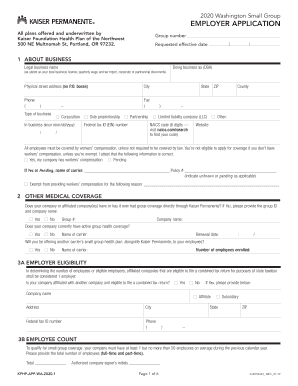
  2. Begin by completing the Employer Group Information section, including the Group Number and Group Name. This is essential for processing your request.
  3. In Section A, indicate the Type of Activity by checking the appropriate boxes for adding, changing, or removing coverage. Be sure to include the Date of Event.
  4. Fill out Section B with your Employee Information. Ensure all fields are completed clearly, including your contact details and employment information.
  5. In Section C, select your Plan Options by checking one box in the left column and indicating your Primary Copay amount.
  6. Section D requires you to list individuals covered under your plan. Use 'A', 'C', or 'R' to denote whether you are adding, changing, or removing coverage for each individual.
  7. Complete Sections E and F if applicable, providing details about any other insurance coverage and dependent information.
  8. Finally, sign in Section G to confirm that all information is accurate. The employer must complete Section H for verification before submission.

Start using our platform today to easily fill out your New Jersey Enrollment Change Request for free!

be ready to get more

Complete this form in 5 minutes or less

Get form

Got questions?

We have answers to the most popular questions from our customers. If you can't find an answer to your question, please contact us.
Contact us
An open enrollment period is a window of time that happens once a year typically in the fall when you can sign up for health insurance, adjust your current plan or cancel your plan. Its usually limited to a few weeks. If you miss it, you may have to wait until the next open enrollment period to make any changes.
Open Enrollment happens once a year, from November 1 to January 31. It is typically the only time you can enroll in coverage unless you have a qualifying life event or meet a certain income level.
An employee may be able to change an election if: The employees legal marital status changes through marriage, divorce, death of spouse, legal separation, or annulment. The employees number of dependents changes because of birth, adoption (or placement for adoption), or death.
Enrollment/Change Form means an agreement pursuant to which an Employee may elect to enroll in the Plan, to authorize a new level of payroll deductions, or to stop payroll deductions and withdraw from an Offering Period.

Security and compliance

At DocHub, your data security is our priority. We follow HIPAA, SOC2, GDPR, and other standards, so you can work on your documents with confidence.

Learn more
ccpa2
pci-dss
gdpr-compliance
hipaa
soc-compliance