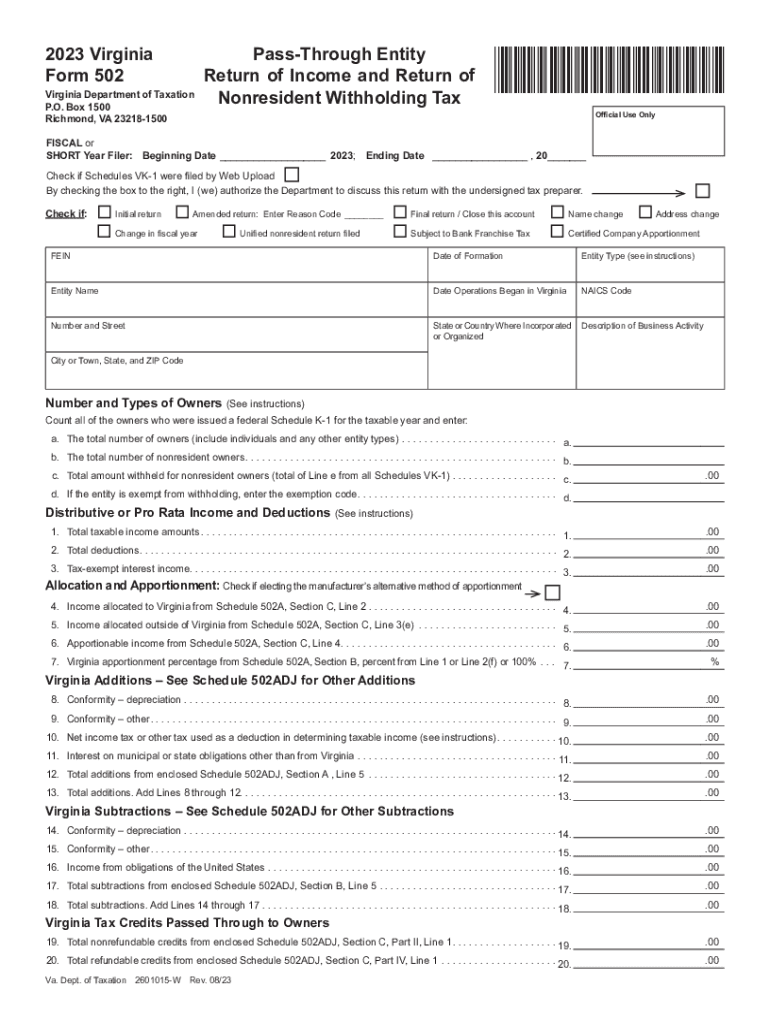
2022 virginia form 502-2026

Get Form
2023 virginia form 502 Preview on Page 1

Here's how it works

01. Edit your 2023 virginia form 502 online
Type text, add images, blackout confidential details, add comments, highlights and more.
02. Sign it in a few clicks
Draw your signature, type it, upload its image, or use your mobile device as a signature pad.
03. Share your form with others
Send 2023 va form 502 via email, link, or fax. You can also download it, export it or print it out.

How to use or fill out 2022 Virginia Form 502 with our platform

Form edit decoration
9.5
Ease of Setup
DocHub User Ratings on G2
9.0
Ease of Use
DocHub User Ratings on G2
  1. Click ‘Get Form’ to open the 2022 Virginia Form 502 in the editor.
  2. Begin by entering your entity's name and FEIN at the top of the form. Ensure that all details are accurate for proper processing.
  3. Indicate whether you are filing an initial, amended, or final return by checking the appropriate box. This helps categorize your submission correctly.
  4. Fill in the fiscal year dates and check if Schedules VK-1 were filed by Web Upload. This is crucial for nonresident withholding tax calculations.
  5. Complete Section 1 regarding withholding payment reconciliation, ensuring to accurately report total withholding tax due and any payments made.
  6. Proceed to Section 2 and Section 3 to address any penalties or interest charges applicable to your filing situation.
  7. Finally, review all entries for accuracy before signing and submitting your form. Utilize our platform’s features to save and share your completed document easily.

Start using our platform today for free to streamline your form completion process!

See more 2022 virginia form 502 versions

We've got more versions of the 2022 virginia form 502 form. Select the right 2022 virginia form 502 version from the list and start editing it straight away!
Versions Form popularity Fillable & printable
2023 4.6 Satisfied (55 Votes)
2022 4.4 Satisfied (53 Votes)
2021 4.9 Satisfied (40 Votes)
2020 4.3 Satisfied (166 Votes)
2019 4.2 Satisfied (91 Votes)
2018 4.1 Satisfied (43 Votes)
2011 4.4 Satisfied (586 Votes)
be ready to get more

Complete this form in 5 minutes or less

Get form

Got questions?

We have answers to the most popular questions from our customers. If you can't find an answer to your question, please contact us.
Contact us
Go to IRS.gov/OrderForms to order current forms, instruc- tions, and publications; call 800-829-3676 to order prior-year forms and instructions. The IRS will process your order for forms and publications as soon as possible.
S Corporations, Partnerships, and Limited Liability Companies. Every pass-through entity (PTE) that does business in Virginia or receives income from Virginia sources must file an annual Virginia income tax return on Form 502 or Form 502PTET.
Form 502 is a tax document that individuals need to fill out to report their annual income to the state tax department. It helps in calculating the amount of state income tax owed based on the income earned throughout the year.
Form 502 is a vital document for many taxpayers. Heres what its used for: To report individual income taxes. To claim deductions and tax credits. To calculate the state income tax owed.
You may submit paper tax forms and payments at any of the local branch offices between 8:30 a.m. - 4:30 p.m., Monday through Friday. If you are sending a Form 502 or Form 505 (with a payment) through the US Postal Service, send it to: Comptroller of Maryland, Payment Processing, PO Box 8888, Annapolis, MD 21401-8888.

Security and compliance

At DocHub, your data security is our priority. We follow HIPAA, SOC2, GDPR, and other standards, so you can work on your documents with confidence.

Learn more
ccpa2
pci-dss
gdpr-compliance
hipaa
soc-compliance

People also ask

You may request or download Virginia State Income Tax forms online from the Virginia Department of Taxation or by calling 804-440-2541.
To access the IRS website and download tax forms for the 2023 and 2024 tax years, simply visit .irs.gov and click on the Forms and Instructions link. From there, you can search for the forms you need and download them in your preferred format.
If you did not receive your Form W-2 or prefer an electronic version, you can access them on Cal Employee Connect under the W-2 tab.

Related links