EMPLOYEE & BUSINESS OPERATOR INFORMATION SHEET 2026

Get Form
EMPLOYEE & BUSINESS OPERATOR INFORMATION SHEET Preview on Page 1

Here's how it works

01. Edit your form online
Type text, add images, blackout confidential details, add comments, highlights and more.

02. Sign it in a few clicks
Draw your signature, type it, upload its image, or use your mobile device as a signature pad.

03. Share your form with others
Send it via email, link, or fax. You can also download it, export it or print it out.

How to use or fill out EMPLOYEE & BUSINESS OPERATOR INFORMATION SHEET with our platform

Form edit decoration
9.5
Ease of Setup
DocHub User Ratings on G2
9.0
Ease of Use
DocHub User Ratings on G2
  1. Click ‘Get Form’ to open the EMPLOYEE & BUSINESS OPERATOR INFORMATION SHEET in the editor.
  2. Begin by entering your License #, Permit #, and APD # at the top of the form. These identifiers are crucial for processing your application.
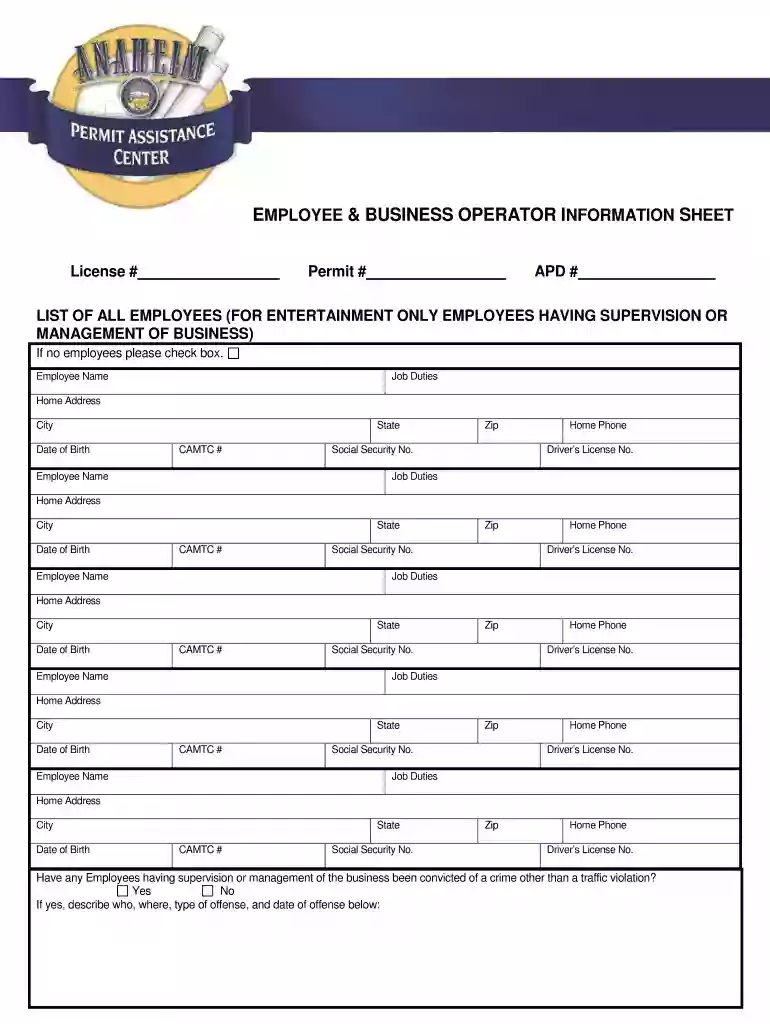
  3. In the 'LIST OF ALL EMPLOYEES' section, if you have no employees, simply check the designated box. If you do have employees, fill in their names, job duties, home addresses (including city, state, zip), date of birth, CAMTC #, social security number, home phone number, and driver’s license number for each employee listed.
  4. Next, answer whether any employees with supervision or management roles have been convicted of a crime other than a traffic violation. If yes, provide details in the space provided.
  5. Proceed to the 'CRIMINAL RECORD OF BUSINESS OPERATOR' section and indicate if you (the business owner) have ever been convicted of a crime. If so, list the nature of the offense and sentence received.
  6. In 'PERMIT HISTORY OF BUSINESS OPERATOR', detail any previous licenses/permits held or applied for. Include city names and dates for each entry.
  7. Finally, complete the 'BUSINESS OPERATING DETAILS' section by specifying your hours of operation and whether food service is offered. If applicable, describe the food offered.

Start filling out your EMPLOYEE & BUSINESS OPERATOR INFORMATION SHEET today using our platform for free!

be ready to get more

Complete this form in 5 minutes or less

Get form

Got questions?

We have answers to the most popular questions from our customers. If you can't find an answer to your question, please contact us.
Contact us
Common fields on an employee information form include: Full legal name. Mailing address and phone number. Job title and department. Social Security number. Employment start date. Salary or compensation details. Emergency contact information. Educational and professional history.
An employee information form template serves as a standardized method for gathering personal, contact, employment, compensation, educational, medical, and additional information. This template allows you to consistently and accurately record all necessary data.
Purpose of New Employee Forms The new hire paperwork ensures the following: Checking if the new employee can work legally. Determines employment conditions, such as work duties, wages, and benefits.
An employee intake form helps you collect all relevant information about your new hire so that you can: Contact them appropriately with company news or HR requests. Get in touch with emergency contacts in case of an emergency. Make salary payments into their bank accounts according to their preferences.
An employee information form is a simple document that captures essential data about an employee, such as their full name, address, contact numbers, emergency contacts, social security number, and other relevant personal details. It serves as a foundational record for each individual employee within an organization.

Security and compliance

At DocHub, your data security is our priority. We follow HIPAA, SOC2, GDPR, and other standards, so you can work on your documents with confidence.

Learn more
ccpa2
pci-dss
gdpr-compliance
hipaa
soc-compliance

People also ask

Partnership or Sole Proprietorship When your business is classified as a partnership or a sole proprietorship you are allowed to be an employee on the payroll.
How to Create an Employee Registration Form Define Your Purpose. Choose a Form Creation Tool. Choose the Right Fields. Ensure Data Privacy and Security. Create an Easy-to-Follow Structure. Automate the Process. Test the Form.

Related links