Type text, add images, blackout confidential details, add comments, highlights and more.

02. Sign it in a few clicks
Draw your signature, type it, upload its image, or use your mobile device as a signature pad.

03. Share your form with others
Send it via email, link, or fax. You can also download it, export it or print it out.

How to use or fill out F17A-1: Application - TFSA (Tax-Free Savings Account) with DocHub
Ease of Setup
DocHub User Ratings on G2
Ease of Use
DocHub User Ratings on G2
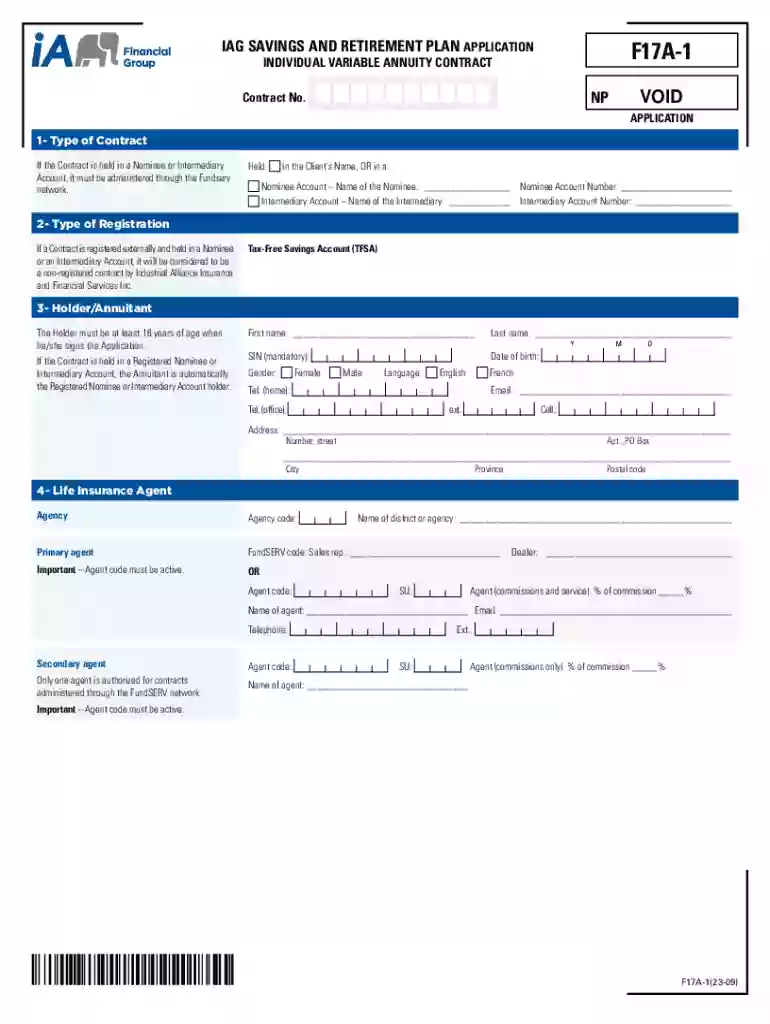
Click ‘Get Form’ to open the F17A-1 application in our editor.
Begin by filling out the 'Type of Contract' section. Indicate whether the contract is held in your name or a nominee/intermediary account, and provide the necessary details.
In the 'Holder/Annuitant' section, enter your personal information including first name, last name, date of birth, and contact details. Ensure all mandatory fields are completed.
Proceed to the 'Beneficiaries' section. Here, you can designate primary and contingent beneficiaries. Fill in their names, relationships, and percentages as applicable.
Complete sections for investment instructions and any pre-authorized debit (PAD) agreements if applicable. Specify amounts and frequencies clearly.
Review all entered information for accuracy. Once satisfied, use the electronic signature tool to finalize your application by clicking on the ‘Finalize!’ button.
Start using our platform today to easily complete your TFSA application online for free!
Fill out F17A-1: Application - TFSA (Tax-Free Savings Account) online It's free
See more F17A-1: Application - TFSA (Tax-Free Savings Account) versions
We've got more versions of the F17A-1: Application - TFSA (Tax-Free Savings Account) form. Select the right F17A-1: Application - TFSA (Tax-Free Savings Account) version from the list and start editing it straight away!
At any time in the year, if you contribute more than your available TFSA contribution room, you will have to pay a tax equal to 1% of the highest excess TFSA amount in the month, for each month that the excess amount remains in your account.
Can I use my TFSA as a savings account?
A TFSA is an ideal all-purpose savings account that offers complete flexibility to save for a multitude of uses in one registered account. Your savings build up over time tax-free - helping you reach your goals sooner, and you can withdraw your money when you need it.
Is a TFSA better than a savings account?
Both of these accounts are extremely useful for different goals. Savings accounts are perfect for short-term savings and emergency funds, while TFSAs are an ideal place to save long-term and grow your investments tax-free. No maintenance or monthly fees.
How much can I put in my TFSA if I have never contributed?
What if youve never contributed to a TFSA before? If you have lived in Canada your entire life and you were 18 or older when the Government of Canada first introduced TFSAs (in 2009) and youve never put money into a TFSA, then your contribution room could be as much as $102,000 (in 2025).
What is the TFSA lifetime limit?
The TFSA program launched in 2009 as a way to set aside tax-free money. If you were 18 years or older at that time, your contribution room has been growing since then, and your total cumulative TFSA limit is now $102,000.
What is the TFSA limit for tax-free savings account?
TFSA contribution room 2009 to 2012$ 5,000 2015 $10,000 2016 to 2018 $ 5,500 2019 to 2022 $ 6,000 2023 $ 6,5002 more rows Jan 24, 2025
What is a tax-free savings account TFSA?
The TFSA program began in 2009. It is a way for individuals who are 18 and older and who have a valid social insurance number (SIN) to set money aside tax-free throughout their lifetime. Contributions to a TFSA are not deductible for income tax purposes.
What are the 5 mistakes you must avoid in a TFSA?
Here are five mistakes to avoid when managing your TFSA. Overcontributing to your account. Naming spouse a beneficiary instead of successor holder. Holding investments that produce foreign income. Not recognizing how market gains and losses impact your future contribution room. Choosing non-qualified investments.
Cookie consent notice
This site uses cookies to enhance site navigation and personalize your experience.
By using this site you agree to our use of cookies as described in our Privacy Notice.
You can modify your selections by visiting our Cookie and Advertising Notice.