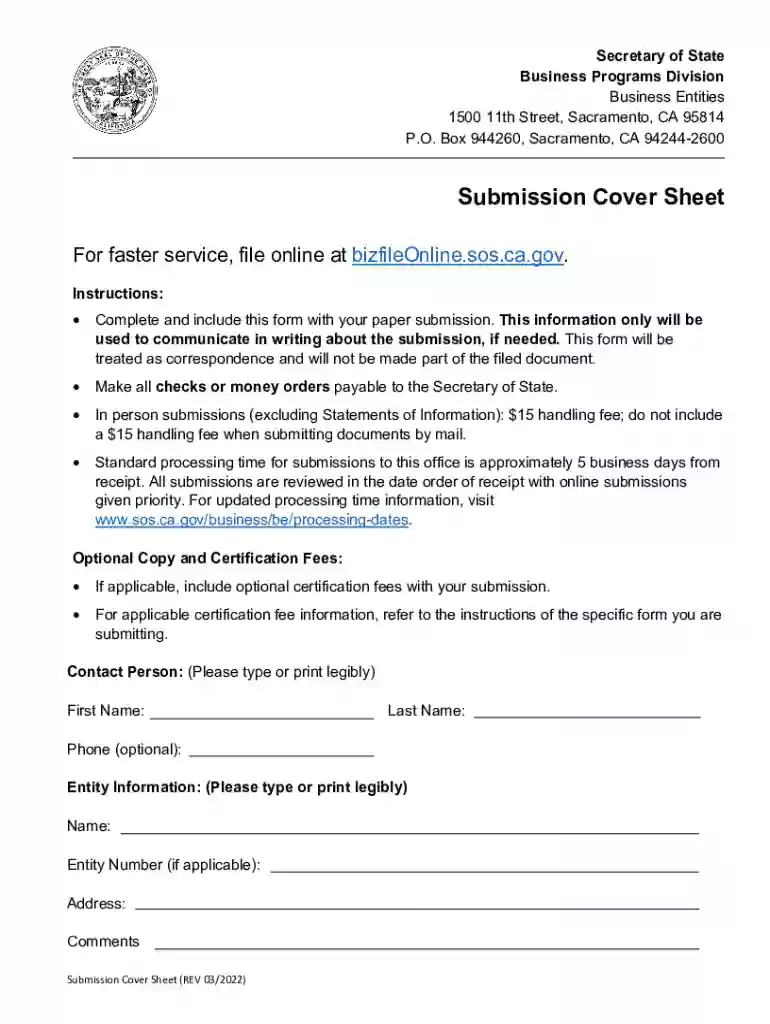
Submission Cover Sheet for Business EntitiesSecretary of 2026

Get Form
Submission Cover Sheet for Business EntitiesSecretary of Preview on Page 1

Here's how it works

01. Edit your form online
Type text, add images, blackout confidential details, add comments, highlights and more.

02. Sign it in a few clicks
Draw your signature, type it, upload its image, or use your mobile device as a signature pad.

03. Share your form with others
Send it via email, link, or fax. You can also download it, export it or print it out.

How to use or fill out Submission Cover Sheet for Business EntitiesSecretary of with our platform

Form edit decoration
9.5
Ease of Setup
DocHub User Ratings on G2
9.0
Ease of Use
DocHub User Ratings on G2
  1. Click ‘Get Form’ to open the Submission Cover Sheet in the editor.
  2. Begin by filling out the 'Contact Person' section. Enter your first name, last name, and an optional phone number to ensure communication regarding your submission.
  3. Next, move to the 'Entity Information' section. Provide the entity name, entity number (if applicable), and complete address. Ensure all information is typed or printed legibly.
  4. Review any optional fees that may apply, such as certification fees, and include them with your submission if necessary.
  5. Finally, read the declaration at the bottom of the form and sign it. Make sure you are authorized to sign on behalf of the foreign corporation before submitting.

Start using our platform today for free to streamline your document editing and submission process!

See more Submission Cover Sheet for Business EntitiesSecretary of versions

We've got more versions of the Submission Cover Sheet for Business EntitiesSecretary of form. Select the right Submission Cover Sheet for Business EntitiesSecretary of version from the list and start editing it straight away!
Versions Form popularity Fillable & printable
2023 4.8 Satisfied (28 Votes)
2017 4.3 Satisfied (22 Votes)
2014 4.8 Satisfied (97 Votes)
be ready to get more

Complete this form in 5 minutes or less

Get form

Got questions?

We have answers to the most popular questions from our customers. If you can't find an answer to your question, please contact us.
Contact us
Form 100 is the California Corporation Franchise or Income Tax Return. This form is used by corporations in California to report their income and calculate franchise tax liabilities. It is essential for compliance with Californias tax laws and must be filed annually to avoid penalties and interest.
The process through which a company files information and documents to register as a business in that state is known as a Secretary of State (SOS) filing. Importantly, a company may be required to register in a state even if its headquartered in a different jurisdiction.
Registering your business with the secretary of states office generally ensures no one else in your state will operate a business under the same name.
Statement of Information (Form SI-100) This form is first due within six months of filing the initial Articles of Incorporation and thereafter is due every two years during the calendar month that the Articles of Incorporation were filed and can be filed up to five months in advance of that date.
Fees: The fee for filing the Statement of Information is $20.00. Checks should be made payable to the Secretary of State. If this statement is being filed to amend any information on a previously filed statement and is being filed outside the applicable filing period, as defined above, no fee is required.

Security and compliance

At DocHub, your data security is our priority. We follow HIPAA, SOC2, GDPR, and other standards, so you can work on your documents with confidence.

Learn more
ccpa2
pci-dss
gdpr-compliance
hipaa
soc-compliance

People also ask

In business and marketing settings, a cover page is the initial contact point between brand and reader. It needs to provide a professional and convincing first impression that sets the tone. Get it right and a cover page can encourage them to read beyond it.

Related links