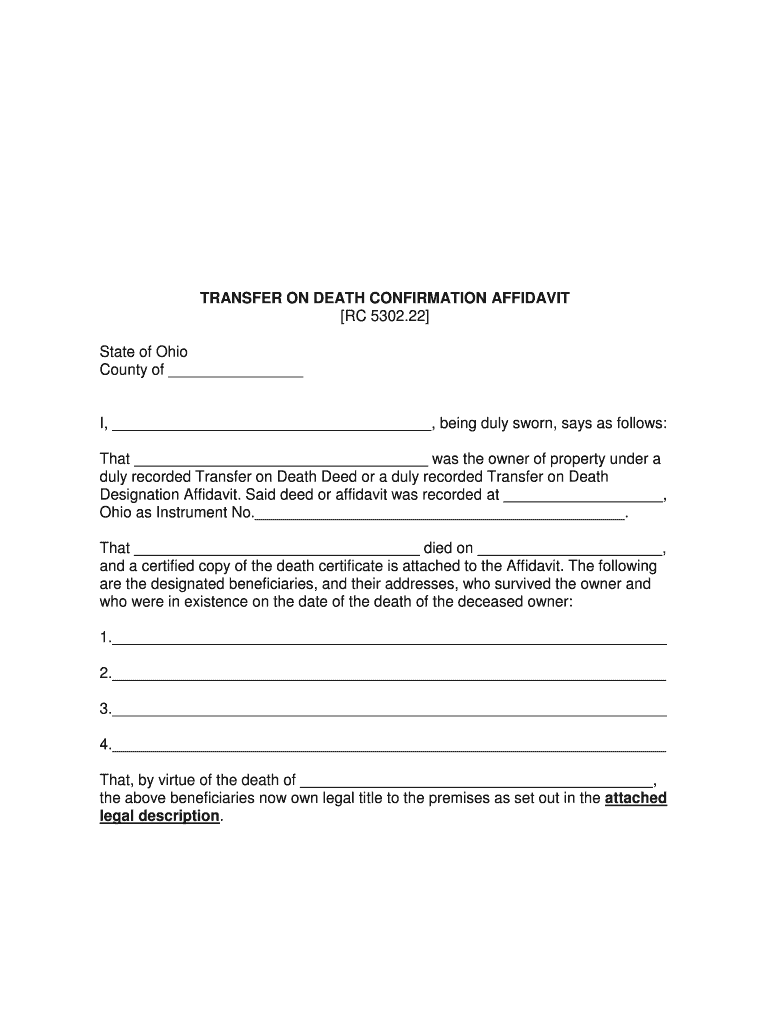
TRANSFER ON DEATH CONFIRMATION AFFIDAVIT (5302 222 Ohio-2026

Get Form
affidavit of confirmation ohio Preview on Page 1

Here's how it works

01. Edit your affidavit of confirmation ohio online
Type text, add images, blackout confidential details, add comments, highlights and more.
02. Sign it in a few clicks
Draw your signature, type it, upload its image, or use your mobile device as a signature pad.
03. Share your form with others
Send transfer on death confirmation affidavit ohio via email, link, or fax. You can also download it, export it or print it out.

How to use or fill out TRANSFER ON DEATH CONFIRMATION AFFIDAVIT (5302 222 Ohio)

Form edit decoration
9.5
Ease of Setup
DocHub User Ratings on G2
9.0
Ease of Use
DocHub User Ratings on G2
  1. Click ‘Get Form’ to open the TRANSFER ON DEATH CONFIRMATION AFFIDAVIT in our editor.
  2. Begin by filling in the county where the affidavit is being executed. This is crucial for jurisdictional purposes.
  3. In the first blank, enter your name as the affiant, ensuring it matches your identification documents.
  4. Next, specify the name of the deceased property owner in the designated space.
  5. Provide details about where the Transfer on Death Deed or Designation Affidavit was recorded, including the instrument number.
  6. Indicate the date of death of the property owner and attach a certified copy of their death certificate as required.
  7. List all designated beneficiaries along with their addresses. Ensure that this information is accurate and complete.
  8. Finally, sign and date the affidavit before a notary public to validate your statements.

Start using our platform today to fill out your TRANSFER ON DEATH CONFIRMATION AFFIDAVIT for free!

See more TRANSFER ON DEATH CONFIRMATION AFFIDAVIT (5302 222 Ohio versions

We've got more versions of the TRANSFER ON DEATH CONFIRMATION AFFIDAVIT (5302 222 Ohio form. Select the right TRANSFER ON DEATH CONFIRMATION AFFIDAVIT (5302 222 Ohio version from the list and start editing it straight away!
Versions Form popularity Fillable & printable
2020 4.7 Satisfied (39 Votes)
2013 3.9 Satisfied (26 Votes)
be ready to get more

Complete this form in 5 minutes or less

Get form

Got questions?

We have answers to the most popular questions from our customers. If you can't find an answer to your question, please contact us.
Contact us
How to create a Transfer on Death for your home Choose your recipients. You can choose one or more people to become owner of any home or land that you own. Find a copy of your deed. Complete the TOD for real estate form. Take the form to a notary. Submit the form at your County Recorders Office.
How to Prepare a Transfer-on-Death Deed Using Deed Forms or WillMaker to Make Your Own TOD Deed. Name the Beneficiary of Your Real Estate. Describe the Property Using the Exact Legal Description. Sign the TOD Deed. Have the TOD Deed docHubd (and Possibly Witnessed) Record the Transfer-on-Death Deed.
Ohio no longer recognizes transfer on death deeds, having replaced them in 2009 with a transfer on death designation affidavit. This change in state law allows property owners to pass real estate directly to beneficiaries without probate, as long as the affidavit is properly recorded during the owners lifetime.
The Transfer on Death Designation Affidavit (TOD), when properly recorded, permits the direct transfer of the described real property to the designated beneficiary or beneficiaries upon the death of the owner, thus avoiding Probate administration.

Security and compliance

At DocHub, your data security is our priority. We follow HIPAA, SOC2, GDPR, and other standards, so you can work on your documents with confidence.

Learn more
ccpa2
pci-dss
gdpr-compliance
hipaa
soc-compliance