drs pw Preview on Page 1

Drs wa gov forms 2026

Here's how it works

  • 01. Edit your drs pw online

    Type text, add images, blackout confidential details, add comments, highlights and more.

  • 02. Sign it in a few clicks

    Draw your signature, type it, upload its image, or use your mobile device as a signature pad.

  • 03. Share your form with others

    Send drs wa gov via email, link, or fax. You can also download it, export it or print it out.

How to use or fill out drs wa gov forms with DocHub

Form edit decoration
9.5
Ease of Setup
DocHub User Ratings on G2
9.0
Ease of Use
DocHub User Ratings on G2
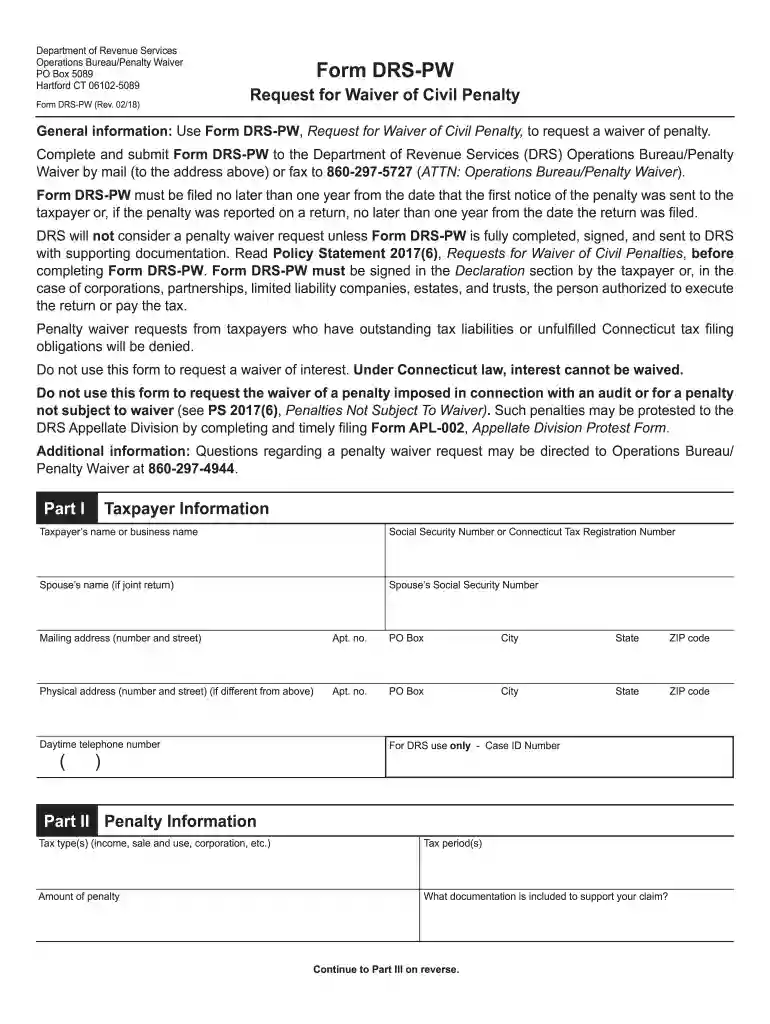
  1. Click ‘Get Form’ to open the DRS-PW form in our platform's editor.
  2. Begin by filling out Part I, Taxpayer Information. Enter your name or business name, Social Security Number or Connecticut Tax Registration Number, and your spouse’s details if applicable. Ensure all mailing and physical addresses are accurately provided.
  3. Proceed to Part II, Penalty Information. Specify the tax type(s) involved, the relevant tax period(s), and the amount of penalty you are requesting a waiver for. Include any documentation that supports your claim.
  4. In Part III, provide detailed explanations regarding your inability to comply with tax obligations. Address each question thoroughly and attach any supporting documents as necessary.
  5. Finally, complete the Declaration section by signing and dating the form. Ensure all required documentation is attached before submission.

Start using our platform today to easily fill out and submit your DRS-PW form for free!

See more drs pw versions

We've got more versions of the drs pw form. Select the right drs pw version from the list and start editing it straight away!

VersionsForm popularityFillable & printable
20214.9 Satisfied (20 Votes)
20204.4 Satisfied (109 Votes)
20194.2 Satisfied (71 Votes)
20184.3 Satisfied (113 Votes)
20154.4 Satisfied (573 Votes)
20154.2 Satisfied (49 Votes)
20104 Satisfied (47 Votes)

be ready to get more

Complete this form in 5 minutes or less

Got questions?

We have answers to the most popular questions from our customers. If you can't find an answer to your question, please contact us.

The average annual state pension for all plans (weighted by headcount) is $21,493.
The Deferred Compensation Program is a supplemental retirement savings program you control. The Washington State Department of Retirement Systems (DRS) administers this 457(b) plan, which is similar to a 401(k) or 403(b) that many employers offer.
A: When you log in, you have five chances to enter the correct User ID and password. If youre unsuccessful, youre locked out of the application for 15 minutes. After 15 minutes, you can try again.
Vesting. You earn the right to a monthly benefit in retirement when you have 5 years of service credit. Pension benefit: You earn the right to a monthly benefit in retirement after 10 years of service credit in most cases, or after 5 years of service credit with at least 12 months earned after age 44.

Security and compliance

At DocHub, your data security is our priority. We follow HIPAA, SOC2, GDPR, and other standards, so you can work on your documents with confidence.

Related links

DRS: Forms

Member information form for new or returning PERS, SERS or TRS customers. DCP Enrollment, New DCP customers, use this form to enroll in the Washington StateRead more

Learn more
Science Board Transcript- October 7, 2019

Oct 7, 2019 10. We have a full day and lots to do, so Ill. 11 officially now call the Science Board meeting to. 12 order. Wed like to start by goingRead more

Learn more
Washington State Department of Retirement Systems

The Department of Retirement Systems (DRS) requires you provide your Social Security number for this form. DRS will use your Social Security number as aRead more

Learn more
If you believe that this page should be taken down, please follow our DMCA take down process here