




Here's how it works

01. Edit your 2210n online
Type text, add images, blackout confidential details, add comments, highlights and more.

02. Sign it in a few clicks
Draw your signature, type it, upload its image, or use your mobile device as a signature pad.

03. Share your form with others
Send it via email, link, or fax. You can also download it, export it or print it out.
How to use or fill out Individual Underpayment of Estimated Tax 2022 with our platform

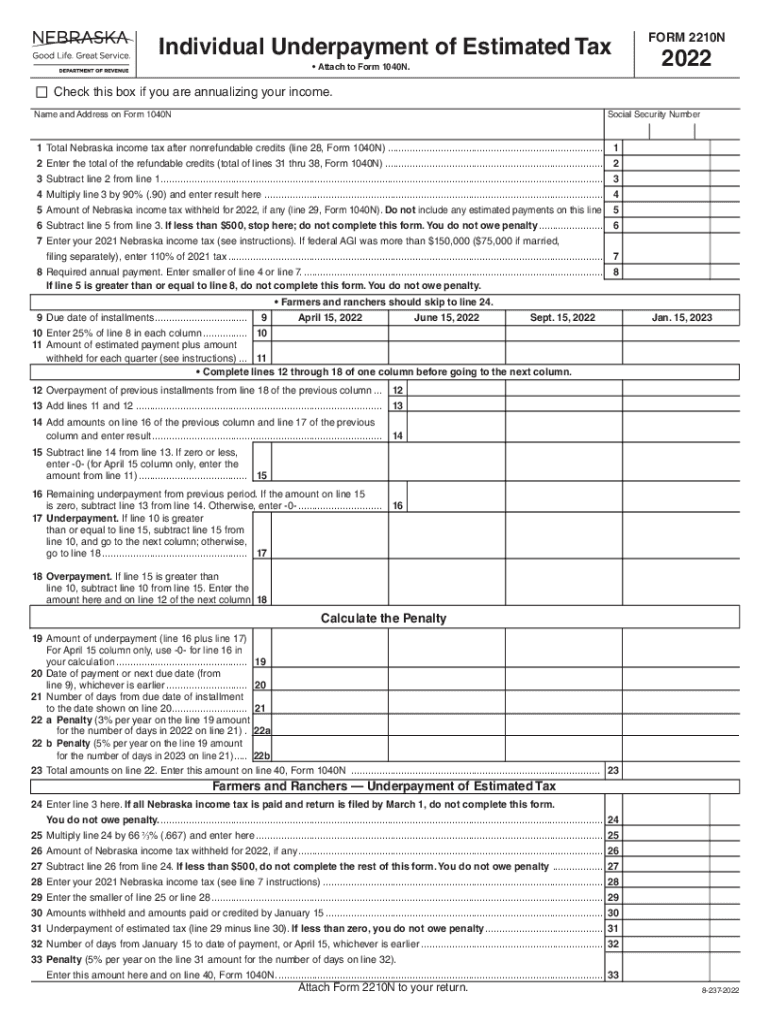
- Click ‘Get Form’ to open the Individual Underpayment of Estimated Tax 2022 in the editor.
- Begin by entering your name and address as it appears on Form 1040N, along with your Social Security Number.
- Complete line 1 by entering your total Nebraska income tax after nonrefundable credits from line 28 of Form 1040N.
- On line 2, input the total refundable credits from lines 31 through 38 of Form 1040N.
- Subtract line 2 from line 1 and enter the result on line 3. This is your adjusted tax amount.
- Multiply the amount on line 3 by 90% (0.90) and record this value on line 4.
- Enter any Nebraska income tax withheld for the year on line 5, excluding estimated payments.
- If the result from subtracting line 5 from line 3 is less than $500, you do not need to complete this form.
Start using our platform today to easily fill out your tax forms online for free!
Fill out Individual Underpayment of Estimated Tax 2022 online
It's free
It's free
See more Individual Underpayment of Estimated Tax 2022 versions
We've got more versions of the Individual Underpayment of Estimated Tax 2022 form. Select the right Individual Underpayment of Estimated Tax 2022 version from the list and start editing it straight away!
Security and compliance
At DocHub, your data security is our priority. We follow HIPAA, SOC2, GDPR, and other standards, so you can work on your documents with confidence.
Learn more




