Forms, New Employee Orientation, Division of - AlaskaForms, New Employee Orientation, Division of - 2026

Get Form
Forms, New Employee Orientation, Division of - AlaskaForms, New Employee Orientation, Division of -  Preview on Page 1

Here's how it works

01. Edit your form online
Type text, add images, blackout confidential details, add comments, highlights and more.

02. Sign it in a few clicks
Draw your signature, type it, upload its image, or use your mobile device as a signature pad.

03. Share your form with others
Send it via email, link, or fax. You can also download it, export it or print it out.

How to use or fill out Forms, New Employee Orientation, Division of - AlaskaForms, New Employee Orientation, Division of -

Form edit decoration
9.5
Ease of Setup
DocHub User Ratings on G2
9.0
Ease of Use
DocHub User Ratings on G2
  1. Click ‘Get Form’ to open it in the editor.
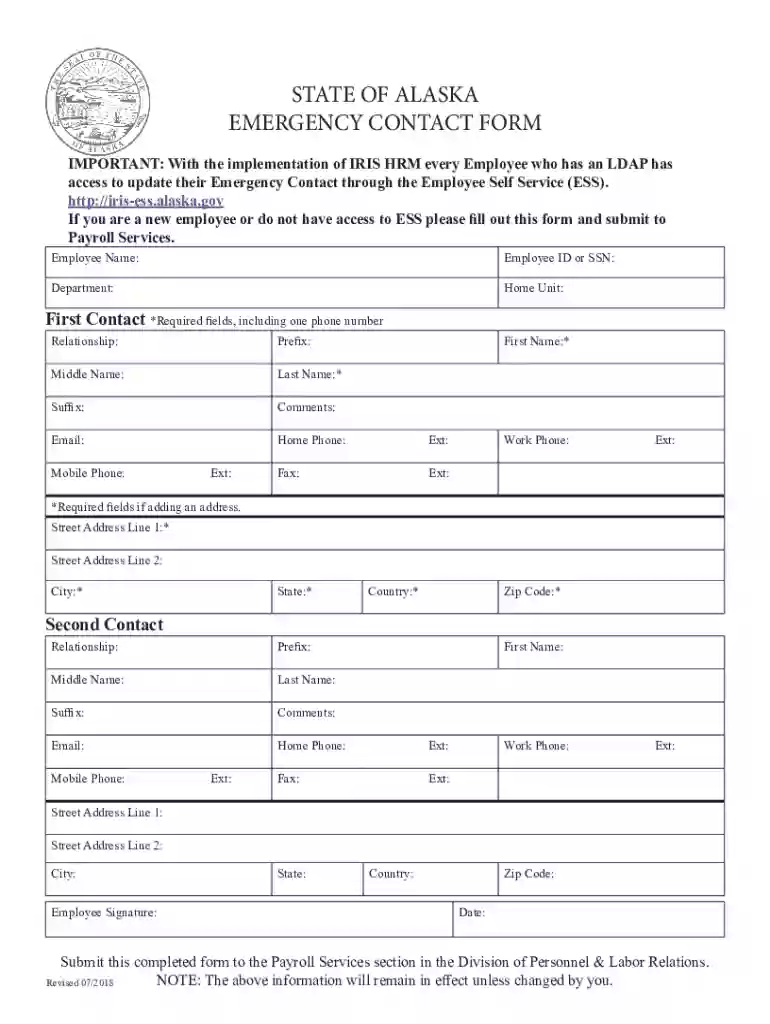
  2. Begin by entering your Employee Name and ID or SSN in the designated fields. Ensure accuracy as this information is crucial for identification.
  3. Fill in your Department and Home Unit to provide context about your position within the organization.
  4. For the First Contact section, complete all required fields marked with an asterisk. This includes entering their Relationship to you, Prefix, Middle Name, Last Name, and at least one phone number.
  5. If applicable, add comments and email addresses for both contacts. Make sure to include home and work phone numbers along with any extensions.
  6. Complete the address fields for both contacts if necessary. Required fields include Street Address Line 1, City, State, Country, and Zip Code.
  7. Sign and date the form at the bottom before submitting it to Payroll Services as instructed.

Start using our platform today to easily fill out your forms online for free!

See more Forms, New Employee Orientation, Division of - AlaskaForms, New Employee Orientation, Division of - versions

We've got more versions of the Forms, New Employee Orientation, Division of - AlaskaForms, New Employee Orientation, Division of - form. Select the right Forms, New Employee Orientation, Division of - AlaskaForms, New Employee Orientation, Division of - version from the list and start editing it straight away!
Versions Form popularity Fillable & printable
2018 4.8 Satisfied (139 Votes)
2017 4.1 Satisfied (47 Votes)
be ready to get more

Complete this form in 5 minutes or less

Get form

Got questions?

We have answers to the most popular questions from our customers. If you can't find an answer to your question, please contact us.
Contact us
Orientation Session Examples In corporate settings, examples of orientation sessions may include an introduction to company culture, policies, and procedures, as well as team-building activities. In educational institutions, orientation sessions often cover academic expectations, campus resources, and student services.
Demographic and Administrative Forms Form Number (if applicable)Form Description I-9 Employment Eligibility Verification SF-144 Statement of Prior Federal Service * Employee Address Form (for Bureau of Labor Statistics new employees only) W-4 Federal Withholding Form8 more rows
Here are some examples to demonstrate various aspects of orientation: Example 1: Company Overview and History. Example 2: Mission, Vision, and Core Values. Example 3: Introduction to Organizational Structure and Departments. Example 4: Explanation of Job Roles and Expectations.
New employee orientation is a short-term process that usually takes place over a day to a week. Its the introductory phase of the broader onboarding journey, focused on shaping the new hires first impressions of their workplace.
How to design an effective orientation program Welcome the employee. From the time the new employee walks in the door, the focus should be on easing their anxiety. Provide the employee handbook. Go over policies. Thoroughly explain the details of the job. Set goals and action steps. Clearly define overarching expectations.

Security and compliance

At DocHub, your data security is our priority. We follow HIPAA, SOC2, GDPR, and other standards, so you can work on your documents with confidence.

Learn more
ccpa2
pci-dss
gdpr-compliance
hipaa
soc-compliance
be ready to get more

Complete this form in 5 minutes or less

Get form