Statement compliance 2026

Get Form
statement compliance Preview on Page 1

Here's how it works

01. Edit your statement compliance online
Type text, add images, blackout confidential details, add comments, highlights and more.
02. Sign it in a few clicks
Draw your signature, type it, upload its image, or use your mobile device as a signature pad.
03. Share your form with others
Send it via email, link, or fax. You can also download it, export it or print it out.

How to use or fill out statement compliance with our platform

Form edit decoration
9.5
Ease of Setup
DocHub User Ratings on G2
9.0
Ease of Use
DocHub User Ratings on G2
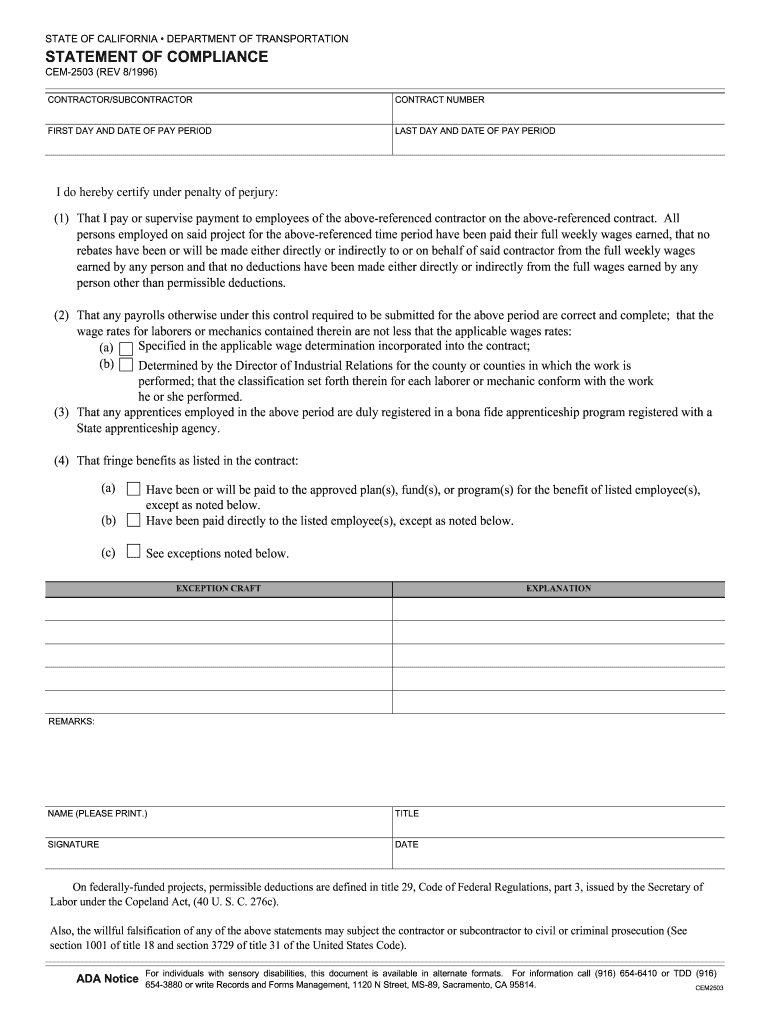
  1. Click ‘Get Form’ to open the Statement of Compliance in the editor.
  2. Begin by entering the contractor/subcontractor name and contract number at the top of the form. This identifies who is responsible for compliance.
  3. Fill in the first and last day of the pay period. Accurate dates are crucial for payroll records.
  4. In Section 1, certify that all employees have been paid their full wages. Ensure no unauthorized deductions have been made.
  5. For Section 2, check the appropriate box indicating whether wage rates meet federal or state requirements based on your project’s location.
  6. Complete Section 3 by confirming that any apprentices are registered in a bona fide program.
  7. In Section 4, indicate how fringe benefits are handled—either paid to approved plans or directly to employees—and note any exceptions if applicable.
  8. Finally, print your name, title, sign, and date the form to validate your compliance certification.

Start using our platform today for free to streamline your document editing and compliance processes!

See more statement compliance versions

We've got more versions of the statement compliance form. Select the right statement compliance version from the list and start editing it straight away!
Versions Form popularity Fillable & printable
1996 4.8 Satisfied (107 Votes)
be ready to get more

Complete this form in 5 minutes or less

Get form

Got questions?

We have answers to the most popular questions from our customers. If you can't find an answer to your question, please contact us.
Contact us
The purpose of the risk and compliance statement is for the company to confirm that it has complied with all its relevant statutory, licence and regulatory obligations that have not been confirmed by other processes, and is taking appropriate steps to manage and/or mitigate the risks it faces.
To get a statement of compliance you need to: Contact an authorised representative of the vehicles manufacturer. The representative must be either a New Zealand or an overseas representative who is authorised by the manufacturer to issue statements of compliance.

Security and compliance

At DocHub, your data security is our priority. We follow HIPAA, SOC2, GDPR, and other standards, so you can work on your documents with confidence.

Learn more
ccpa2
pci-dss
gdpr-compliance
hipaa
soc-compliance