Type text, add images, blackout confidential details, add comments, highlights and more.

02. Sign it in a few clicks
Draw your signature, type it, upload its image, or use your mobile device as a signature pad.

03. Share your form with others
Send donation securities form via email, link, or fax. You can also download it, export it or print it out.

How to use or fill out Charitable Donation of Securities in Kind Form - TD Bank with our platform
Ease of Setup
DocHub User Ratings on G2
Ease of Use
DocHub User Ratings on G2
Click ‘Get Form’ to open it in the editor.
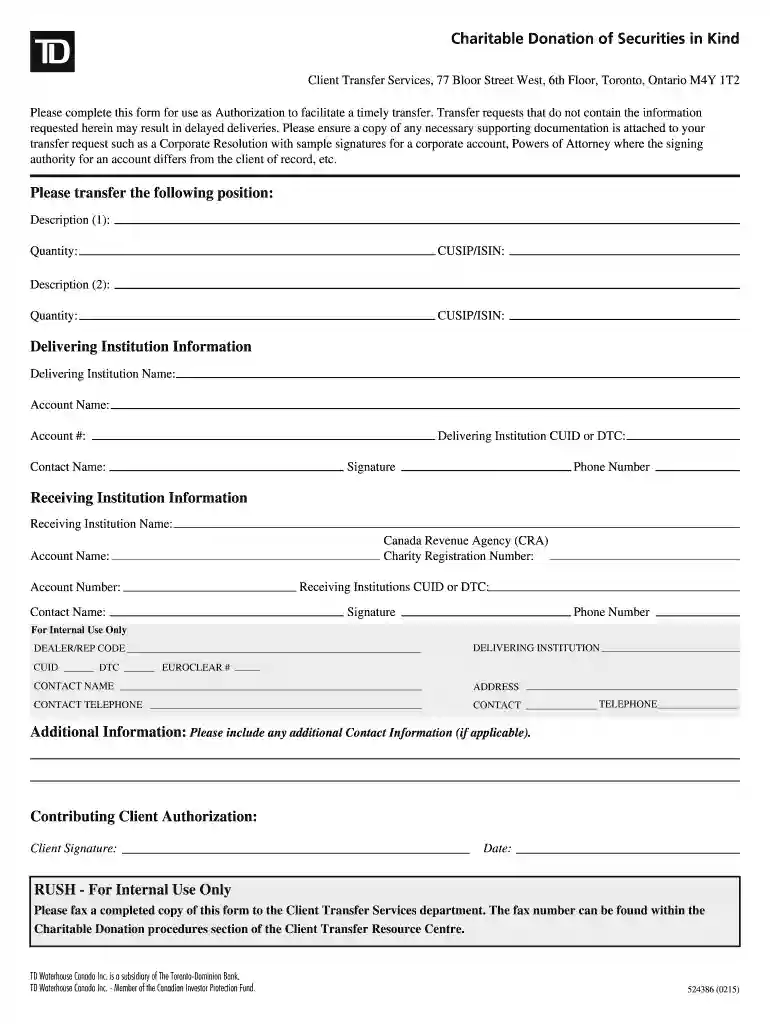
Begin by filling out the 'Please transfer the following position' section. Enter the description, quantity, and CUSIP/ISIN for each security you wish to donate.
Next, provide the Delivering Institution Information. Fill in the name, account name, account number, and CUID or DTC of the delivering institution.
Complete the Receiving Institution Information by entering details such as Canada Revenue Agency (CRA) charity registration number, account name, and contact information.
In the Contributing Client Authorization section, ensure you sign and date the form to authorize the transfer.
Attach any necessary supporting documentation as indicated in the instructions to avoid delays.
Start using our platform today for free to streamline your charitable donation process!
Fill out Charitable Donation of Securities in Kind Form - TD Bank online It's free
See more Charitable Donation of Securities in Kind Form - TD Bank versions
We've got more versions of the Charitable Donation of Securities in Kind Form - TD Bank form. Select the right Charitable Donation of Securities in Kind Form - TD Bank version from the list and start editing it straight away!
Td charitable donation of securities in kind formCharitable donation of securities in kind form td bank onlineTD Bank beneficiary form onlineTD Bank pod form pdfTD Form 800290TD Bank forms PDFTD gift letter formTd rrsp transfer form
Security and compliance
At DocHub, your data security is our priority. We follow HIPAA, SOC2, GDPR, and other standards, so you can work on your documents with confidence.
Cookie consent notice
This site uses cookies to enhance site navigation and personalize your experience.
By using this site you agree to our use of cookies as described in our Privacy Notice.
You can modify your selections by visiting our Cookie and Advertising Notice.