01. Edit your self appraisal teaching staff online
Type text, add images, blackout confidential details, add comments, highlights and more.
02. Sign it in a few clicks
Draw your signature, type it, upload its image, or use your mobile device as a signature pad.
03. Share your form with others
Send self appraisal teaching staff form via email, link, or fax. You can also download it, export it or print it out.
How to use or fill out self appraisal teaching staff form with our platform
Ease of Setup
DocHub User Ratings on G2
Ease of Use
DocHub User Ratings on G2
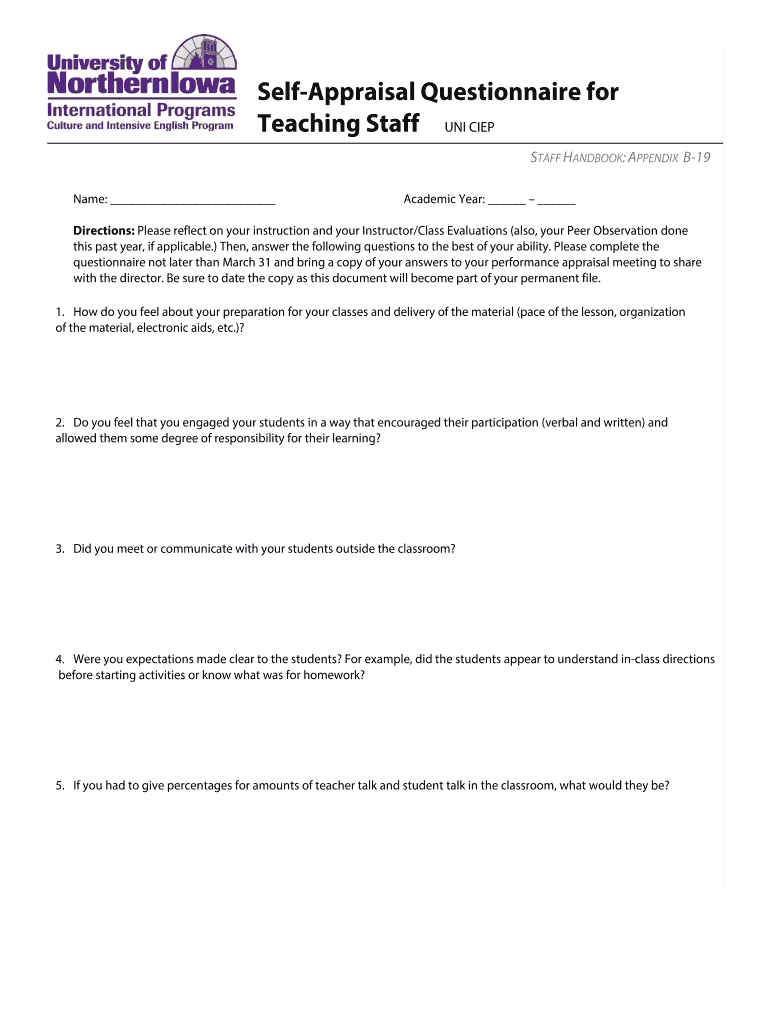
Click ‘Get Form’ to open the self-appraisal questionnaire in the editor.
Begin by entering your name and the academic year at the top of the form. This personalizes your submission and ensures proper documentation.
Reflect on your teaching experiences as prompted by each question. For instance, consider how well you prepared for classes and engaged students, then provide thoughtful responses in the designated areas.
For questions regarding student engagement and communication, be specific about your methods and interactions. Use bullet points if necessary to clearly outline your strategies.
When discussing professional development activities, list any relevant workshops or training sessions you attended, along with their impact on your teaching.
In the goal worksheet section, articulate SMART goals for the upcoming year. Ensure they align with broader objectives and specify any resources needed for achievement.
Once completed, review your answers for clarity and completeness before saving or printing a copy to bring to your performance appraisal meeting.
Start using our platform today to streamline your self-appraisal process effortlessly!
Fill out self appraisal teaching staff form online It's free
ACCOMPLISHMENTS/ACHIEVEMENTS Please list or discuss the most important accomplishments you achieved during the past performance appraisal period.Read more
Employee Evaluation - Evaluation Form - # - Merchant WiKi
An evaluation form is a structured document or digital template used to capture performance ratings, manager comments, employee self-assessment, goals,Read more
Cookie consent notice
This site uses cookies to enhance site navigation and personalize your experience.
By using this site you agree to our use of cookies as described in our Privacy Notice.
You can modify your selections by visiting our Cookie and Advertising Notice.