01. Edit your parent income verification form online
Type text, add images, blackout confidential details, add comments, highlights and more.
02. Sign it in a few clicks
Draw your signature, type it, upload its image, or use your mobile device as a signature pad.
03. Share your form with others
Send parent income form via email, link, or fax. You can also download it, export it or print it out.
How to use or fill out parent income form with our platform
Ease of Setup
DocHub User Ratings on G2
Ease of Use
DocHub User Ratings on G2
Click ‘Get Form’ to open the parent income form in the editor.
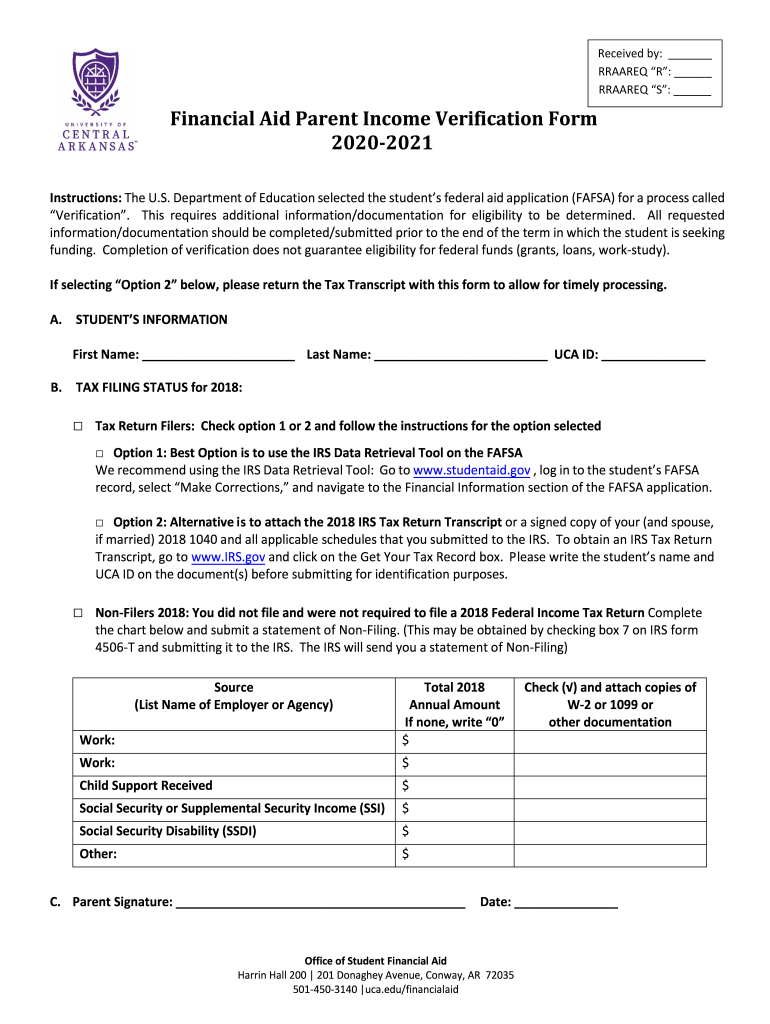
Begin by filling out Section A with the student’s information, including their first name, last name, and UCA ID. Ensure accuracy for proper identification.
In Section B, indicate the tax filing status for 2018. Choose between Tax Return Filers or Non-Filers. If you select Option 1, follow the instructions to use the IRS Data Retrieval Tool on FAFSA.
If you opt for Option 2, attach the required IRS Tax Return Transcript or signed copy of your 1040 forms. Remember to write the student’s name and UCA ID on these documents.
For Non-Filers, complete the chart provided by listing sources of income and total annual amounts for each source. If there are no earnings, indicate '0'.
Finally, sign and date Section C to confirm that all information is accurate. Attach any necessary documentation such as W-2s or 1099s before submission.
Start using our platform today to easily fill out your parent income form online for free!
Parent income form pdfDoes FAFSA require both parents income if divorcedFAFSA single parent incomeFAFSA parent income limitsWhos my FAFSA parentParent wizard FAFSADo both parents need to fill out FAFSAHow old do you have to be to file FAFSA without parents
Security and compliance
At DocHub, your data security is our priority. We follow HIPAA, SOC2, GDPR, and other standards, so you can work on your documents with confidence.
Jan 23, 2018 Enter the amount from line 3 of the Foreign Earned Income Tax. Worksheet as the parents taxable income, on line 6 of. Form 8615. Line 7 (NetRead more
Cookie consent notice
This site uses cookies to enhance site navigation and personalize your experience.
By using this site you agree to our use of cookies as described in our Privacy Notice.
You can modify your selections by visiting our Cookie and Advertising Notice.