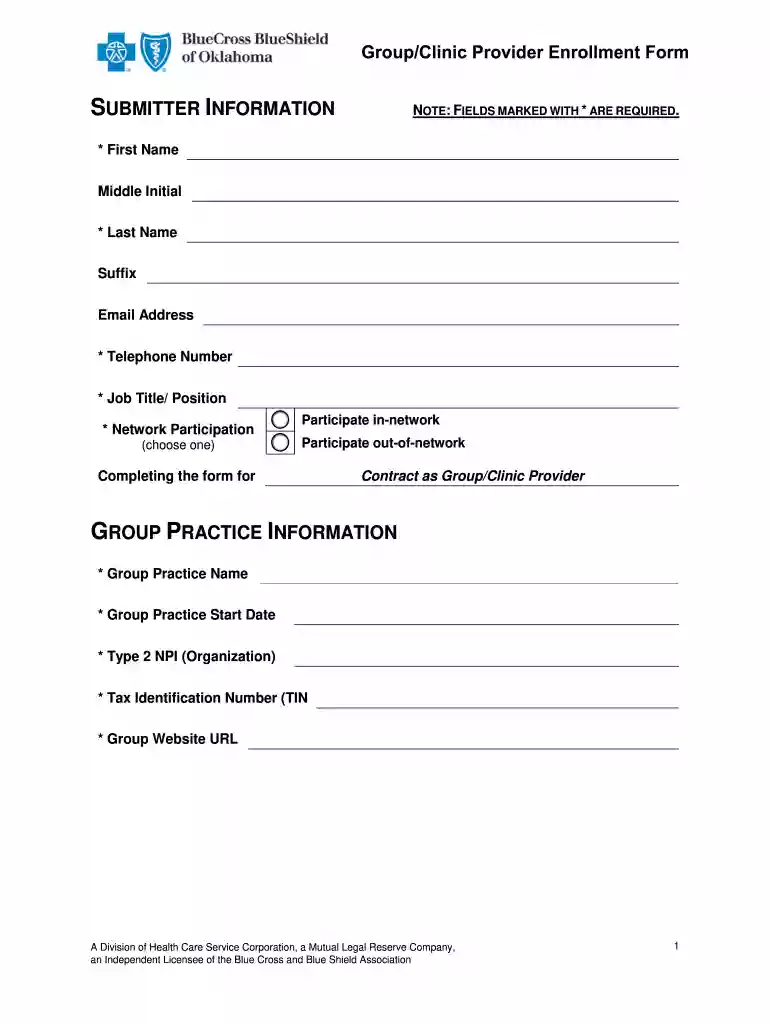
Clinic enrollment form 2026

Get Form
clinic form Preview on Page 1

Here's how it works

01. Edit your clinic form online
Type text, add images, blackout confidential details, add comments, highlights and more.

02. Sign it in a few clicks
Draw your signature, type it, upload its image, or use your mobile device as a signature pad.

03. Share your form with others
Send it via email, link, or fax. You can also download it, export it or print it out.

How to use or fill out clinic enrollment form with our platform

Form edit decoration
9.5
Ease of Setup
DocHub User Ratings on G2
9.0
Ease of Use
DocHub User Ratings on G2
  1. Click ‘Get Form’ to open the clinic enrollment form in the editor.
  2. Begin by filling out the Submitter Information section. Ensure you complete all required fields marked with an asterisk, including your First Name, Last Name, Email Address, and Telephone Number.
  3. Next, provide details about your Group Practice. Fill in the Group Practice Name, Start Date, Type 2 NPI, and Tax Identification Number (TIN). If applicable, include your Group Website URL.
  4. In the Additional Group Practitioner Information section, specify your Primary Group Type and Specialty. You may also add any additional group types if necessary.
  5. Complete the Office Physical Location section by entering the Location Name, Office Contact Name, and full address details. Indicate whether this is the primary location for your practice and if it accepts new patients.
  6. Fill out the Hours of Operation by selecting days and entering opening and closing times. Ensure compliance with ADA standards in the designated section.
  7. Answer questions regarding treating categories and associations as applicable to your practice.
  8. Finally, review all sections for accuracy before submitting. Use our platform’s features to save or share your completed form easily.

Start using our platform today to streamline your clinic enrollment process for free!

be ready to get more

Complete this form in 5 minutes or less

Get form

Got questions?

We have answers to the most popular questions from our customers. If you can't find an answer to your question, please contact us.
Contact us
What is the 855B? ❖ The CMS form used for the enrollment of Clinic/Group practices and Certain Other Suppliers. This form is also used to submit changes to your enrollment data.
CMS 40B. Form Title. Application for Enrollment in Medicare - Part B (Medical Insurance)
An enrollment form is a type of form used to collect information from individuals who are registering for a service, program, or event. The purpose of an enrollment form is to gather the necessary data to enroll the individual and ensure that they meet the eligibility criteria for the service or program.
Enrollment forms record whether employees have enrolled in or waived group benefits. For instance, if you have more than 50 full-time employees, you will need this data to complete IRS forms 1094 and 1095, which record health care coverage.
You will electronically sign the online application, so you will need to provide an email address. If you prefer, you can fax or mail the completed forms CMS-40B Application for Enrollment in Medicare Part B (Medical Insurance) and CMS-L564 Request for Employment Information to your local Social Security office.

Security and compliance

At DocHub, your data security is our priority. We follow HIPAA, SOC2, GDPR, and other standards, so you can work on your documents with confidence.

Learn more
ccpa2
pci-dss
gdpr-compliance
hipaa
soc-compliance
be ready to get more

Complete this form in 5 minutes or less

Get form

People also ask

This form is your application for Medicare Part B (Medical Insurance). You can use this form to sign up for Part B: During your Initial Enrollment Period (IEP) when youre first eligible for Medicare. During the General Enrollment Period (GEP) from January 1 through March 31 of each year.

Related links