Type text, add images, blackout confidential details, add comments, highlights and more.
02. Sign it in a few clicks
Draw your signature, type it, upload its image, or use your mobile device as a signature pad.
03. Share your form with others
Send orthotics intake form via email, link, or fax. You can also download it, export it or print it out.
How to Use or Fill Out Confidential Information with Our Platform
Ease of Setup
DocHub User Ratings on G2
Ease of Use
DocHub User Ratings on G2
Click ‘Get Form’ to open the Patient Intake Form in the editor.
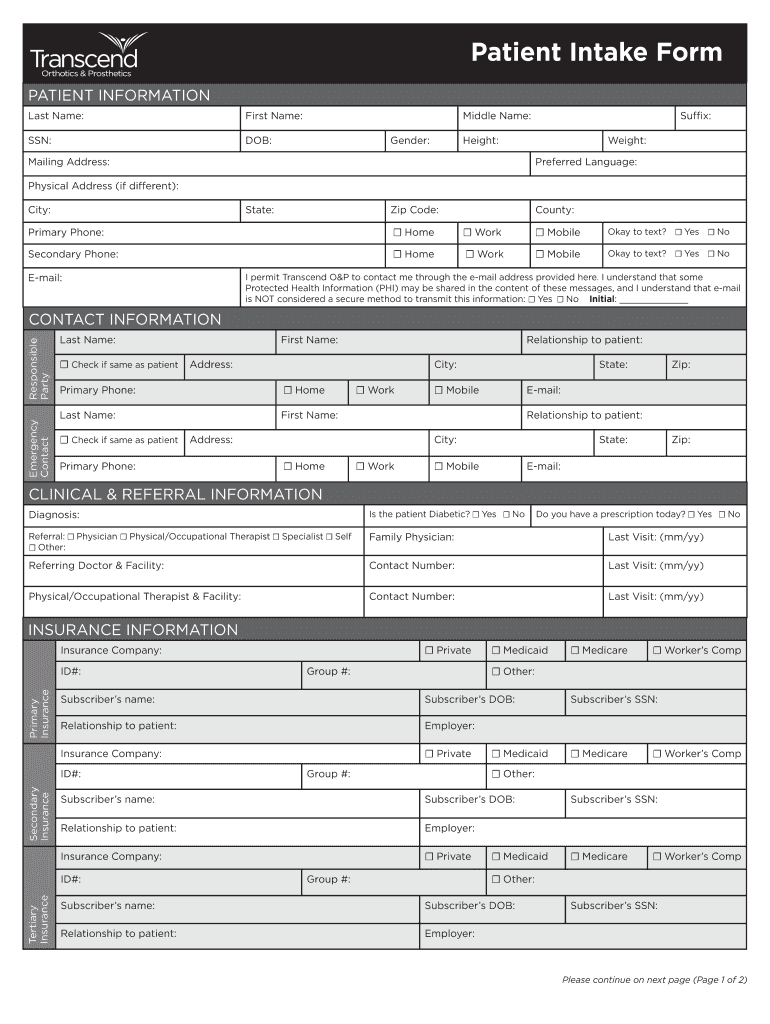
Begin by entering your personal details in the 'Patient Information' section. Fill in your last name, first name, and other required fields such as SSN and DOB. Ensure accuracy as this information is crucial for your medical records.
In the 'Contact Information' section, provide details for both primary and secondary contacts. If applicable, check the box indicating if the contact is the same as the patient.
Proceed to 'Clinical & Referral Information'. Here, indicate any diagnoses and referral sources. Be sure to answer questions regarding prescriptions and diabetes status accurately.
Complete the 'Insurance Information' section by providing details about your primary, secondary, and tertiary insurance plans. This includes ID numbers and subscriber information.
Finally, review all entries for completeness before signing at the bottom of the form. Your signature confirms that you understand and agree to the terms outlined.
Start filling out your Patient Intake Form today on our platform for free!
Fill out confidential information online It's free
Confidential information examplesConfidential information synonymLegal definition of confidential informationConfidential information TarkovExamples of confidential information in a companyConfidential information pdfConfidential Information definition clauseWhat is confidential information in the workplace
Security and compliance
At DocHub, your data security is our priority. We follow HIPAA, SOC2, GDPR, and other standards, so you can work on your documents with confidence.
Confidentiality, data protection and trade secrets
Use sensitive information in any way for your personal benefit. Disclose sensitive information to anyone outside of (^Company^). Copy sensitive documents andRead more
Guide on the disclosure of confidential information
The purpose of this guide is to inform a wide range of professionals working with children and families about confidentiality and privilege laws.Read more
Cookie consent notice
This site uses cookies to enhance site navigation and personalize your experience.
By using this site you agree to our use of cookies as described in our Privacy Notice.
You can modify your selections by visiting our Cookie and Advertising Notice.