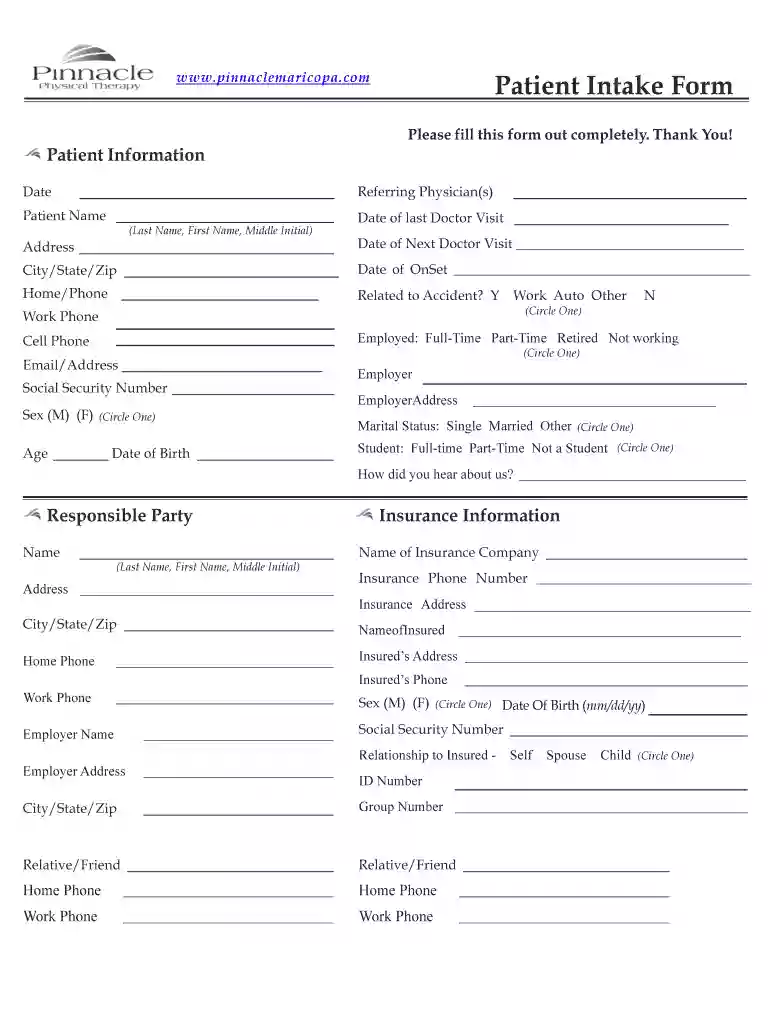
Patient pip intake form 2026

Get Form
patient pip intake form Preview on Page 1

Here's how it works

01. Edit your patient pip intake form online
Type text, add images, blackout confidential details, add comments, highlights and more.

02. Sign it in a few clicks
Draw your signature, type it, upload its image, or use your mobile device as a signature pad.

03. Share your form with others
Send submitted duplicate via email, link, or fax. You can also download it, export it or print it out.

How to use or fill out patient pip intake form with our platform

Form edit decoration
9.5
Ease of Setup
DocHub User Ratings on G2
9.0
Ease of Use
DocHub User Ratings on G2
  1. Click ‘Get Form’ to open the patient pip intake form in the editor.
  2. Begin by filling out the 'Patient Information' section. Enter your name, date of birth, and contact details including phone numbers and email address.
  3. Next, provide information about your referring physician and any recent doctor visits. Be sure to include dates and addresses where applicable.
  4. In the 'Insurance Information' section, input your insurance company details, including the policy number and insured's information.
  5. Proceed to the 'Patient History' section. Here, describe your pain history, including when it started and what activities exacerbate it.
  6. Indicate any medications you are currently taking and any allergies you may have in the designated fields.
  7. Finally, review all entered information for accuracy before submitting the form through our platform.

Start using our platform today to easily complete your patient pip intake form online for free!

be ready to get more

Complete this form in 5 minutes or less

Get form

Got questions?

We have answers to the most popular questions from our customers. If you can't find an answer to your question, please contact us.
Contact us

Yes, and it’s really straightforward! DocHub is a web-based PDF editor with advanced document processing capabilities that allow you promptly adjust your forms, complete empty fields and add new ones for others to fill out, and create eSignatures in several ways. Import your patient pip intake form, provide information as requested, and decide how you want to eSign your document - by typing your name, drawing your signature, uploading its picture, or utilizing a QR code.

If you edit your patient pip intake form with DocHub, you simply will not need to look for other software or solutions to sign it. An electronic signature is a component of DocHub’s comprehensive editing toolset, which allows you to apply changes in your form without jumping between websites. Just complete your form, double-check the correctness of the information and place your electronic signature at the end to make it submission-ready in minutes.

Personal injury protection (PIP) covers the healthcare costs related to injuries sustained in an automobile accident. PIP covers both the policyholders and their passengers, regardless of whether they have health insurance. PIP policies have a minimum coverage amount and a per-person maximum coverage limit.
Intake Form are made up of five parts: General, Appointment Type, Profile Fields, Questionnaires and Consents.
A patient intake form is designed to increase the efficiency of your practice and improve the patient experience. First, your forms need to ask for basic information, like their name, date of birth, age, sex, contact information, emergency contact, employer, and insurance information.

Security and compliance

At DocHub, your data security is our priority. We follow HIPAA, SOC2, GDPR, and other standards, so you can work on your documents with confidence.

Learn more
ccpa2
pci-dss
gdpr-compliance
hipaa
soc-compliance
be ready to get more

Complete this form in 5 minutes or less

Get form

People also ask

One of the most important documents your office will use is the physical therapy patient intake form. This document allows you to assess a patients medical history, past treatment, and current condition. Intake forms also uncover details about a patients insurance coverage and any prescription drugs they take.
This could include basic information such as name, date of birth, and contact details, as well as more complex information such as medical history, current symptoms, and insurance coverage. The patient intake process sets the tone for the entire healthcare experience.
That said, there are some good basics you should request on any intake form, such as: Their contact information (clients business name, address, point of contact, email address, phone number, etc.). Links to their website and any social media platforms. Their current marketing strategies.
What is a client intake form? Client intake forms are preliminary paperwork potential customers fill out to determine their fit for your services. These forms ask for information about the person or their business. If their answers line up with the services you provide, you can begin onboarding.
Include as much detail as possible. To qualify for PIP, you need to show that you need help with the activities on more than half the days in a year. Make it clear on the form how often you have problems with the activities. If your health changes, explain how often this happens and the effect it has on you.

Related links