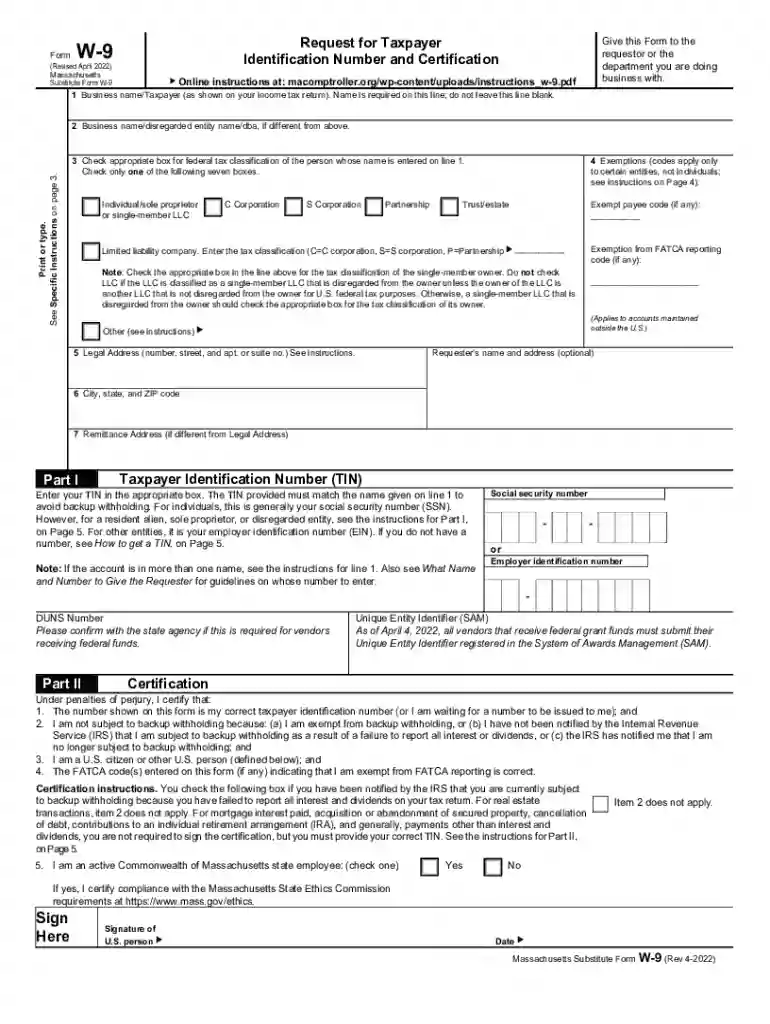
Form W9 request for taxpayer identification and certification 2026

Get Form
massachusetts substitute w 9 form Preview on Page 1

Here's how it works

01. Edit your massachusetts substitute w 9 form online
Type text, add images, blackout confidential details, add comments, highlights and more.

02. Sign it in a few clicks
Draw your signature, type it, upload its image, or use your mobile device as a signature pad.

03. Share your form with others
Send it via email, link, or fax. You can also download it, export it or print it out.

How to use or fill out Form W9 request for taxpayer identification and certification with DocHub

Form edit decoration
9.5
Ease of Setup
DocHub User Ratings on G2
9.0
Ease of Use
DocHub User Ratings on G2
  1. Click ‘Get Form’ to open it in the editor.
  2. Begin by entering your business name as shown on your income tax return in Line 1. Ensure this line is not left blank.
  3. If applicable, provide a different business name or DBA on Line 2.
  4. Select the appropriate federal tax classification by checking one box on Line 3. Options include Individual, C Corporation, S Corporation, Partnership, etc.
  5. Fill in your legal address on Lines 5 and 6, ensuring accuracy for correspondence.
  6. In Part I, enter your Taxpayer Identification Number (TIN) in the designated box. For individuals, this is typically your Social Security Number (SSN).
  7. Complete Part II by signing and dating the form to certify that the information provided is correct and that you are not subject to backup withholding.

Start using our platform today to fill out your Form W9 easily and for free!

See more Form W9 request for taxpayer identification and certification versions

We've got more versions of the Form W9 request for taxpayer identification and certification form. Select the right Form W9 request for taxpayer identification and certification version from the list and start editing it straight away!
Versions Form popularity Fillable & printable
2022 4.6 Satisfied (56 Votes)
2009 4.9 Satisfied (43 Votes)
2004 4.4 Satisfied (252 Votes)
be ready to get more

Complete this form in 5 minutes or less

Get form

Got questions?

We have answers to the most popular questions from our customers. If you can't find an answer to your question, please contact us.
Contact us
Use Form W-9 to provide your correct Taxpayer Identification Number (TIN) to the person who is required to file an information return with the IRS to report, for example: Income paid to you. Real estate transactions.
If you ever find yourself filling out a Form W-9, it generally means a business or person who is paying you money needs your U.S. Taxpayer Identification number (TIN)which can be the U.S. Social Security Number (SSN), Individual Taxpayer Identification Number (ITIN), or Federal Employer Identification Number (EIN/FEIN
You would use Form W-9 to request the TIN. If the person you pay is a foreign person, Form W-8 would be used instead of Form W-9. Second, if you receive more than $600 from someone else, the payor will use Form W-9 to request your TIN. If you dont have a TIN, you must request one.
Form W-9 Instructions Line 1 Name. This should be your full name. Line 2 Business name. Line 3 Federal tax classification. Line 4 Exemptions. Lines 5 6 Address, city, state, and ZIP code. Line 7 Account number(s) Part I Taxpayer Identification Number (TIN) Part II Certification.
Social Security Number, the most important aspect that stands out is that SSN is a type of TIN. The major difference between Social Security number (SSN) and any other tax id is that this number is primarily used by individuals for filing taxes while a tax ID number like EIN is used by businesses to file their taxes.

Security and compliance

At DocHub, your data security is our priority. We follow HIPAA, SOC2, GDPR, and other standards, so you can work on your documents with confidence.

Learn more
ccpa2
pci-dss
gdpr-compliance
hipaa
soc-compliance
be ready to get more

Complete this form in 5 minutes or less

Get form

People also ask

Go to .irs.gov/FormW9 for instructions and the latest information. Give form to the requester.

Related links