
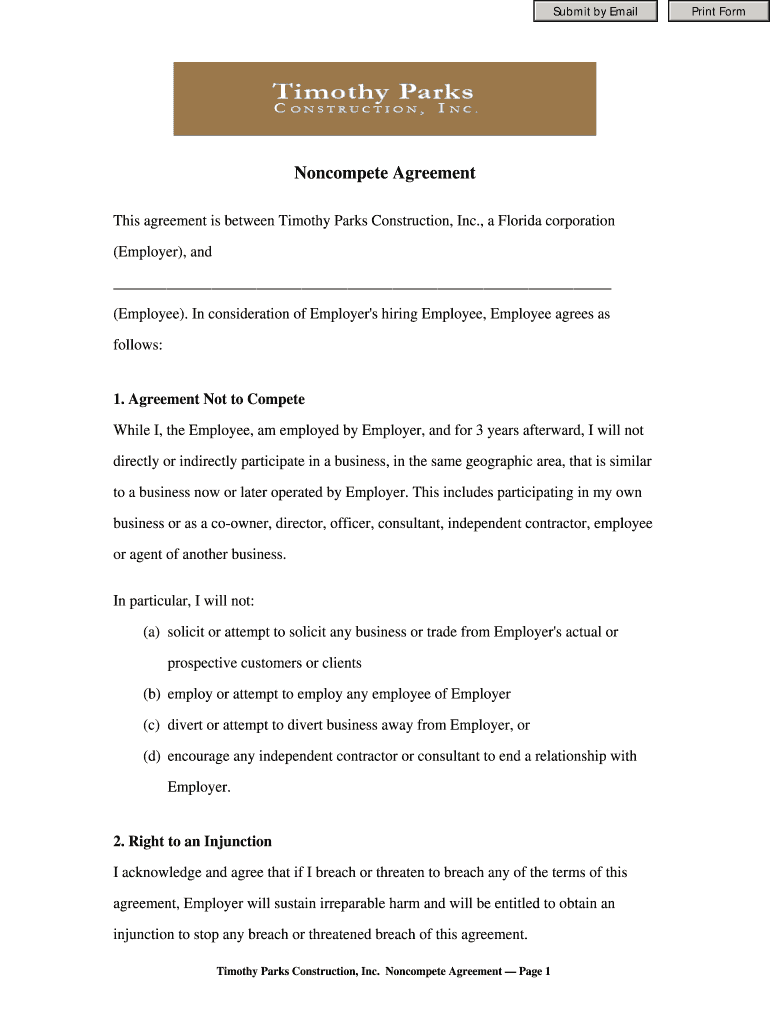





Noncompete Agreement 2026

Get Form
Noncompete Agreement Preview on Page 1

Here's how it works

01. Edit your form online
Type text, add images, blackout confidential details, add comments, highlights and more.
02. Sign it in a few clicks
Draw your signature, type it, upload its image, or use your mobile device as a signature pad.
03. Share your form with others
Send it via email, link, or fax. You can also download it, export it or print it out.

How to use or fill out Noncompete Agreement with our platform

Form edit decoration
9.5
Ease of Setup
DocHub User Ratings on G2
9.0
Ease of Use
DocHub User Ratings on G2
  1. Click ‘Get Form’ to open the Noncompete Agreement in the editor.
  2. Begin by filling in the Employee's name in the designated field. This identifies who is agreeing to the terms.
  3. Review Section 1, 'Agreement Not to Compete.' Ensure you understand the restrictions during and after employment. You may want to highlight key points for clarity.
  4. In Section 2, acknowledge your understanding of potential legal actions by signing next to the statement regarding injunctions.
  5. Complete Sections 3 through 11 by reading each clause carefully. Fill in any required information, such as your address and date at the end of the document.
  6. Finally, sign and date the agreement at the bottom. Make sure all parties involved have their signatures before finalizing.

Start using our platform today for free to streamline your Noncompete Agreement process!

be ready to get more

Complete this form in 5 minutes or less

Get form

Got questions?

We have answers to the most popular questions from our customers. If you can't find an answer to your question, please contact us.
Contact us

Yes, electronically drawing your signature is appropriate, but only if you utilize a tool that complies with industry regulations and policies. Consider DocHub, which guarantees eSignature validity under ESIGN and UETA requirements. All you need to eSign your Noncompete Agreement is an account with DocHub and an internet connection. After you open your file in our editor, click Sign and select the Draw option.

With DocHub, there are several convenient ways to edit your Noncompete Agreement online. You can drag and drop the form and edit it directly at the DocHub website or use our browser extension to fill out your form immediately. On top of that, you can edit your PDF on your phone, as DocHub is compatible with all the accessible mobile platforms.

Introduced in Senate (02/09/2023) To amend the Fair Labor Standards Act of 1938 to prevent employers from using non-compete agreements in employment contracts for certain non-exempt employees.
There are now five states that outright ban virtually all non-competes, i.e., California, Colorado, Minnesota, North Dakota and Oklahoma. These laws have just very narrow exceptions, such as for certain sales of businesses. The Non-Compete Landscape in 2023 Employment Law Worldview the-non Employment Law Worldview the-non
Noncompetes prohibit employees from working for corporate competitors or opening their own competing business within a geographic area for a certain period of time after they leave a company. States Outlaw Noncompete Agreements - SHRM Society for Human Resource Management states-restrict-noncompetes Society for Human Resource Management states-restrict-noncompetes

Security and compliance

At DocHub, your data security is our priority. We follow HIPAA, SOC2, GDPR, and other standards, so you can work on your documents with confidence.

Learn more
ccpa2
pci-dss
gdpr-compliance
hipaa
soc-compliance
be ready to get more

Complete this form in 5 minutes or less

Get form

People also ask

In 2023, California expanded its comprehensive ban on non-competes through two new laws that take effect on January 1, 2024. The first, AB 1076, goes beyond existing law that renders non-compete clauses void and unenforceable, now making them illegal as well. Year in Review: Laws Impacting Employee Non-Competition - Mintz mintz.com insights-center viewpoints 2 mintz.com insights-center viewpoints 2
In 2023, California expanded its comprehensive ban on non-competes through two new laws that take effect on January 1, 2024. The first, AB 1076, goes beyond existing law that renders non-compete clauses void and unenforceable, now making them illegal as well.
Non-competes ensure the employee will not use information learned during employment to start a business and compete with the employer once work is over. It also ensures the employer keeps its place in the market. Non-competes should be designed to protect the best interests of the employer and the employee. What Is a Non-Compete Agreement? Its Purpose and Investopedia Investing Agreements Investopedia Investing Agreements
Typically, the only way to fight a non-compete agreement is to go to court. If you are an employee (or former employee) who signed such an agreement, this means you must violate the agreement and wait to be sued. It may be that your former employer has never sued another employee to enforce the non-compete agreement.
Voiding a non-compete contract is possible in certain circumstances such as proving you never signed it or the contract is against the public interest.

Related links