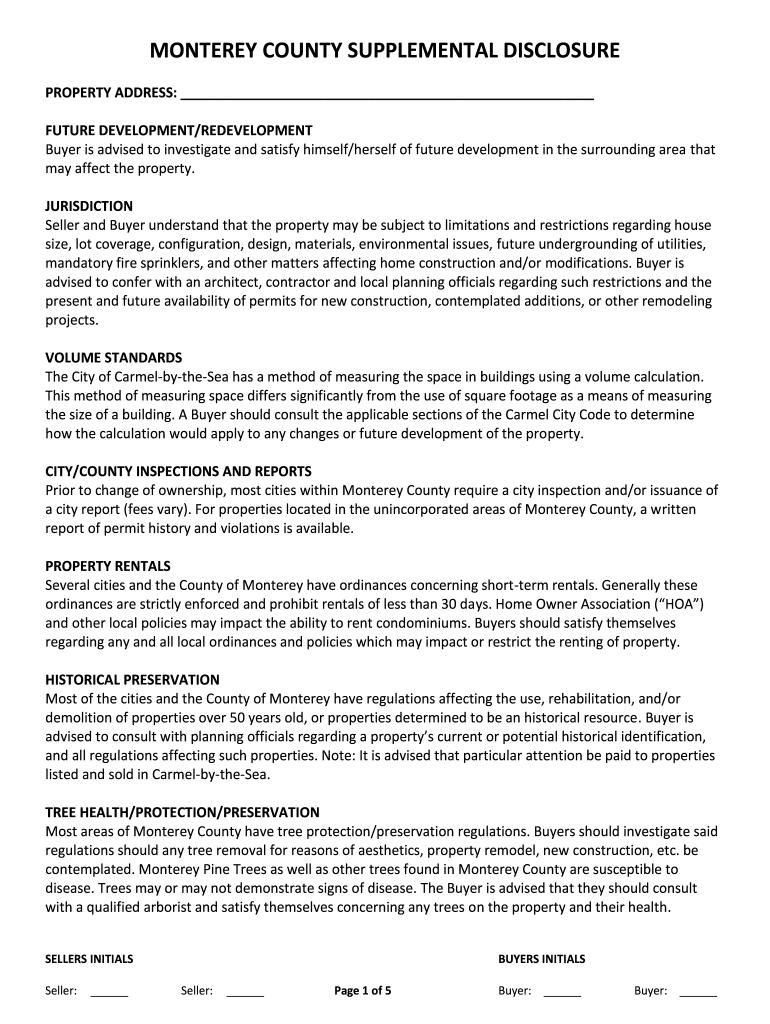
Monterey county supplemental disclosure 2026

Get Form
property inspection Preview on Page 1

Here's how it works

01. Edit your property inspection online
Type text, add images, blackout confidential details, add comments, highlights and more.
02. Sign it in a few clicks
Draw your signature, type it, upload its image, or use your mobile device as a signature pad.
03. Share your form with others
Send county supplemental disclosure via email, link, or fax. You can also download it, export it or print it out.

How to use or fill out Monterey County Supplemental Disclosure with our platform

Form edit decoration
9.5
Ease of Setup
DocHub User Ratings on G2
9.0
Ease of Use
DocHub User Ratings on G2
  1. Click ‘Get Form’ to open the Monterey County Supplemental Disclosure in the editor.
  2. Begin by entering the property address in the designated field at the top of the form. Ensure accuracy as this is crucial for all subsequent disclosures.
  3. Review each section carefully, starting with 'Future Development/Redevelopment.' Here, you should acknowledge potential developments that may affect your property.
  4. In the 'Jurisdiction' section, familiarize yourself with any limitations regarding construction and modifications. It’s advisable to consult local planning officials for clarity.
  5. Proceed to fill out sections on inspections, rentals, historical preservation, and tree health. Each section requires your acknowledgment of local regulations and potential impacts on your property.
  6. Finally, ensure both seller and buyer initial where indicated throughout the document to confirm understanding and agreement on all disclosures.

Start using our platform today to easily complete your Monterey County Supplemental Disclosure for free!

be ready to get more

Complete this form in 5 minutes or less

Get form

Got questions?

We have answers to the most popular questions from our customers. If you can't find an answer to your question, please contact us.
Contact us

Yes, you’ll find numerous applications for this on the web. However, if you need to eSign your year unit without installing extra software, DocHub is the optimum choice you can make. This powerful editor works on mobile devices just like on desktops. Open our editor in your preferred internet browser, register or sign in to your account, and start managing your forms.

If you want to edit your monterey county supplemental disclosure on the internet easily, it does not matter what internet browser you use. DocHub’s straightforward editing tools are accessible using any internet browser. Simply open the appropriate tab in the editor, add your document, and fill it out without stress.

Security and compliance

At DocHub, your data security is our priority. We follow HIPAA, SOC2, GDPR, and other standards, so you can work on your documents with confidence.

Learn more
ccpa2
pci-dss
gdpr-compliance
hipaa
soc-compliance