Type text, add images, blackout confidential details, add comments, highlights and more.
02. Sign it in a few clicks
Draw your signature, type it, upload its image, or use your mobile device as a signature pad.
03. Share your form with others
Send dor 4809 via email, link, or fax. You can also download it, export it or print it out.
How to use or fill out dor 4809 with our platform
Ease of Setup
DocHub User Ratings on G2
Ease of Use
DocHub User Ratings on G2
Click ‘Get Form’ to open the dor 4809 in the editor.
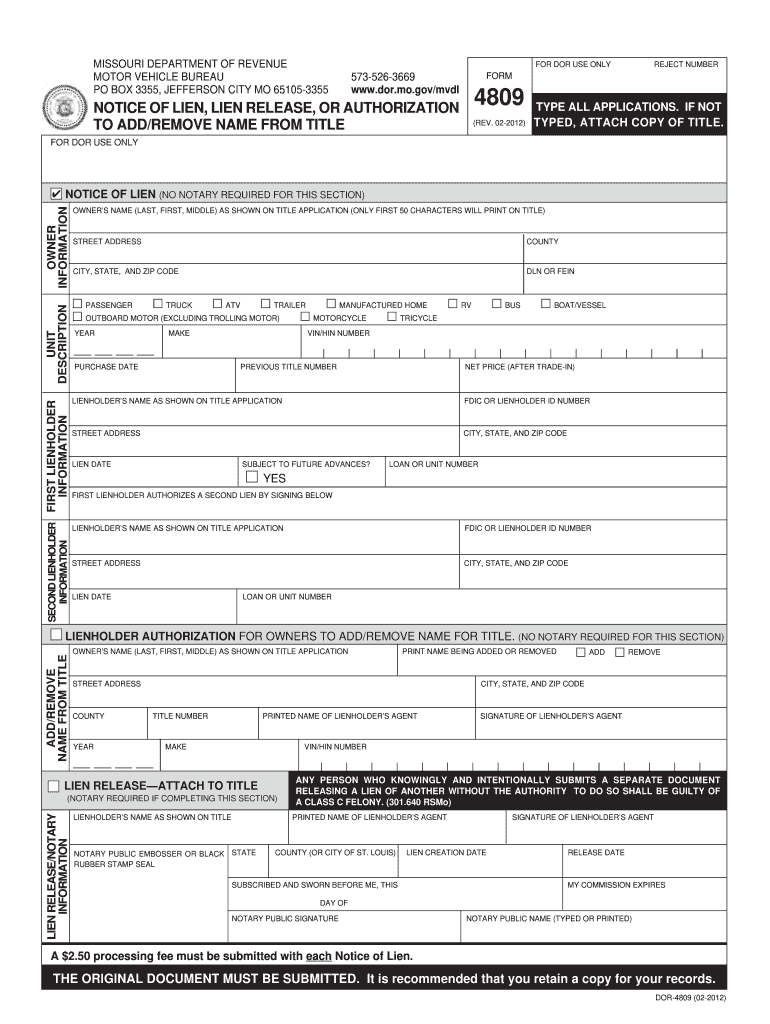
Begin by filling out the 'Owner Information' section. Enter the owner's name, street address, county, city, state, and zip code as shown on the title application.
In the 'Unit Description' section, specify the type of vehicle (e.g., passenger, truck) and provide details such as year, make, and VIN/HIN number.
Complete the 'First Lienholder Information' if applicable. Include their name, ID number, address, and lien date.
If there is a second lienholder, fill out their information in the designated section. Ensure that both lienholders authorize any changes by signing where required.
For lien release or adding/removing names from titles, follow similar steps ensuring all necessary signatures are included. Notarization may be required for certain sections.
Start using our platform today to simplify your form completion process for free!
Form 4809 - Notice of Lien, Lien Release, or Authorization to
The lienholder will receive a receipt as proof the lien has been perfected. Submit the completed Notice of Lien (Form 4809) to your local license office or byRead more
Web form 4809 is a DocHubd document that shows you have paid off a loan and are released from a lien on your vehicle. Web proof of financial responsibility.Read more
Cookie consent notice
This site uses cookies to enhance site navigation and personalize your experience.
By using this site you agree to our use of cookies as described in our Privacy Notice.
You can modify your selections by visiting our Cookie and Advertising Notice.