




Here's how it works



How to use or fill out tank facility statement with our platform

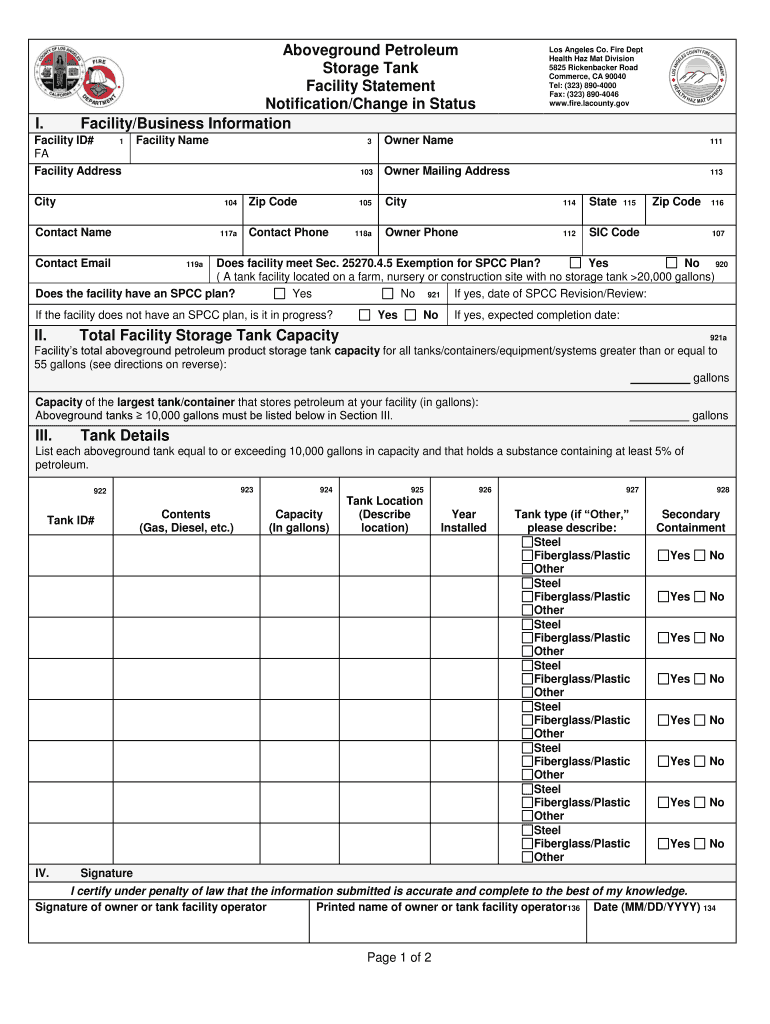
- Click ‘Get Form’ to open the tank facility statement in the editor.
- Begin by entering the Facility ID# and Facility Name. Ensure that the name reflects your business accurately.
- Fill in the Facility Address, including City and Zip Code. This information is crucial for geographic identification.
- Provide Owner Name and Owner Mailing Address, ensuring all contact details are accurate for correspondence.
- Indicate whether the facility meets Section 25270.4.5 Exemption for SPCC Plan by checking 'Yes' or 'No'.
- Complete the Total Facility Storage Tank Capacity section by calculating the total capacity of all tanks over 55 gallons.
- List each aboveground tank exceeding 10,000 gallons in capacity, detailing its contents, location, and year installed.
- Finally, certify your submission by signing and dating the form at the bottom before saving or exporting it.
Start filling out your tank facility statement online for free today!
It's free
Got questions?
What do I need to sign my tank facility statement fillable electronically?
Electronic document signing requires a software solution that complies with data protection and eSignature laws. DocHub is a perfect tool for that, because it fulfills all the aforementioned requirements. Whatever method you like to sign your tank facility statement fillable in DocHub, your electronic signature will be legally binding and court-admissible.
Do I need to install software to modify my aboveground petroleum?
When you edit your aboveground petroleum with DocHub, you merely need a steady internet connection and virtually any web browser installed on your device. No need to install any third-party applications or study tutorials. Simply open a tab with DocHub, drag and drop your file, and edit it immediately.
How far should a fuel tank be from a building?
What are the tank facilities?
How do tank farms work?
Security and compliance
At DocHub, your data security is our priority. We follow HIPAA, SOC2, GDPR, and other standards, so you can work on your documents with confidence.
Learn more


