D D M Y M Y D D M Y M Y D D M Y M Y - American Express 2026

Get Form
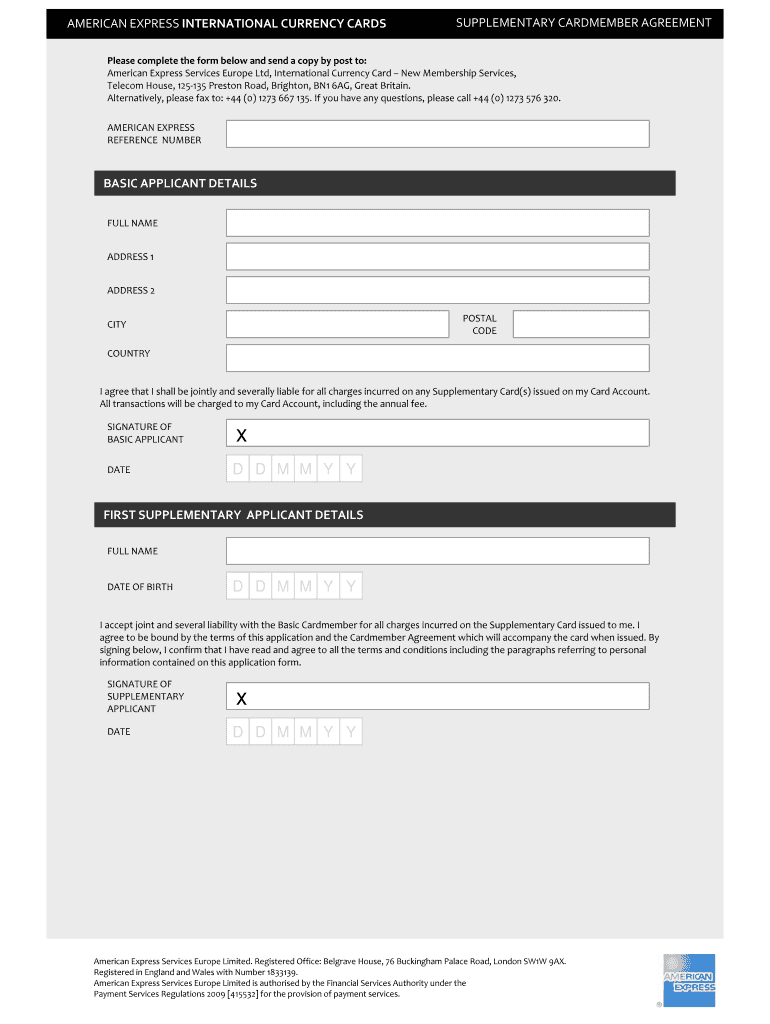
D D M Y M Y D D M Y M Y D D M Y M Y - American Express Preview on Page 1

Here's how it works

01. Edit your form online
Type text, add images, blackout confidential details, add comments, highlights and more.
02. Sign it in a few clicks
Draw your signature, type it, upload its image, or use your mobile device as a signature pad.
03. Share your form with others
Send it via email, link, or fax. You can also download it, export it or print it out.

How to use or fill out D D M Y M Y D D M Y M Y D D M Y M Y - American Express with our platform

Form edit decoration
9.5
Ease of Setup
DocHub User Ratings on G2
9.0
Ease of Use
DocHub User Ratings on G2
  1. Click ‘Get Form’ to open it in the editor.
  2. Begin by entering your Basic Applicant Details. Fill in your Full Name, Address (including Address 1, Address 2, Postal Code, City, and Country).
  3. Review the liability statement and provide your Signature along with the Date in the specified format (D D M M Y Y).
  4. For each Supplementary Applicant, repeat the process: enter their Full Name and Date of Birth. Ensure they understand their joint liability by reviewing the terms.
  5. Each Supplementary Applicant must sign and date the form as well. Make sure all signatures are completed before submission.
  6. Once all fields are filled out correctly, save your document and follow the instructions for sending it via post or fax.

Start using our platform today for free to streamline your document completion!

be ready to get more

Complete this form in 5 minutes or less

Get form

Got questions?

We have answers to the most popular questions from our customers. If you can't find an answer to your question, please contact us.
Contact us

Of course, it is possible with DocHub. This trustworthy and compliant online solution has a phone-based signing option. After you log in to your DocHub account and add your D D M Y M Y D D M Y M Y D D M Y M Y - American Express to our editor, complete all empty fields and utilize the Sign tool on the upper barf. Click on Create your signature and select Phone from the available choices. Here, you scan a QR code using your smartphone and draw your signature on your phone display, as you normally do when approving physical papers. If you access DocHub right from your mobile device, you can eSign your document by drawing your eSignature, adding its image, or simply with a typed name.

As a comprehensive document editing service, DocHub is available on mobile phones. Open DocHub in your choice of mobile browser and employ our smart mobile-friendly toolset to fill out your D D M Y M Y D D M Y M Y D D M Y M Y - American Express.

Charge Verification Sorry, we are unable to continue at this time due to a system issue. Please call 1-800-824-9289 for immediate assistance.
American Express is more expensive to process than other credit cards, which is why some businesses choose not to accept Amex cards. Its worth noting that the Amex OptBlue programfor merchants processing less than $1 million in Amex transactions annuallyoffers more competitive pricing for small businesses.
The American Express Company (American Express), based in New York, New York, has agreed to pay a $108.7 million civil penalty to resolve allegations that it violated the Financial Institutions Reform, Recovery and Enforcement Act of 1989 (FIRREA) by deceptively marketing credit card and wire transfer products and by

Security and compliance

At DocHub, your data security is our priority. We follow HIPAA, SOC2, GDPR, and other standards, so you can work on your documents with confidence.

Learn more
ccpa2
pci-dss
gdpr-compliance
hipaa
soc-compliance
be ready to get more

Complete this form in 5 minutes or less

Get form

People also ask

AmEx used to have some of the highest merchant fees in the industry. As a result, they were losing business to MC, Visa, and others because merchants stopped accepting their cards. It took years for AmEx to overcome this reputation.
Most businesses do not accept American Express (Amex) for several reasons: Higher Merchant Fees: American Express typically charges higher transaction fees compared to other credit card networks like Visa and MasterCard.
Some businesses choose not to accept American Express (Amex) cards for several reasons: Higher Transaction Fees: American Express typically charges higher merchant fees compared to other credit card networks like Visa and Mastercard. These fees can be a docHub burden for small businesses with tight profit margins.

Related links