




Here's how it works

01. Edit your dhb 3051 form online
Type text, add images, blackout confidential details, add comments, highlights and more.

02. Sign it in a few clicks
Draw your signature, type it, upload its image, or use your mobile device as a signature pad.

03. Share your form with others
Send dhb 3051 form 2024 via email, link, or fax. You can also download it, export it or print it out.
How to use or fill out nc form personal care with our platform

- Click ‘Get Form’ to open the nc form personal care in the editor.
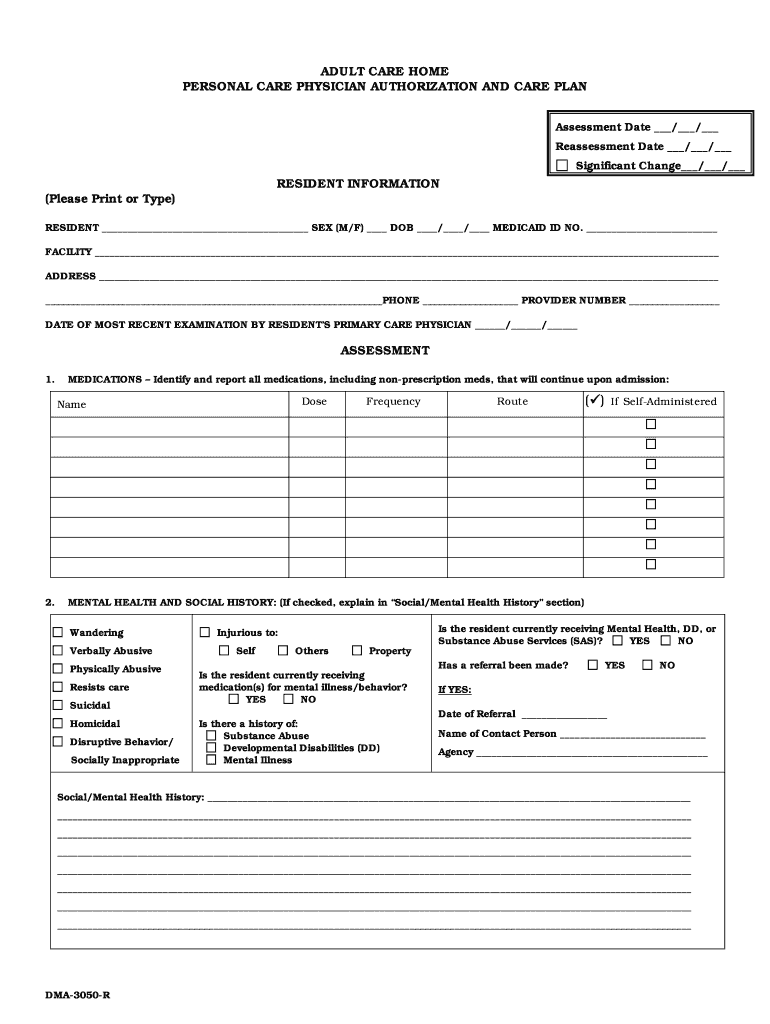
- Begin by filling out the Resident Information section. Ensure you include the resident's name, sex, date of birth, Medicaid ID number, and facility details accurately.
- In the Assessment section, list all medications under 'Medications' including non-prescription drugs. Indicate if they are self-administered by checking the appropriate box.
- Complete the Mental Health and Social History section by checking any applicable boxes and providing detailed information about the resident’s mental health status and history.
- Proceed to fill out sections on Ambulation/Locomotion, Upper Extremities, Nutrition, Respiration, Skin, Bowel, Bladder, Orientation, Memory, Vision, Hearing, and Speech/Communication Method. Check relevant boxes and provide additional details as necessary.
- Finally, complete the Care Plan section by detailing assistance needed for Activities of Daily Living (ADL) and coding each task based on performance levels. Ensure that both Assessor Certification and Physician Authorization sections are signed appropriately.
Start using our platform today to streamline your document editing experience for free!
Fill out nc form personal care online
It's free
It's free
Security and compliance
At DocHub, your data security is our priority. We follow HIPAA, SOC2, GDPR, and other standards, so you can work on your documents with confidence.
Learn more


