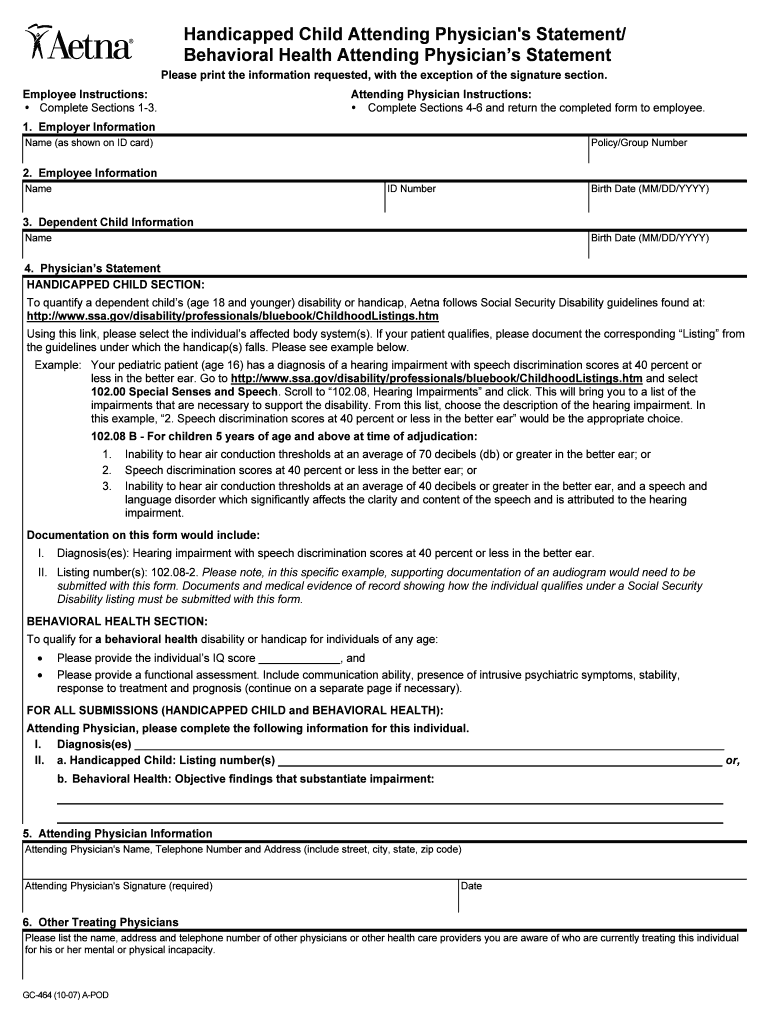
Handicapped Dependent Claim Form Attending Physician 2026

Get Form
Handicapped Dependent Claim Form Attending Physician Preview on Page 1

Here's how it works

01. Edit your form online
Type text, add images, blackout confidential details, add comments, highlights and more.
02. Sign it in a few clicks
Draw your signature, type it, upload its image, or use your mobile device as a signature pad.
03. Share your form with others
Send it via email, link, or fax. You can also download it, export it or print it out.

How to use or fill out Handicapped Dependent Claim Form Attending Physician with DocHub

Form edit decoration
9.5
Ease of Setup
DocHub User Ratings on G2
9.0
Ease of Use
DocHub User Ratings on G2
  1. Click ‘Get Form’ to open the Handicapped Dependent Claim Form Attending Physician in our editor.
  2. Begin by filling out Section 1, which requires employer information. Enter the name as shown on the ID card and the policy/group number.
  3. Proceed to Section 2 for employee information. Fill in your name, ID number, and birth date in the specified format (MM/DD/YYYY).
  4. In Section 3, provide details about the dependent child, including their name and birth date.
  5. For Sections 4-6, as an attending physician, document the necessary medical information regarding the child's disability or handicap. Use the provided guidelines to select appropriate listings from Social Security Disability criteria.
  6. Complete your contact details in Section 5, including your name, telephone number, and address. Don’t forget to sign and date the form.
  7. Finally, list any other treating physicians in Section 6 who are involved in the care of the individual.

Start using our platform today to easily complete your Handicapped Dependent Claim Form!

be ready to get more

Complete this form in 5 minutes or less

Get form

Got questions?

We have answers to the most popular questions from our customers. If you can't find an answer to your question, please contact us.
Contact us
This statement, filled out by your attending physician, provides the disability insurance company with vital data to assess the validity of your disability claim. The APS can influence the decision-making process significantly, making it crucial to ensure it is accurately and thoroughly completed.
Attendings are fully licensed doctors responsible for overseeing the care team, while residents are physicians in training working under their supervision. Residents play a crucial role in day-to-day patient care, acting as the first point of contact and communicating patient concerns to attending physicians promptly.
When you file your claim for short-term disability or long-term disability benefits, the insurance carrier will likely send you an Attending Physician Statement (APS) form for your treating medical provider to complete. While an APS looks simple, how an APS is completed can make or break your case.
An attending physician statement (APS) is a report by a physician, hospital, or medical facility that has treated, or is currently treating, a person seeking insurance. In traditional underwriting, an APS is one of the most frequently ordered additional sources of medical background information.
An Attending Physician Statement (APS) is a form questionnaire from the insurance company that your treating doctor must complete. The purpose of the APS is for your doctor to certify your inability to work.

Security and compliance

At DocHub, your data security is our priority. We follow HIPAA, SOC2, GDPR, and other standards, so you can work on your documents with confidence.

Learn more
ccpa2
pci-dss
gdpr-compliance
hipaa
soc-compliance
be ready to get more

Complete this form in 5 minutes or less

Get form

People also ask

A typical APS will contain history of any medical conditions and prognosis. The doctor will explain your medical history by noting how long you have been treated, what are the symptoms, and what other treatments you might have had.

Related links