




Here's how it works



How to use or fill out Patient Registration & Health History Form - Altoona Smiles

- Click ‘Get Form’ to open it in the editor.
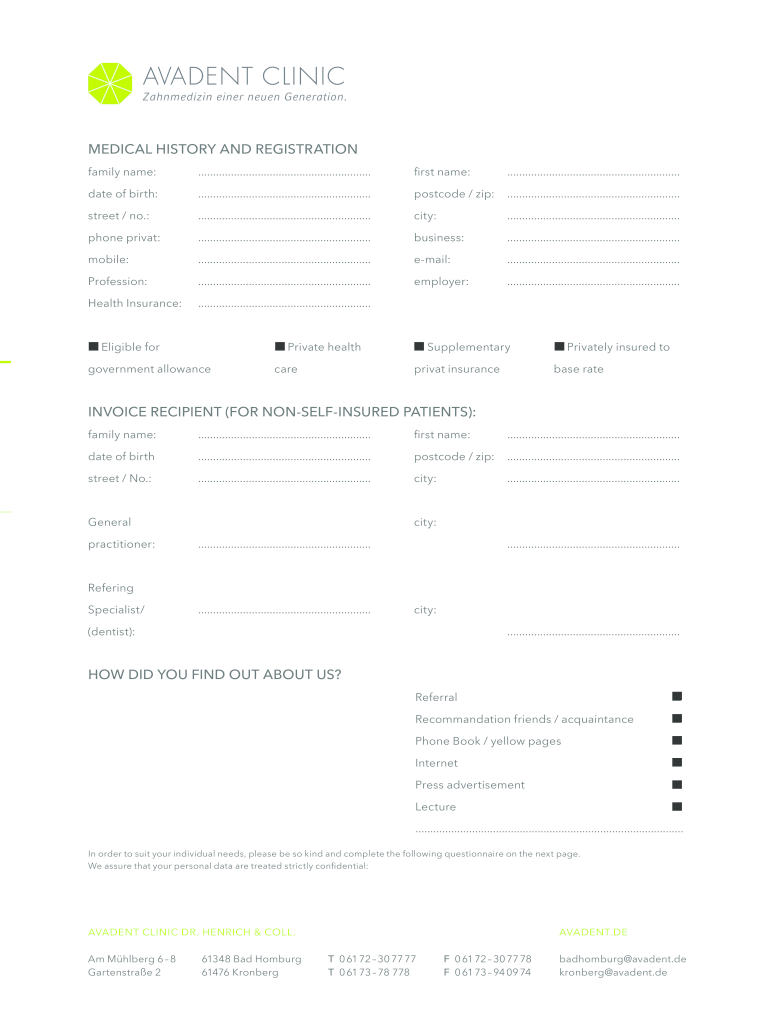
- Begin by entering your family name and first name in the designated fields. This ensures that your information is accurately recorded.
- Fill in your date of birth, postcode/zip, street address, city, and contact numbers including private, business, and mobile. This information is crucial for identification and communication.
- Provide your email address and profession along with employer details. This helps the clinic understand your background.
- Indicate your health insurance status by selecting the appropriate options provided. This section is important for billing purposes.
- Complete the invoice recipient section if applicable, ensuring all necessary details are filled out correctly.
- Answer the health questions thoroughly. Mark any relevant diseases or conditions you may have to assist in providing tailored care.
- Finally, review all entered information for accuracy before signing and dating the form at the bottom.
Start filling out your Patient Registration & Health History Form today for free using our platform!
It's free
Got questions?
What do I need to sign my Patient Registration & Health History Form - Altoona Smiles electronically?
Electronic document approval demands a software solution that works in compliance with data protection and eSignature standards. DocHub is an excellent tool for that, since it meets all the above mentioned requirements. Whatever method you prefer to sign your Patient Registration & Health History Form - Altoona Smiles in DocHub, your electronic signature will be legally binding and court-admissible.
How do you edit Patient Registration & Health History Form - Altoona Smiles on iOS?
You can easily edit fill out your Patient Registration & Health History Form - Altoona Smiles on any iOS device. Open an internet browser of your choice, go to the DocHub website, authorize or create a new account, upload your file for editing, and make your desired adjustments. Our service is mobile-friendly, so using its features on your phone will be a no-brainer, even on the first try.
What are the uses of patient registries?
What are examples of registries?
What are the different types of registries?
Security and compliance
At DocHub, your data security is our priority. We follow HIPAA, SOC2, GDPR, and other standards, so you can work on your documents with confidence.
Learn more




