




Here's how it works

01. Edit your notice to remedy breach rent arrears qld online
Type text, add images, blackout confidential details, add comments, highlights and more.

02. Sign it in a few clicks
Draw your signature, type it, upload its image, or use your mobile device as a signature pad.

03. Share your form with others
Send how many breach notices before eviction qld via email, link, or fax. You can also download it, export it or print it out.
How to use or fill out notice to remedy breach form 11 with our platform

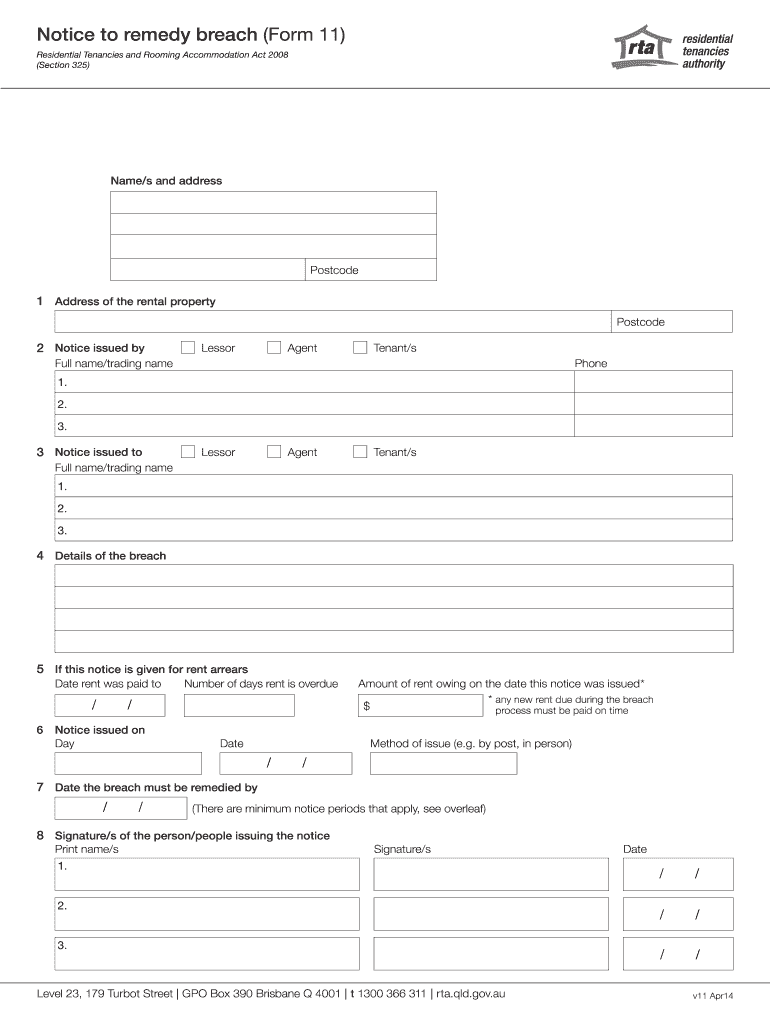
- Click ‘Get Form’ to open the notice to remedy breach form 11 in the editor.
- Begin by entering your name and address at the top of the form. Ensure that all details are accurate for effective communication.
- In section 1, provide the address of the rental property along with its postcode. This identifies where the breach has occurred.
- Section 2 requires you to indicate who is issuing the notice—whether it’s the lessor, agent, or tenant. Fill in their full name and contact number.
- In section 3, specify who is receiving the notice. Again, select from lessor, agent, or tenant and provide their full name.
- Detail the nature of the breach in section 4. Be clear and concise to avoid misunderstandings.
- If applicable, fill out section 5 regarding rent arrears by providing the date rent was last paid and how many days it is overdue.
- Complete sections 6 through 8 by indicating when this notice was issued, any amounts owed, and sign off with your name in section 8.
Start using our platform today for free to streamline your document editing and ensure a smooth process!
Fill out notice to remedy breach form 11 online
It's free
It's free
Security and compliance
At DocHub, your data security is our priority. We follow HIPAA, SOC2, GDPR, and other standards, so you can work on your documents with confidence.
Learn more




