
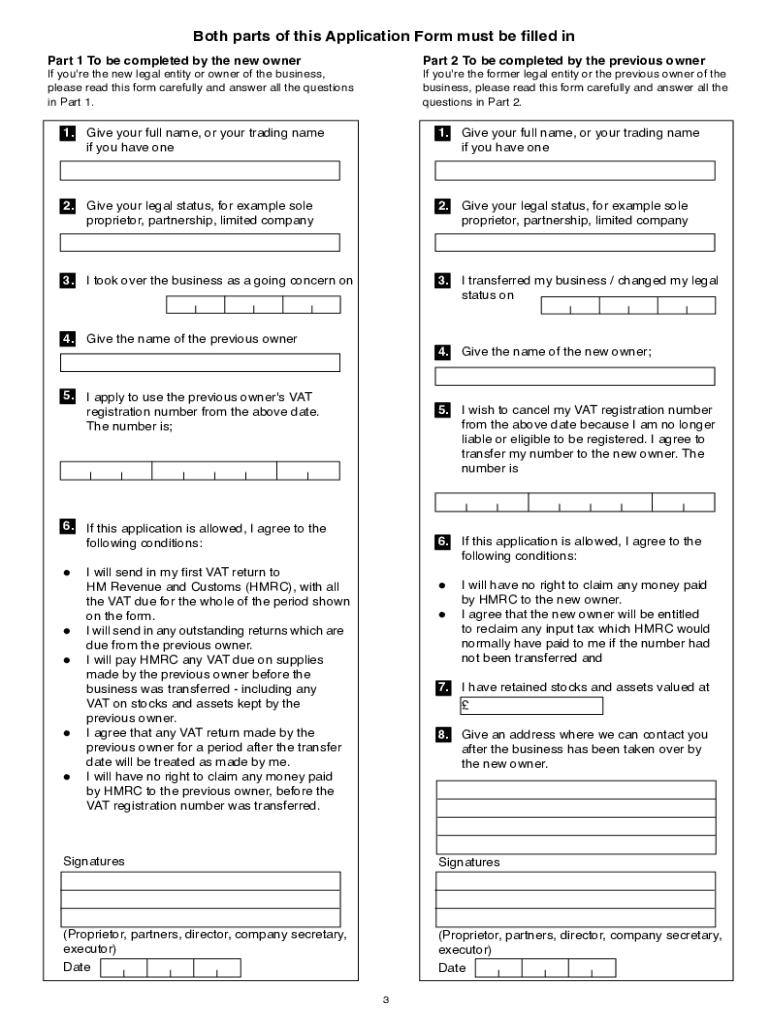





Hmrc vat 68 2026

Get Form
hmrc vat 68 form Preview on Page 1

Here's how it works

01. Edit your hmrc vat 68 form online
Type text, add images, blackout confidential details, add comments, highlights and more.
02. Sign it in a few clicks
Draw your signature, type it, upload its image, or use your mobile device as a signature pad.
03. Share your form with others
Send hmrc vat 68 via email, link, or fax. You can also download it, export it or print it out.

Definition and Meaning of HMRC VAT 68

The HMRC VAT 68 form is an official document used in the process of transferring a Value Added Tax (VAT) registration number from a previous business owner to a new one when a business is sold or transferred as a going concern. This transfer ensures continuity in tax reporting and compliance with HMRC regulations. When using this form, both parties involved in the transfer must meet specific criteria set by HMRC to validate the change in ownership officially.

How to Obtain the HMRC VAT 68

To acquire the HMRC VAT 68 form, you can visit the official HMRC website, where it is available for download. This ensures you access the most up-to-date version of the form. It is also possible to request a copy directly from HMRC, either by phone or by mailing a written request to the appropriate department. Be sure to provide accurate business details when requesting to avoid any delays in receiving the form.

Steps to Complete the HMRC VAT 68

  1. Identification Information: Begin by entering the details of both the original and new business owners, including names, addresses, and contact information.
  2. VAT Details: Provide the VAT registration number to be transferred along with details about the effective date of the business transfer.
  3. Agreement Confirmation: Both parties must sign the form to confirm their agreement to the terms of the transfer.
  4. Submit the Form: Once completed, submit the form to HMRC for processing. This can be done through mail or electronically, depending on HMRC's submission preferences.

Key Elements of the HMRC VAT 68

  • Ownership Details: Essential for identifying both the outgoing and incoming business owners.
  • VAT Registration Number: The central focus of the form, indicating which number is to be transferred.
  • Effective Date: The official date when the new ownership is acknowledged to take place.
  • Signatures: Signatures from both parties involved in the transfer to validate the agreement.

Eligibility Criteria for Using the HMRC VAT 68

Eligibility to use the HMRC VAT 68 form hinges on certain business-specific conditions, such as the business being transferred as a going concern. This means the business must remain operational and meet HMRC's guidelines for such transfers. Both parties must possess a valid VAT registration, and the appropriate transfer agreement should be in place.


decoration image ratings of Dochub

Legal Use of the HMRC VAT 68

The legal use of this form requires adherence to HMRC's guidelines, ensuring that all declarations, agreements, and submissions comply with the regulatory framework in place. Misuse or incorrect completion can lead to penalties or the rejection of the transfer application by HMRC. Thus, familiarity with VAT laws and accurate form completion is critical.

Required Documents for HMRC VAT 68 Submission

  • Business Agreements: Relevant documentation showing legal transfer agreements between the old and new owner.
  • Identification Proofs: Valid identification documents for both parties involved.
  • VAT Registration Certificates: Proof of current VAT registration for both parties.

Ensure all supporting documents are accurate and complete to facilitate a smooth verification process by HMRC.

Penalties for Non-Compliance

Failure to comply with the requirements for submitting and completing the HMRC VAT 68 form may result in substantial penalties, including fines and potential audits by HMRC. It's crucial for businesses to adhere to all procedural and regulatory guidelines to avoid such repercussions. In addition, an invalid transfer can disrupt continuity in VAT processing, impacting the financial operations of the business.

These sections provide an in-depth understanding of the HMRC VAT 68 form, covering its definitions, acquisition methods, completion steps, and legal frameworks, ensuring comprehensive guidance for users involved in such business transfers.

See more hmrc vat 68 versions

We've got more versions of the hmrc vat 68 form. Select the right hmrc vat 68 version from the list and start editing it straight away!
Versions Form popularity Fillable & printable
2021 4.8 Satisfied (163 Votes)
2010 4.4 Satisfied (52 Votes)
be ready to get more

Complete this form in 5 minutes or less

Get form

Got questions?

We have answers to the most popular questions from our customers. If you can't find an answer to your question, please contact us.
Contact us

Electronic document approval demands a software solution that complies with data protection and eSignature regulations. DocHub is a great tool for that, as it meets all the previously mentioned requirements. Whatever method you like to sign your hmrc vat 68 in DocHub, your electronic signature will be legally binding and court-admissible.

You can find the latest and most relevant version of the hmrc vat 68 in our DocHub forms library. Search it by categories or use the search field to find the exact template that fits your case. You can open this form for editing once you find it.

If youre shipping goods to a country in the European Union (EU), youll need an EU VAT number to clear customs.VAT vs. EIN. #Value-Added Tax Identification Number (VATIN)Employer Identification Number (EIN)1.Applies to all EU countries and other nations that use VATApplies to US businesses only3 more rows
If you have any queries about your client lists, please contact the VAT Online Services Helpdesk on 0300 200 3701 for assistance.

Security and compliance

At DocHub, your data security is our priority. We follow HIPAA, SOC2, GDPR, and other standards, so you can work on your documents with confidence.

Learn more
ccpa2
pci-dss
gdpr-compliance
hipaa
soc-compliance
be ready to get more

Complete this form in 5 minutes or less

Get form

People also ask

VAT (Value Added Tax) is a tax added to most products and services sold by VAT -registered businesses. Businesses have to register for VAT if their VAT taxable turnover is more than 85,000. They can also choose to register if their turnover is less than 85,000.
You can usually register for VAT online. You need a Government Gateway user ID and password to register for VAT . If you do not already have a user ID you can create one when you sign in for the first time. Registering for VAT also creates a VAT online account.
Where Can I Find a VAT Number? A business can find their own number on the VAT registration certificate that they will have been issued by HMRC. If youre looking for the VAT code of another business, it should appear on any custom invoice that has been supplied to you.
You must get help to apply for a VAT number. An application must be submitted to the local tax authorities using the right registration forms. This application should include documentation about your business, evidence of the authority of the legal representative, and detailed information about your planned activities.
Calling the HMRC VAT helpline HMRC has a complete database of VAT-registered businesses, so if youre in any doubt about a registration number you should call their VAT helpline on 0300 200 3700.

Related links

