




Here's how it works

01. Edit your tangible personal property schedule online
Type text, add images, blackout confidential details, add comments, highlights and more.

02. Sign it in a few clicks
Draw your signature, type it, upload its image, or use your mobile device as a signature pad.

03. Share your form with others
Send personal property tax via email, link, or fax. You can also download it, export it or print it out.
How to use or fill out Tangible Personal Property Tax with our platform

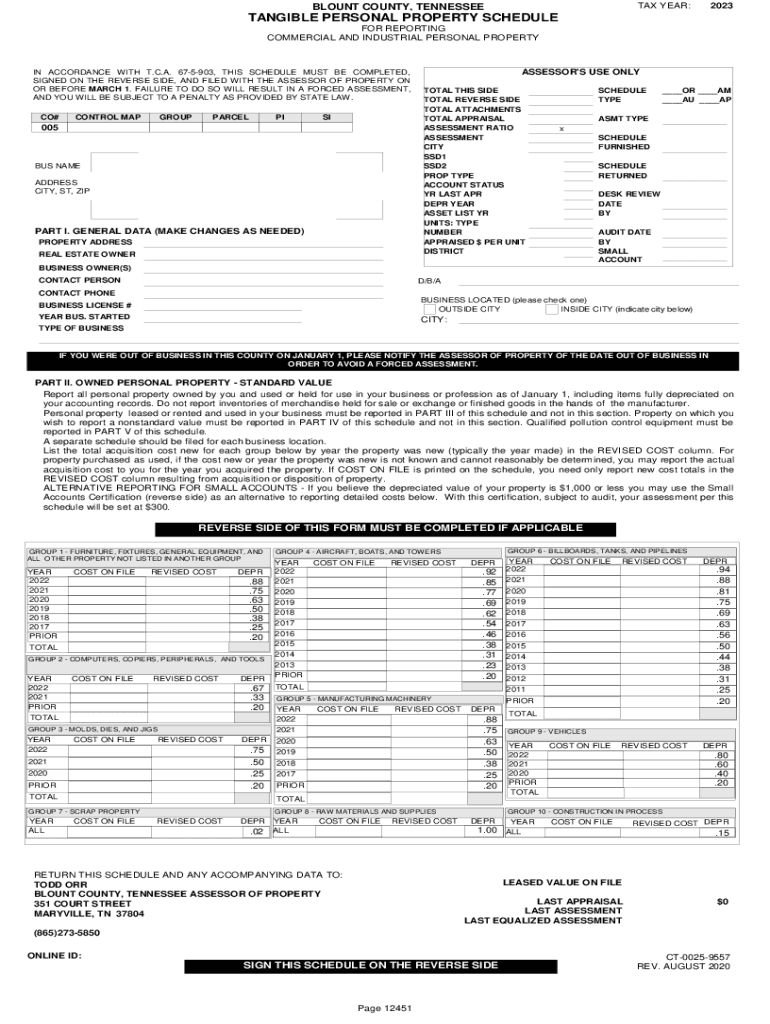
- Click ‘Get Form’ to open the Tangible Personal Property Tax schedule in the editor.
- Begin by filling out the 'General Data' section. Enter your business name, address, and contact information accurately. Ensure that you provide the correct property address and real estate owner details.
- Proceed to 'Part II: Owned Personal Property - Standard Value'. List all personal property owned as of January 1. Include acquisition costs and depreciation values for each item. If applicable, utilize the 'Small Accounts Certification' option for properties valued at $1,000 or less.
- In 'Part III: Leased Personal Property', report any items leased for your business. Fill in details such as item description, make and model number, lease term, and lessor's information.
- Complete 'Part IV: Owned Personal Property - Nonstandard Value' if you wish to report a different value than standard depreciated cost. Attach supporting evidence if necessary.
- Finally, review all sections for accuracy before signing on the reverse side of the form. Once completed, submit it to the Assessor of Property by the deadline.
Start using our platform today to streamline your Tangible Personal Property Tax filing process for free!
Fill out Tangible Personal Property Tax online
It's free
It's free
See more Tangible Personal Property Tax versions
We've got more versions of the Tangible Personal Property Tax form. Select the right Tangible Personal Property Tax version from the list and start editing it straight away!
Security and compliance
At DocHub, your data security is our priority. We follow HIPAA, SOC2, GDPR, and other standards, so you can work on your documents with confidence.
Learn more




