Certificate of origin form 2026

Get Form
of certificate origin form Preview on Page 1

Here's how it works

01. Edit your of certificate origin form online
Type text, add images, blackout confidential details, add comments, highlights and more.

02. Sign it in a few clicks
Draw your signature, type it, upload its image, or use your mobile device as a signature pad.

03. Share your form with others
Send certificate of origin form free via email, link, or fax. You can also download it, export it or print it out.

How to use or fill out certificate of origin form with DocHub

Form edit decoration
9.5
Ease of Setup
DocHub User Ratings on G2
9.0
Ease of Use
DocHub User Ratings on G2
  1. Click ‘Get Form’ to open the certificate of origin form in our editor.
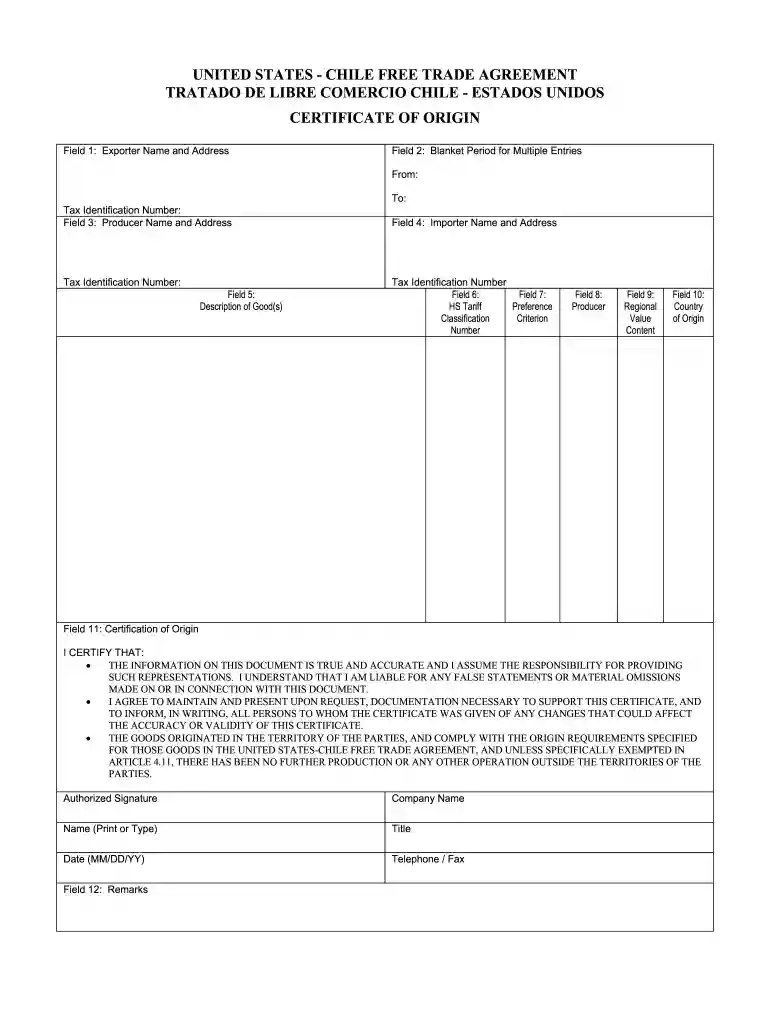
  2. Begin by filling out Field 1 with the complete name, address, and tax identification number of the exporter. Ensure all details are accurate for compliance.
  3. In Field 2, specify the blanket period for multiple entries by entering the start and end dates. This is crucial if you are covering multiple shipments.
  4. Proceed to Field 3 to enter the producer's name, address, and tax identification number. If applicable, indicate 'SAME' if the producer is also the exporter.
  5. Field 4 requires you to input the importer's details similarly as done in previous fields.
  6. In Field 5, provide a detailed description of each good being exported. This should align with invoice descriptions for clarity.
  7. Complete Fields 6 through 10 by identifying HS classification numbers, preference criteria, regional value content methods, and country of origin respectively.
  8. Finally, in Field 11, certify your information by signing and dating it. Include your name, title, and company for validation.

Start using our platform today to easily fill out your certificate of origin form online for free!

be ready to get more

Complete this form in 5 minutes or less

Get form

Got questions?

We have answers to the most popular questions from our customers. If you can't find an answer to your question, please contact us.
Contact us
A Certificate of Origin or Declaration of Origin (often abbreviated to C/O, CO or DOO) is a document widely used in international trade transactions which attests that the product listed therein has met certain criteria to be considered as originating in a particular country.
Apply: Once registered, the exporter can log in to the chambers online system and submit an application for a CO. This involves providing detailed information about the shipment, including the exporters and importers details, a description of the goods, the country of origin, and other relevant information.
Certificates of Origin certifies that goods in a shipment are wholly obtained, produced, manufactured or processed in a particular country.
In the United States, a Certificate of Origin is typically issued by local Chambers of Commerce. Exporters can also use accredited service providers authorized to issue valid certificates.

Security and compliance

At DocHub, your data security is our priority. We follow HIPAA, SOC2, GDPR, and other standards, so you can work on your documents with confidence.
Learn more
ccpa2
pci-dss
gdpr-compliance
hipaa
soc-compliance