Type text, add images, blackout confidential details, add comments, highlights and more.
02. Sign it in a few clicks
Draw your signature, type it, upload its image, or use your mobile device as a signature pad.
03. Share your form with others
Send sipc 6 form via email, link, or fax. You can also download it, export it or print it out.
How to use or fill out SIPC 6 form with our platform
Ease of Setup
DocHub User Ratings on G2
Ease of Use
DocHub User Ratings on G2
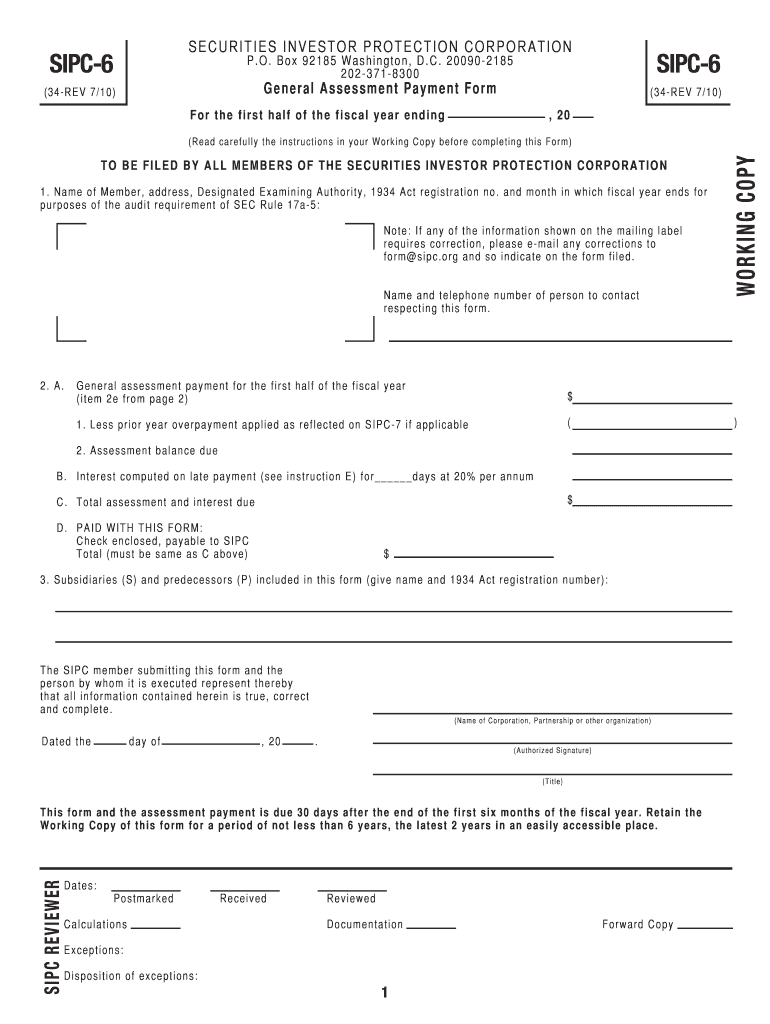
Click ‘Get Form’ to open the SIPC 6 form in the editor.
Begin by filling in your name, address, and designated examining authority in the first section. Ensure that all details match your official records.
In section 2A, enter the general assessment payment for the first half of the fiscal year. If applicable, subtract any prior year overpayment as indicated.
Calculate any interest due on late payments in section 2B and add this to your total assessment balance in section 2C.
List any subsidiaries or predecessors included in this form under section 3, providing their names and registration numbers.
Finally, sign and date the form at the bottom. Make sure to retain a copy for your records as instructed.
Start using our platform today to fill out your SIPC 6 form online for free!
17 CFR 300.600 - Rules relating to supplemental report on
A broker or dealer must file with SIPC, within 60 days after the end of its fiscal year, a supplemental report on the status of its membership in SIPC.Read more
Dec 13, 2025 The 4 pillars of JOIFF aiming to support its Membership in preventing and/or mitigating hazardous incidents in Industry are: Shared Learning.Read more
Cookie consent notice
This site uses cookies to enhance site navigation and personalize your experience.
By using this site you agree to our use of cookies as described in our Privacy Notice.
You can modify your selections by visiting our Cookie and Advertising Notice.