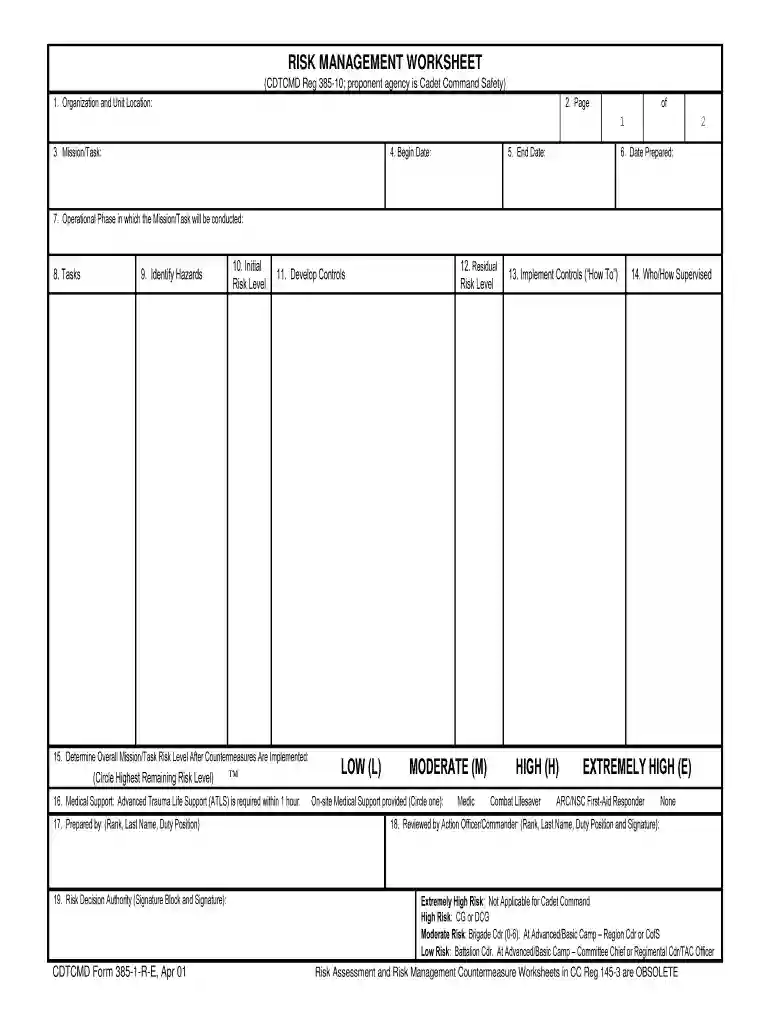
army draw form Preview on Page 1

Army form risk 2026

Here's how it works

  • 01. Edit your army draw form online

    Type text, add images, blackout confidential details, add comments, highlights and more.

  • 02. Sign it in a few clicks

    Draw your signature, type it, upload its image, or use your mobile device as a signature pad.

  • 03. Share your form with others

    Send army draw via email, link, or fax. You can also download it, export it or print it out.

How to use or fill out army form risk with our platform

Form edit decoration
9.5
Ease of Setup
DocHub User Ratings on G2
9.0
Ease of Use
DocHub User Ratings on G2
  1. Click ‘Get Form’ to open the army form risk in the editor.
  2. Begin by filling in the 'Organization and Unit Location' at the top of the form. This identifies your unit and its location.
  3. Next, enter the 'Mission/Task' along with the 'Begin Date' and 'End Date' to outline the timeframe for your operation.
  4. In section 7, specify the 'Operational Phase' during which your mission will take place, ensuring clarity on timing.
  5. Identify potential hazards in section 9. Use insights from METT-T factors to assess risks accurately.
  6. Determine the 'Initial Risk Level' for each hazard using the provided matrix, then develop controls in section 11 to mitigate these risks.
  7. Implement controls as described in section 13, detailing how each control will be communicated and enforced.
  8. Finally, review all sections for accuracy before signing off in the 'Risk Decision Authority' block at the end of the form.

Start using our platform today to streamline your document editing and ensure efficient completion of your army form risk!

See more army draw form versions

We've got more versions of the army draw form form. Select the right army draw form version from the list and start editing it straight away!

VersionsForm popularityFillable & printable
20014.9 Satisfied (512 Votes)

be ready to get more

Complete this form in 5 minutes or less

Security and compliance

At DocHub, your data security is our priority. We follow HIPAA, SOC2, GDPR, and other standards, so you can work on your documents with confidence.

draw army pdf

DD Form 2977, Deliberate Risk Assessment Worksheet

Windows is either a registered trademark or a trademark of Microsoft Corporation in the United States and/or other countries. Mac is a trademark.Read more

Learn more
USASOC HPW

Sep 22, 2023 The US Military (along with the broader US culture) faces elevated risk in the form of suicide, addiction and mental illness and degradedRead more

Learn more
Standard Form 86 - Questionnaire for National Security

This form may become a permanent document that may be used as the basis for future investigations, eligibility determinations for access to classified.Read more

Learn more
If you believe that this page should be taken down, please follow our DMCA take down process here