Myspendingaccount 2026

Get Form
myspendingaccount Preview on Page 1

Here's how it works

01. Edit your myspendingaccount online
Type text, add images, blackout confidential details, add comments, highlights and more.

02. Sign it in a few clicks
Draw your signature, type it, upload its image, or use your mobile device as a signature pad.

03. Share your form with others
Send sf mra wageworks via email, link, or fax. You can also download it, export it or print it out.

How to use or fill out myspendingaccount with our platform

Form edit decoration
9.5
Ease of Setup
DocHub User Ratings on G2
9.0
Ease of Use
DocHub User Ratings on G2
  1. Click ‘Get Form’ to open the myspendingaccount reimbursement form in the editor.
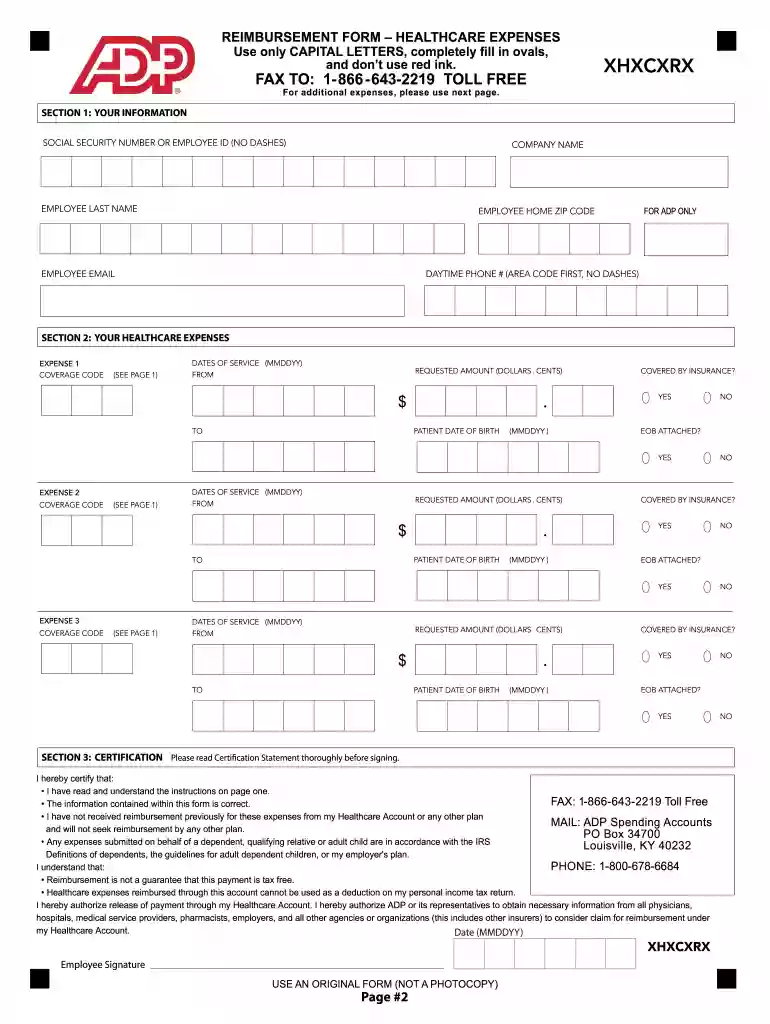
  2. Begin by filling out Section 1 with your personal information, including your Social Security Number or Employee ID, company name, and contact details. Ensure you use capital letters and center your text within the provided boxes.
  3. In Section 2, list each healthcare expense separately. For each expense, include the coverage code from the provided list, dates of service, requested amount, and patient date of birth. Remember to fill in all ovals completely.
  4. Attach supporting documentation by copying receipts onto a white sheet of paper. Write your Social Security Number or employee ID at the top before uploading it through our platform.
  5. Submit your completed form via fax for faster processing or by mail. If you provide an email address, you will receive confirmation once your submission is received.
  6. Opt for Direct Deposit to receive reimbursements faster. Log into your account at myspendingaccount.adp.com to set this up.

Start using our platform today to streamline your reimbursement process effortlessly!

be ready to get more

Complete this form in 5 minutes or less

Get form

Got questions?

We have answers to the most popular questions from our customers. If you can't find an answer to your question, please contact us.
Contact us
WageWorks/HealthEquity. The Countys Spending Account Administrator, WageWorks, Inc., was recently acquired by HealthEquity. There will be no changes or disruptions in services for your Health Care or Dependent Care Spending Accounts.
There are three ways to check the balance on your card: Log into your WageWorks account to check your account balance. Log into your WageWorks account via the WageWorks EZ Receipts mobile app and check your account balance. Call WageWorks Customer Service 1-877-924-3967.
WageWorks, Inc. completed its acquisition of ADP, LLCs Consumer Health and Spending Account (CHSA) business last November. Weve successfully transitioned most operations to WageWorks, and were now preparing to move the acquired ADP systems onto WageWorks infrastructure.
You can access all of your benefits by logging into your WageWorks account on wageworks.com or on the WageWorks EZ Receipts mobile app on your mobile device. If you are new to WageWorks, you may need to first register for a WageWorks account before you can log in.
The WageWorks EZ Receipts mobile app is the quick and easy way to manage your WageWorks benefit accounts. It puts the power of your WageWorks account in the palm of your hand. With this free app you can check your balances, submit claims, snap and submit photos of receiptsall on the go.

Security and compliance

At DocHub, your data security is our priority. We follow HIPAA, SOC2, GDPR, and other standards, so you can work on your documents with confidence.

Learn more
ccpa2
pci-dss
gdpr-compliance
hipaa
soc-compliance

People also ask

My WageWorks Account Go to the WageWorks home page. At the top right of the page, click Login/Register and then click Employee Login. Under the Login button, click Forgot Username or Password. Enter your identifying information and follow the prompts to change your password.

wageworks customer service