Download munson pre qualification letter pdf 2026

Get Form
application form Preview on Page 1

Here's how it works

01. Edit your application form online
Type text, add images, blackout confidential details, add comments, highlights and more.

02. Sign it in a few clicks
Draw your signature, type it, upload its image, or use your mobile device as a signature pad.

03. Share your form with others
Send applicant form via email, link, or fax. You can also download it, export it or print it out.

How to use or fill out download munson pre qualification letter pdf with our platform

Form edit decoration
9.5
Ease of Setup
DocHub User Ratings on G2
9.0
Ease of Use
DocHub User Ratings on G2
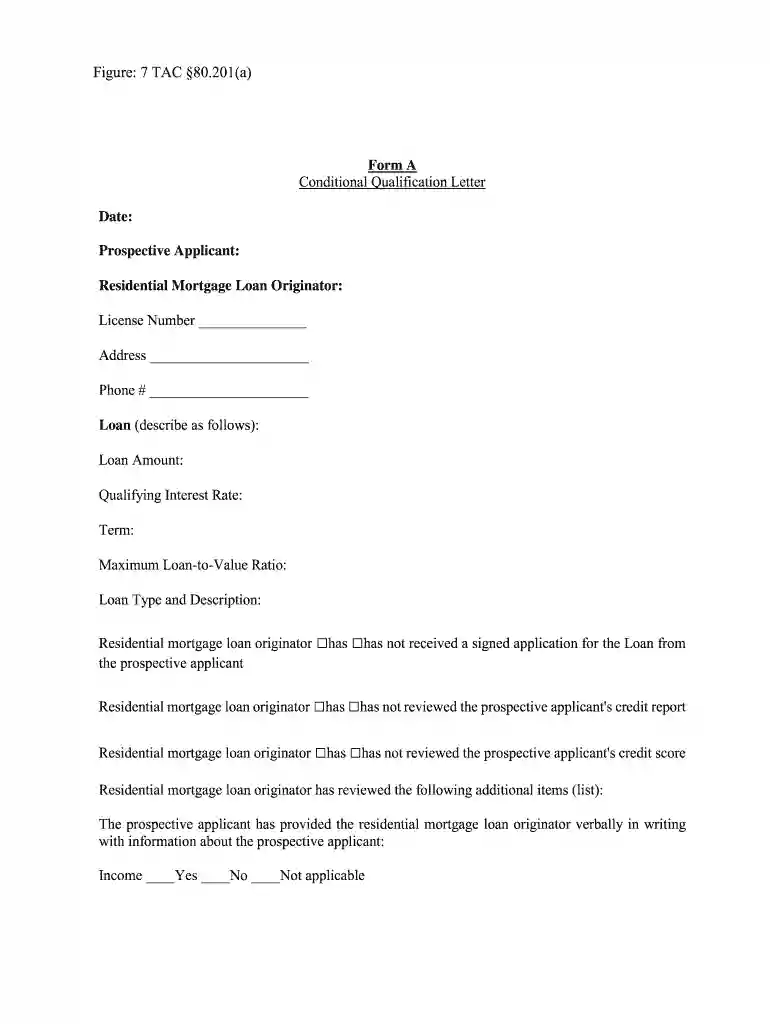
  1. Click ‘Get Form’ to open the download munson pre qualification letter PDF in the editor.
  2. Begin by entering the date at the top of the form. This is essential for record-keeping.
  3. Fill in your name as the prospective applicant, ensuring accuracy for identification purposes.
  4. Provide details for the residential mortgage loan originator, including their license number, address, and phone number.
  5. Describe the loan by filling in fields such as Loan Amount, Qualifying Interest Rate, Term, and Maximum Loan-to-Value Ratio.
  6. Indicate whether a signed application has been received from you and if your credit report and score have been reviewed.
  7. Answer questions regarding your income, available cash for down payment, debts, and assets by selecting 'Yes', 'No', or 'Not applicable'.
  8. Finally, review all entries for accuracy before saving or exporting your completed document.

Start using our platform today to fill out your download munson pre qualification letter PDF easily and for free!

be ready to get more

Complete this form in 5 minutes or less

Get form

Got questions?

We have answers to the most popular questions from our customers. If you can't find an answer to your question, please contact us.
Contact us

Most eSignature solutions require users to have a paid subscription. With DocHub, there are two options for you to create an electronic signature to your applicant format at no cost:

  • You can do it during a 7-day trial period;
  • You can subscribe to a free plan.

The second option, though, has restrictions on the number of signatures, sign requests, emails, and forms for editing available per month. You can check for full details here.

As a comprehensive document modifying service, DocHub is available on mobile phones. Open DocHub in your choice of mobile internet browser and use our smart mobile-friendly toolset to fill out your information form.

How to get pre-qualified for a home loan Talk to a lender. The first step to get pre-qualified for a mortgage is to speak with a lender who offers great rates and customer service. Provide a financial overview. Receive a pre-qualification letter.
In competitive markets, like California, simply being pre-approved for a mortgage isnt always enough. A strong pre-approval letter can be the key to standing out in a bidding war and ultimately getting your offer accepted.
A mortgage prequalification is a quick estimate based on basic financial information provided. On the other hand, a mortgage preapproval is a more in-depth process that involves a credit check and verification of your income, assets, and debts.

Security and compliance

At DocHub, your data security is our priority. We follow HIPAA, SOC2, GDPR, and other standards, so you can work on your documents with confidence.

Learn more
ccpa2
pci-dss
gdpr-compliance
hipaa
soc-compliance

People also ask

Here is how the process generally works: Talk to a lender. The first step to get pre-qualified for a mortgage is to speak with a lender who offers great rates and customer service. Provide a financial overview. Receive a pre-qualification letter.

applicant appraisal