Type text, add images, blackout confidential details, add comments, highlights and more.
02. Sign it in a few clicks
Draw your signature, type it, upload its image, or use your mobile device as a signature pad.
03. Share your form with others
Send it via email, link, or fax. You can also download it, export it or print it out.
How to use or fill out residential safety inspections with our platform
Ease of Setup
DocHub User Ratings on G2
Ease of Use
DocHub User Ratings on G2
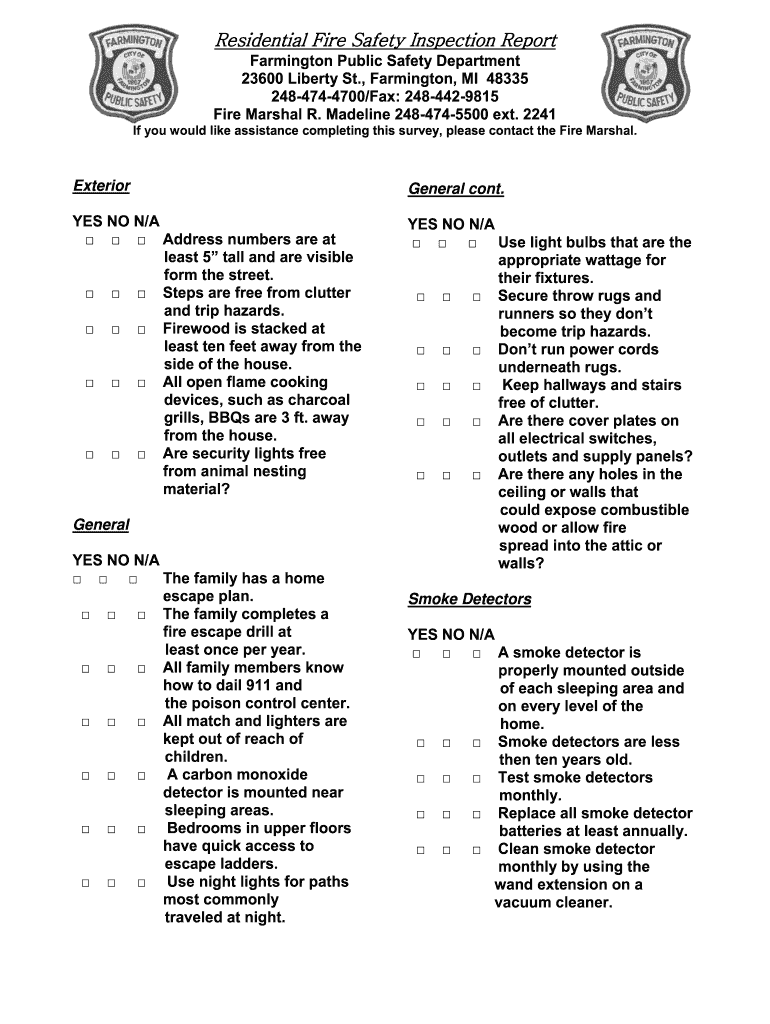
Click ‘Get Form’ to open the Residential Fire Safety Inspection Report in the editor.
Begin by reviewing the 'Exterior' section. Check each item and mark 'YES', 'NO', or 'N/A' as applicable. Ensure that address numbers are visible and that firewood is stored safely.
Move to the 'General' section. Confirm that your family has a home escape plan and that smoke detectors are installed correctly. Mark your responses accordingly.
Proceed to the 'Smoke Detectors' section. Verify that detectors are less than ten years old and test them monthly, marking your answers in the form.
Continue through sections like 'Kitchen', 'Garage/Shed', and 'Utility'. For each area, ensure appliances are safe, chemicals are stored properly, and clearances from combustibles are maintained.
Finally, review all sections for completeness before saving or sharing your inspection report directly from our platform.
Start using our platform today to streamline your residential safety inspections for free!
Fill out residential safety inspections online It's free
List of residential safety inspectionsResidential safety inspections checklistResidential safety inspections 2021Things that fail a home inspectionHome inspection checklistTdhca Inspection checklistTexas home inspection checklistTrec inspection cost
Security and compliance
At DocHub, your data security is our priority. We follow HIPAA, SOC2, GDPR, and other standards, so you can work on your documents with confidence.
Use this checklist to identify possible safety problems in your home. As you go from room to room, place a mark in the appropriate box. Go back over your.Read more
2150 Area Velocity Flow Module and Sensor Safety and
Overview. This document contains the required safety and regulatory information for the 2150 Area Velocity. Flow Module and Sensor. The 2150 Area Velocity.Read more
A home inspection report is a written evaluation of the readily accessible components of a residential building or NRS, including heating, cooling, plumbing,Read more
Cookie consent notice
This site uses cookies to enhance site navigation and personalize your experience.
By using this site you agree to our use of cookies as described in our Privacy Notice.
You can modify your selections by visiting our Cookie and Advertising Notice.