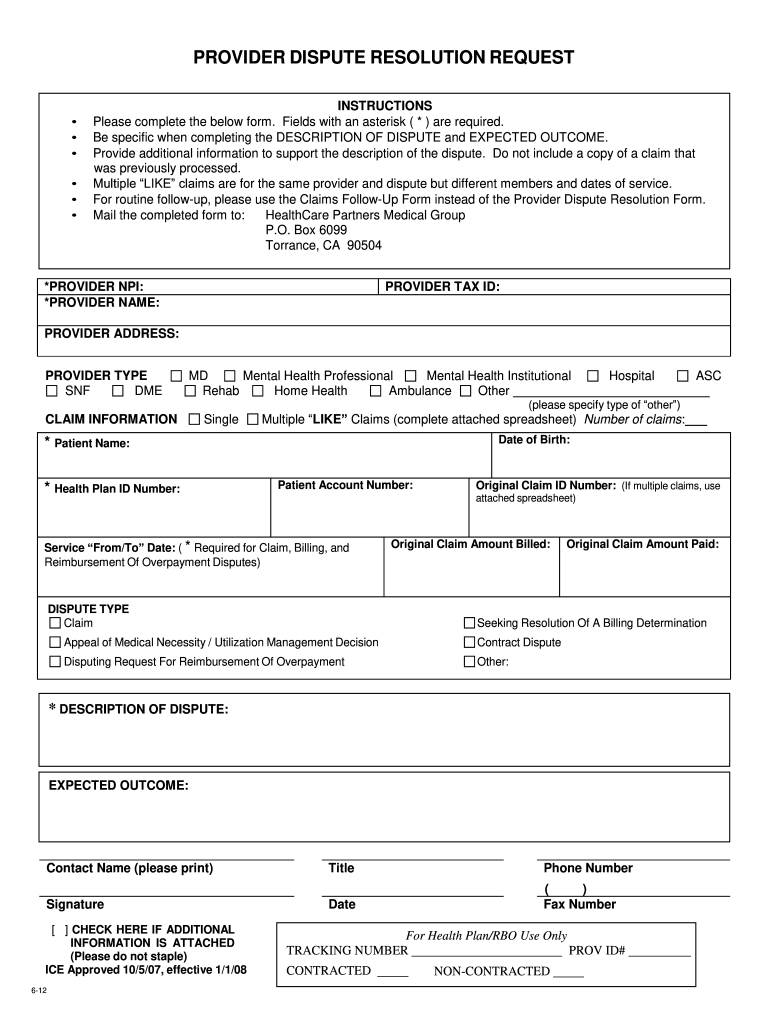
Healthcare partners reconsideration form 2026

Get Form
healthcare partners reconsideration form Preview on Page 1

Here's how it works

01. Edit your healthcare partners reconsideration form online
Type text, add images, blackout confidential details, add comments, highlights and more.
02. Sign it in a few clicks
Draw your signature, type it, upload its image, or use your mobile device as a signature pad.
03. Share your form with others
Send hcp reconsideration form via email, link, or fax. You can also download it, export it or print it out.

How to use or fill out healthcare partners reconsideration form with our platform

Form edit decoration
9.5
Ease of Setup
DocHub User Ratings on G2
9.0
Ease of Use
DocHub User Ratings on G2
  1. Click ‘Get Form’ to open the healthcare partners reconsideration form in the editor.
  2. Begin by filling in the required fields marked with an asterisk (*), such as PROVIDER NPI, PROVIDER NAME, and PATIENT NAME. Ensure accuracy as this information is crucial for processing your request.
  3. In the DISPUTE TYPE section, select the appropriate option that describes your issue. Be specific about whether it’s a claim dispute, billing determination, or another type.
  4. Provide a detailed DESCRIPTION OF DISPUTE and EXPECTED OUTCOME. This is your opportunity to clearly articulate your concerns and what resolution you seek.
  5. If applicable, check the box indicating if additional information is attached. Remember not to staple any documents.
  6. Finally, review all entries for accuracy before signing and dating the form at the bottom. Once completed, you can easily download or share it directly from our platform.

Start using our platform today to streamline your document editing and submission process for free!

be ready to get more

Complete this form in 5 minutes or less

Get form

Got questions?

We have answers to the most popular questions from our customers. If you can't find an answer to your question, please contact us.
Contact us

Electronic document approval requires a software solution that complies with data security and eSignature regulations. DocHub is an excellent tool for that, because it fulfills all the previously mentioned requirements. Whatever method you like to sign your healthcare partners appeal form in DocHub, your eSignature will be legally binding and court-admissible.

If you need to edit your healthcare partners timely filing limit online quickly, it does not matter what browser you use. DocHub’s straightforward editing instruments are available using any internet browser. Just open the appropriate tab in the editor, add your file, and fill it out without stress.

Claims must be filed within 180 days of the date of service.
In HealthPartners appeal guidelines, a provider has 60 days from the remit date of the original timely filing denial to submit an appeal. If the appeal is received after the 60 days, a letter will be sent to the provider stating the appeal was not accepted.
Timely filing is when an insurance company put a time limit on claim submission. For example, if a insurance company has a 90-day timely filing limit that means you need to submit a claim within 90 days of the date of service.

Security and compliance

At DocHub, your data security is our priority. We follow HIPAA, SOC2, GDPR, and other standards, so you can work on your documents with confidence.

Learn more
ccpa2
pci-dss
gdpr-compliance
hipaa
soc-compliance
be ready to get more

Complete this form in 5 minutes or less

Get form

People also ask

For claim submission, the timely filing limit is 180 days from the date of service.
Claims Submission for Empire Medicare Advantage Patients Empire HCP DIRECT Medicare Advantage. EDI via Change Healthcare use Payer ID: 11328. Paper: HealthCare Partners.
within ninety (90) calendar days, or as stated in the written service agreement with PHC California.

emblemhealth appeal form pdf