




Here's how it works

01. Edit your type form w9 online
Type text, add images, blackout confidential details, add comments, highlights and more.

02. Sign it in a few clicks
Draw your signature, type it, upload its image, or use your mobile device as a signature pad.

03. Share your form with others
Send type w9 via email, link, or fax. You can also download it, export it or print it out.
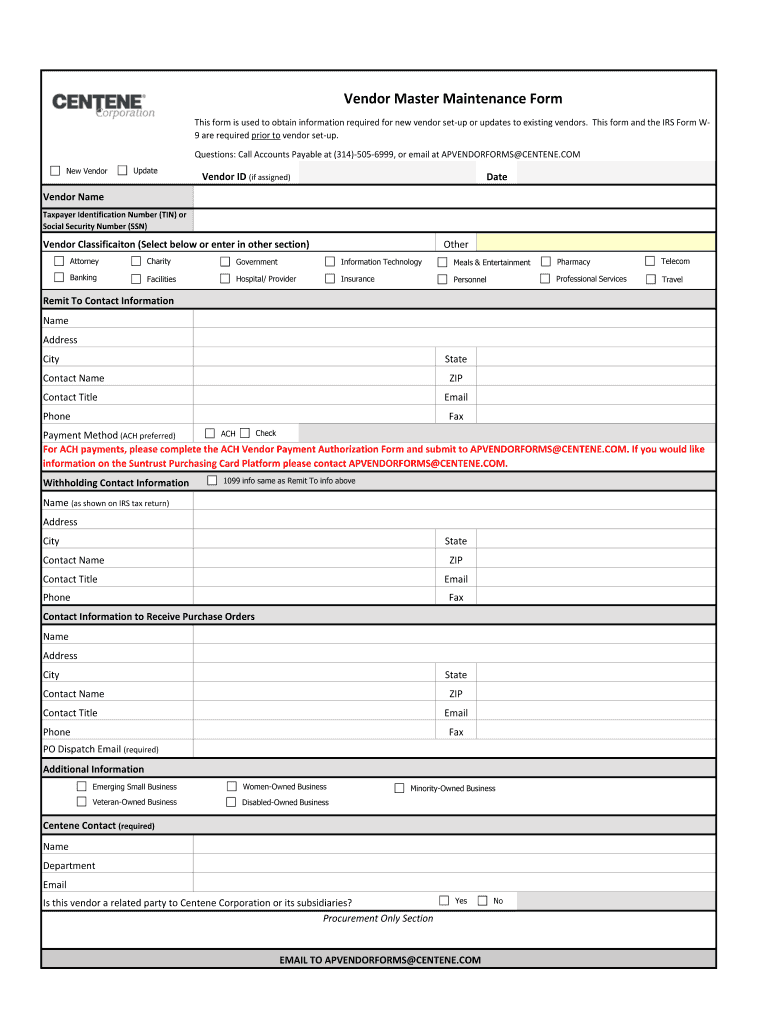
How to use or fill out centene vendor registration with our platform

- Click ‘Get Form’ to open the centene vendor registration in the editor.
- Begin by entering your Vendor ID if assigned, followed by the date and your Vendor Name. Ensure that you provide either a Taxpayer Identification Number (TIN) or Social Security Number (SSN).
- Select your Vendor Classification from the provided options, or specify another classification in the designated section.
- Fill out the Remit To Contact Information, including name, address, city, state, ZIP code, contact name, title, email, phone, and fax.
- Choose your preferred Payment Method (ACH is recommended). If opting for ACH payments, complete the ACH Vendor Payment Authorization Form and submit it as instructed.
- Provide Withholding Contact Information if it differs from Remit To info. Include all required fields such as name and address.
- Complete the Contact Information to Receive Purchase Orders section with necessary details including PO Dispatch Email.
- Indicate if your business qualifies under any additional categories like Emerging Small Business or Women-Owned Business.
- Finally, ensure you fill in the Centene Contact information and answer whether this vendor is a related party to Centene Corporation.
Start using our platform today to streamline your centene vendor registration process for free!
Fill out centene vendor registration online
It's free
It's free
Security and compliance
At DocHub, your data security is our priority. We follow HIPAA, SOC2, GDPR, and other standards, so you can work on your documents with confidence.
Learn more




