






Definition & Meaning of Insurance Card Maker
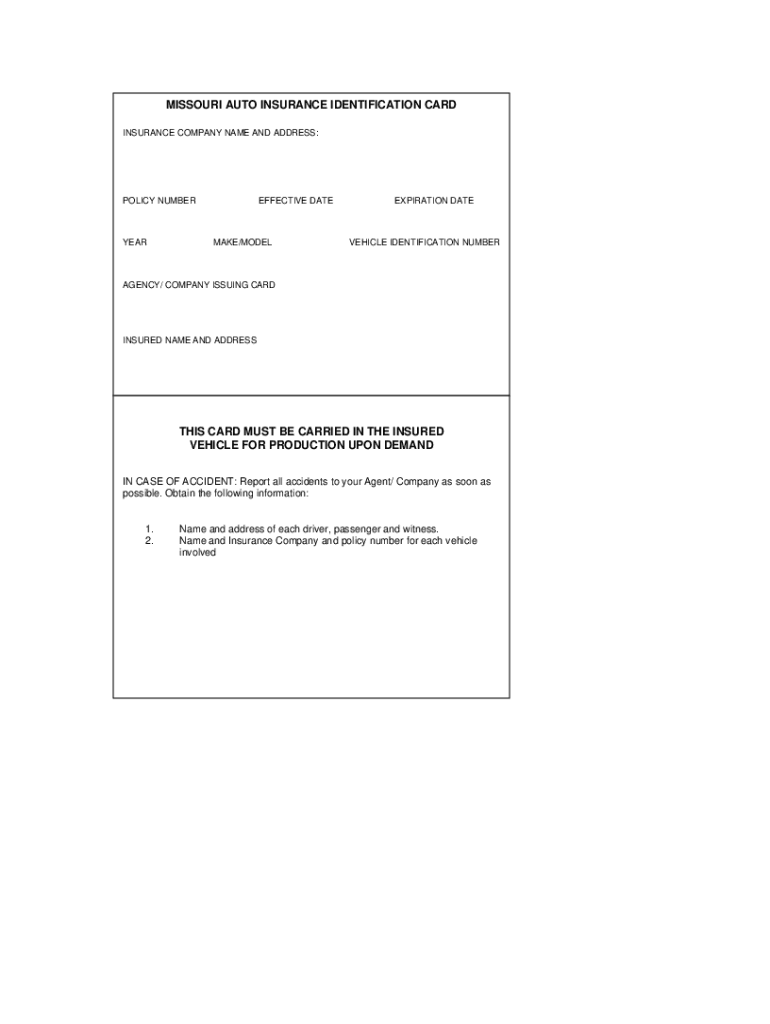
An insurance card maker is a digital tool designed to generate insurance cards for various types of coverage, including auto insurance, health insurance, and more. These tools enable users to create customized cards that include vital information such as the insured's name, policy number, insurance company details, and coverage dates. With the rise of digital documentation, having a reliable insurance card maker streamlines the process of obtaining and managing insurance cards, making it easier for users to access their information when needed.
An insurance card maker can be particularly beneficial for individuals and businesses looking to ensure compliance with state regulations. For example, many states require drivers to have a valid proof of insurance card readily accessible in their vehicles. Using an insurance card maker allows users to quickly create or update their cards, which can save time and reduce stress during situations where proof of insurance is required.
Key Features of Insurance Card Makers
- Customization Options: Users can personalize their cards with specific information, adjusting layout and design.
- Template Availability: Many insurance card makers provide templates tailored to different insurance types, such as auto, health, and liability insurance.
- Downloadable Formats: Completed cards can often be downloaded in various formats (PDF, JPEG), allowing for easy printing or digital storage.
- User-Friendly Interface: Most platforms feature intuitive design tools that enable users to generate cards without the need for advanced technical skills.
Step-by-Step Guide to Using the Insurance Card Maker
Using an insurance card maker involves several straightforward steps that facilitate the creation of custom insurance cards. Here’s a detailed outline of the process:
-
Select the Type of Insurance Card: Identify the specific type of insurance card you need, such as auto or health insurance. Choose a template that suits your requirements.
-
Enter Required Information: Fill in the necessary details, which may include:
- Insured's name
- Policy number
- Insurance provider's name and contact information
- Coverage dates
-
Personalize the Design: Modify the design elements according to your preferences. You can adjust colors, fonts, and layout options to ensure the card reflects your style or branding.
-
Preview Your Card: Utilize the preview feature to check for accuracy in information and design layout. This is crucial to avoid any mistakes before finalizing.
-
Download or Print: Once satisfied, download the card in your preferred format or print it directly. Ensure it is easily accessible for future reference, especially for situations where proof of coverage is needed.
Key Elements to Consider When Creating Insurance Cards
Creating a valid insurance card requires attention to detail to ensure the document meets legal standards and is recognized by authorities. Important elements to include are:
- Policy Holder Information: Name, address, and contact details of the insured.
- Insurance Company Details: Full name and logo of the insurance provider along with contact details.
- Policy Number: A unique identifier for the insurance that verifies coverage.
- Expiration Date: Clearly indicating the period during which the insurance is valid.
- Coverage Description: Brief summary of what the policy covers, providing clearer context for the cardholders and authorities.
Who Typically Uses the Insurance Card Maker?
Insurance card makers are utilized by a variety of individuals and businesses, including:
- Individuals: Those who own vehicles or hold health insurance looking to keep an updated record of their coverage.
- Business Owners: Small and medium enterprises that need to provide proof of liability or employee health insurance coverage.
- Insurance Agents: Professionals creating cards for their clients to streamline the documentation process.
- Freelancers and Contractors: Independent workers who require insurance cards for specific projects or contract jobs.
Each of these groups benefits from the convenience and efficiency of an insurance card maker, allowing them to maintain proper documentation of their insurance policies quickly and easily.


Legal Usage of Insurance Card Makers
The creation and distribution of insurance cards must comply with local laws and regulations. In the United States, various states have specific guidelines for what must be included on insurance cards and how they should be formatted. Common legal aspects to consider include:
- State Regulations: Different states may require certain information to be displayed prominently, such as company contact information or state licensing numbers.
- Verification Standards: Insurance cards must be able to be easily verified by law enforcement or regulatory bodies, ensuring they meet the minimum documentation requirements.
- Digital Acceptance: As digital insurance cards become more prevalent, it’s essential to understand what forms are legally acceptable in your state.
Adhering to these legal requirements ensures that the insurance cards created are valid and recognized by relevant authorities, safeguarding against potential legal issues.