Type text, add images, blackout confidential details, add comments, highlights and more.
02. Sign it in a few clicks
Draw your signature, type it, upload its image, or use your mobile device as a signature pad.
03. Share your form with others
Send natwest redemption statement via email, link, or fax. You can also download it, export it or print it out.
How to use or fill out natwest mortgage deed with our platform
Ease of Setup
DocHub User Ratings on G2
Ease of Use
DocHub User Ratings on G2
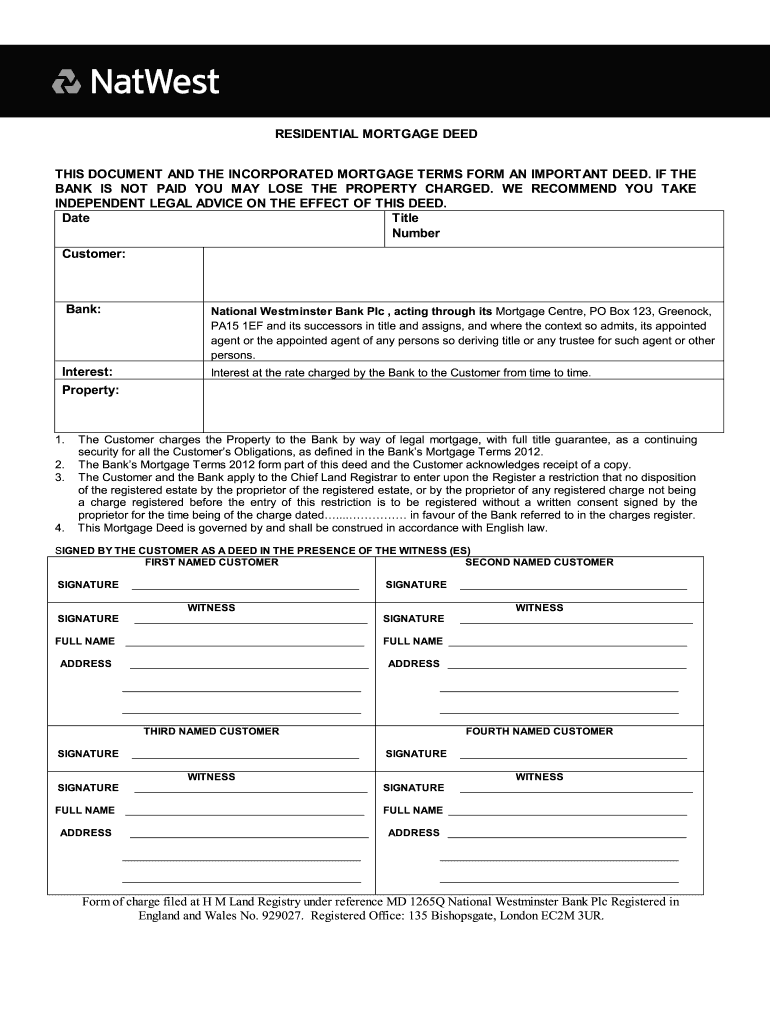
Click ‘Get Form’ to open the natwest mortgage deed in the editor.
Begin by entering the 'Date' at the top of the form. This is crucial for establishing when the agreement takes effect.
Fill in your 'Title Number' and 'Customer' details, ensuring accuracy as these identify you in legal terms.
Next, specify the 'Bank' name, which should be National Westminster Bank Plc, and detail the 'Interest' rate applicable to your mortgage.
In the 'Property' section, provide a clear description of the property being mortgaged. This ensures that all parties are aware of what is secured under this deed.
Signatures are required from all named customers and witnesses. Use our platform’s signature feature to easily add your signatures digitally.
Finally, review all entries for accuracy before saving or exporting your completed document for submission.
Start using our platform today to fill out your natwest mortgage deed online for free!
Date on the terms of the relevant mortgage deed after the date of completion of such Mortgage Loan NatWest Markets Plc and Barclays Bank PLC, in theirRead more
Fixed or Floating Charges over Book Debts in England
by L Pogue 28 A pledge is a legal security interest rather than an equitable interest, which is an important distinction as legal interests have priority.Read more
Cookie consent notice
This site uses cookies to enhance site navigation and personalize your experience.
By using this site you agree to our use of cookies as described in our Privacy Notice.
You can modify your selections by visiting our Cookie and Advertising Notice.