
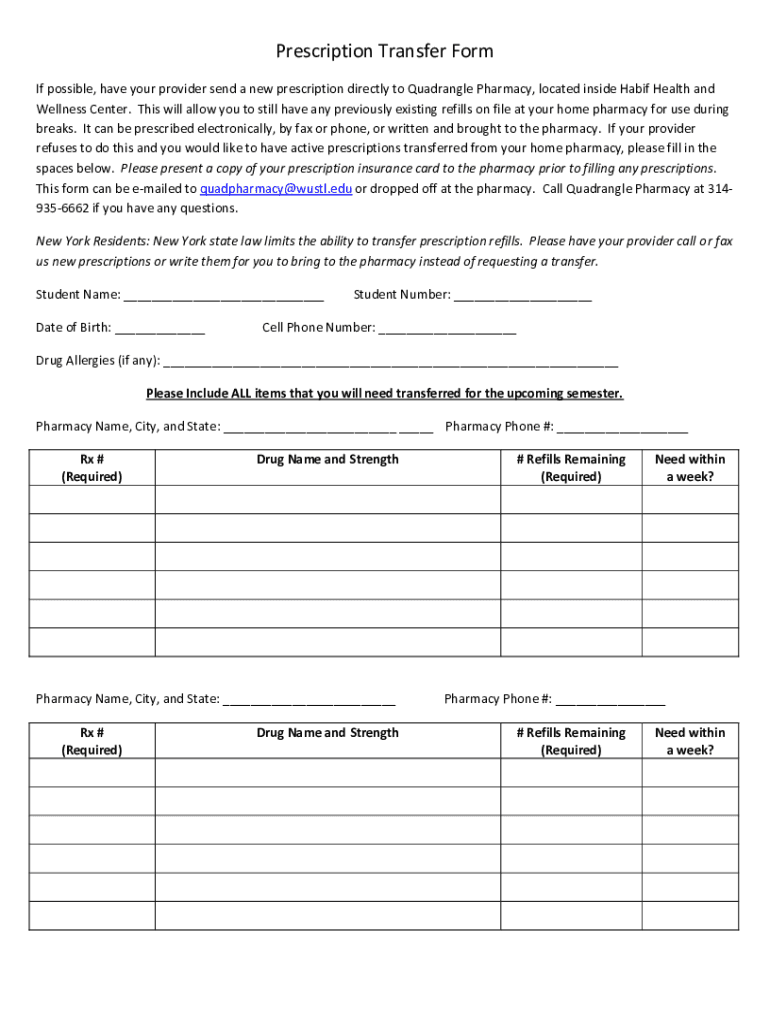







Definition and Purpose of the Prescription Transfer Form
The Prescription Transfer Form for students at Washington University in St. Louis is designed to facilitate the seamless transfer of existing medication prescriptions to the Quadrangle Pharmacy at the Habif Health and Wellness Center. This form allows students to ensure that their medication needs are met conveniently on campus by providing a standardized method for transferring prescriptions from external healthcare providers. It is an essential tool for students who need to maintain continuity of care and medication adherence while engaged in their academic pursuits.
Steps to Obtain the Prescription Transfer Form
Students can acquire the Prescription Transfer Form through several avenues:
- Online Access: The form is available digitally for download. This method allows students to print the form at their convenience.
- In-Person Collection: Students can also visit the Habif Health and Wellness Center to request a physical copy of the form.
- Email Request: For those unable to reach the campus, the form can be requested via email to the Wellness Center's administrative staff.
In all cases, it's vital that students verify they obtain the most recent version of the form to ensure compatibility with current processing protocols.
How to Complete the Prescription Transfer Form
Completing the form requires careful attention to detail to ensure all necessary information is accurately provided:
- Personal Information: Input your full name, student ID, contact information, and date of birth.
- Medication Details: List each medication that requires transfer, including the medication name, dosage, and prescribing healthcare provider.
- Prescriber Information: Include the name, phone number, and fax number of the current prescriber to facilitate direct communication.
- Insurance Information: Attach a copy of your insurance card or provide the necessary details directly on the form.
- Authorization: Sign and date the form to authorize the transfer of your prescriptions.
Upon completion, the form should be submitted according to the preferred submission method outlined by the university.
Key Elements of the Form
Several critical components are integral to the effectiveness of the Prescription Transfer Form:
- Accurate Prescription Listing: Ensure comprehensive details of each medication to avoid any delays in processing.
- Insurance Verification: Providing current insurance information is necessary to prevent interruptions in prescription fulfillment.
- Healthcare Provider Information: Accurate contact details enable the Wellness Center to efficiently request and process prescription transfers.
These elements help streamline the transfer process, minimizing potential errors that could affect medication availability.
Eligibility Criteria for Using the Form
This form is specifically designed for students enrolled at Washington University in St. Louis who require prescription medications from the Quadrangle Pharmacy. Additionally, students must be receiving care from a healthcare provider external to the university. Residents of New York should note special instructions, as state regulations might impose additional requirements for prescription transfers.


Legal and Security Considerations
Securing the personal and medical information provided through the Prescription Transfer Form is a primary concern. The university complies with all relevant health information privacy regulations, like HIPAA, to ensure that student data is protected throughout the transfer process. Students should be aware of their rights and responsibilities concerning medical data sharing and opt to add any supplementary security measures, such as additional passwords, if they deem it necessary.
Specific Instructions for New York Residents
Due to stringent state regulations, students residing in New York might face additional procedures when transferring prescriptions. It is advisable for New York students to:
- Consult with the Habif Health and Wellness Center for guidance specific to their situation.
- Familiarize themselves with New York state's prescription transfer policies to prepare for any potential documentation requirements.
This extra step ensures that all legal prescriptions are transferred without legal complications.
Practical Usage Examples
Consider a student who is transitioning from another state to Washington University. Using the Prescription Transfer Form, they can ensure that their prescription medications are sent directly to the Quadrangle Pharmacy upon their arrival on campus. This process helps avoid a lapse in medication intake and reinforces uninterrupted healthcare service.
In another scenario, a student with multiple prescriptions may use the form to consolidate all their medications under one pharmacy, simplifying their medication management and ensuring all treatments are monitored and appropriately managed by the university's health services.




